Any solutions will be appreciated. Thanks.
What do you mean by 1.0 natural timer?
Use the timer tag! If any of this helps, make a solution.
7 Likes
How to make an accurate timer 
How to create a timer, the Kormorantian way!
How to make a colon-separated timer (Difficulty:  )
)
Lots of these guides are out here for you!
4 Likes
Don’t forget this!
1 Like
so you have 2 people who helped you,can you mark a solution so the topic can close now?
2 Likes
I use those methods already and they didn’t work. -__-
oh(type words here-20 character limit)
What do you mean by that?..
Well, these don’t work, then maybe you did something wrong. Could you show us your device settings and block code so that we may check for errors?

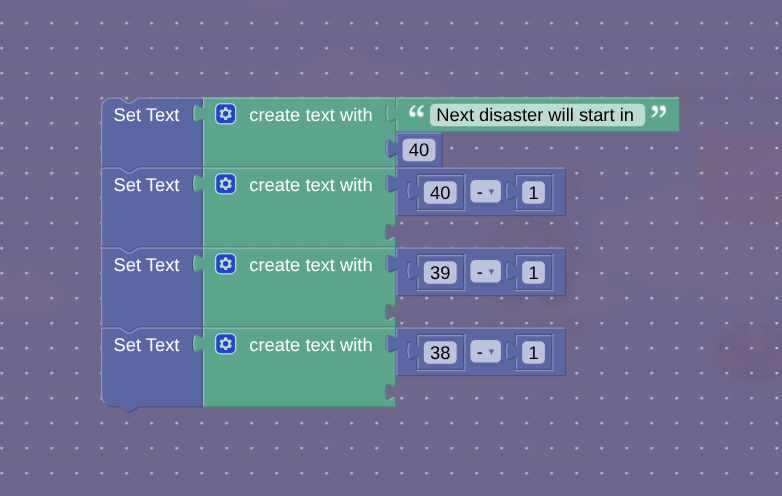

My setting timer is 40 but it immediately changes to 37. I want it to wait for 1.0 seconds for each decrement. That’s what I was trying to say.
1 Like
You will probably have to use counters & a property
Regrettfully, I must leave soon, I will respond as soon as possible 
Can you explain that more better?
I have to leave, either someone else will have the solution, or I will be back tomorrow, and I will explain then. I’m sorry, I wish I could stay and explain to you right away 
Okay, I get it. No worries.
1 Like
You can make a property with the starting value (40 in your case, name it TimeLeft or something like that), and every second decrement it with a trigger loop, and set the block code in the overlay to this:
Set text: Create text with: "Next disaster will start in "
                          : Get property: TimeLeft
When the trigger is activated, you can make it broadcast on channel TimerChange, and run the block code when receiving on that same channel
1 Like
No, that’s not what I meant. What I meant is that I don’t know how to make a timer that waits every 1.0 before a decrement cause If I do this for example, 40-1,
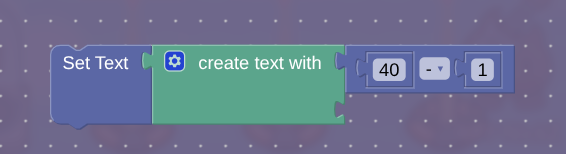
and once I play-tested it,

it literally immediately changes to 39. I want it to wait for 1.0 seconds and THEN it decreases.
Try setting it to 41.
wait no nevermind that
have it so there’s a wire repeater, every second it transmits on a channel
then have it decrease the number
What I wrote is a timer that decreases every second. Your code doesn’t work because gimkit won’t wait one second before decrementing the timer, it does it all at once.
Counter device, srt the target value to 0, and set the initial value to whatever countdown you want like 1 min
Place a repeater device, set the interval to 1 second, set it to sop after receiving channel, so it can be controlled.
Wire the lifecycle to the repeater (game start-------repearter
wire the repeater to the Counter, repeater runs task===Decrement counter
game overlay settings click property, and select the counter you just set up
go to the blocks tab for the overlay, create a block, when property changed—set text
in the counter, set target value reached to stop the repeater if you want
in the overlay block, you can create text with to add a label like time remaining: (counter)
2 Likes
I just want instructions on how to make the timer wait for 1.0 before each decreasement on the overlay device.