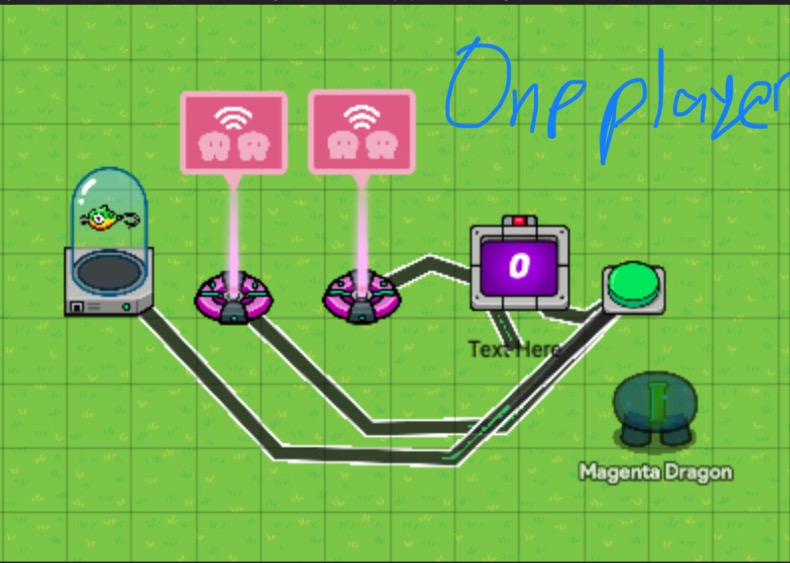
This is my version of the voting system. Its a bit easier to use than the other systems I’ve seen. Well that’s my opinion not yours.
Items you will need
12-17 buttons (depending on how many players you want)
4 properties
6 triggers
24-34 relays
11-16 item granters
12-17 counters
11-16 text
1 Team switcher
1 Inventory Item Manager
1 Team Switcher
1 Lifecycle
1 notification
1 popup
4 barriers
4 teleporters
Very Important, Must read
Do not press the finalize votes button if everyone skips or the votes are tied. If the votes are tied both tied people get switched to specator. If everyone skips then everyone gets switched to spectator. Also on the second time using the voting system when pressing the finalize votes button it might not work right away. Press it a few more times then and it should work.
Making the emergency button
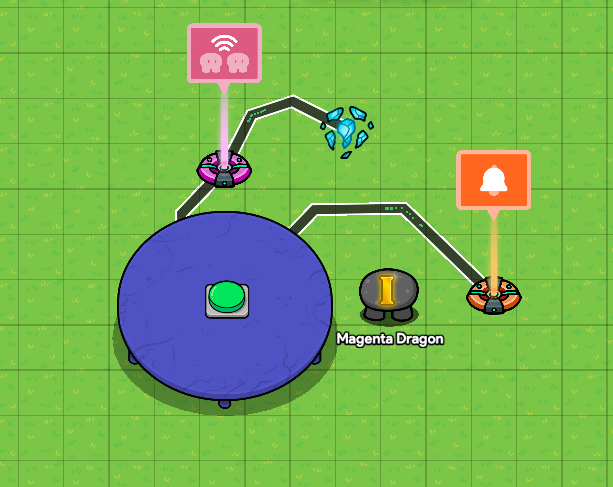
Place down a button. Make it transmit on “Start Meeting”.Wire a button (on a table) to a relay (audience of everyone) to a teleporter. Button pressed → trigger relay → teleport player to target. Have the teleporter’s target group as “vote room”. Now wire the button to a notification that has these blocks⬇️
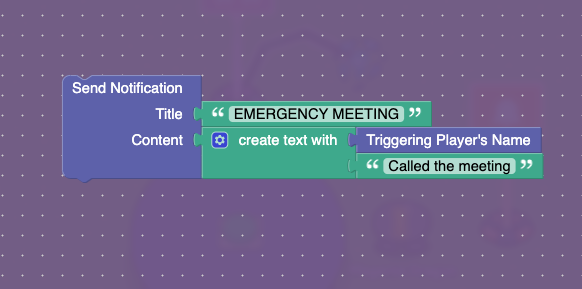
Button pressed → Run pulse wire block.
It should look like this currently⬇️
Creating the voting room
Make sure that there is the same amount of teams there are players. Ok so you want to make the voting room big. Make sure it can fit 11-16 counters. Place down
a teleporter. Have it’s group as “vote room”. Now place 4 barriers like this⬇️
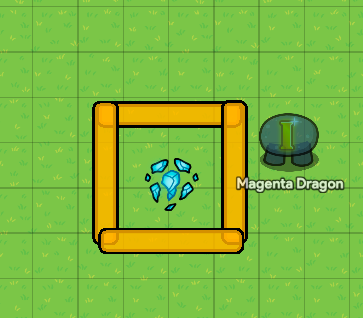
Have it in the teleporter’s channel that when player teleported here, transmit on “open”. Have in the barriers activate channel as “open”. Have all the barriers deactivate on “barrier”.
Now the wire teleporter to a wire repeater with a delay of 30s. Then wire the wire repeater to a trigger. (Make sure the trigger can’t be seen in-game) Have it in the trigger’s channel as, when triggered, transmit on “barrier”. Now wire the teleporter to a popup that says “DISCUSS”. It should look like this so far.

Now place down a button. Have it when button pressed transmit on “activate”. Have the button deactivate on “activate”. Also have the button activate on “open”. Wire the button to a counter. Have the counter target as none. Then place down a relay with all players on specific team. For example team 1. Have the relay be triggered from this channel, “Start Meeting”. Wire the relay to a text. Relay triggered → run pulse wire block. Have the text blocks like this.
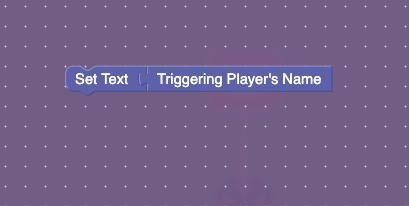
Now wire the vote button to a relay with the team/player that is being voted. Wire that relay to a item granter. Have the item has something not being used. For this tutorial’s purposes we will use bait. It should look like this so far⬇️ (make sure both relays are triggered by “Start Meeting”.
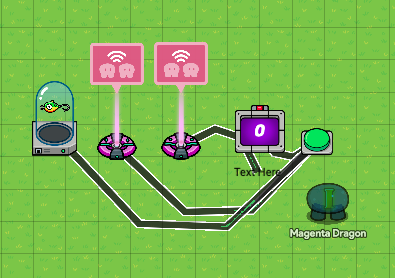
Multiply that for as many players are gonna play the game, but changing the team.
Counting the votes
Property Time!
Place down a player-scoped num property named, “Item” with a default of 0. Place down a global-scoped property name, “Most of Item” with a default of 0. Place down a global-scoped num property named, “People Checked”. Finally place down a global-scoped num property named, “Num Players”.
Now wire a lifecycle to a relay (with an audience of all players) to a counter, incrementing it. Have the counter have no target and update the property "Num Players. This is the live player counter.
Place down a trigger. Copy these blocks onto it.
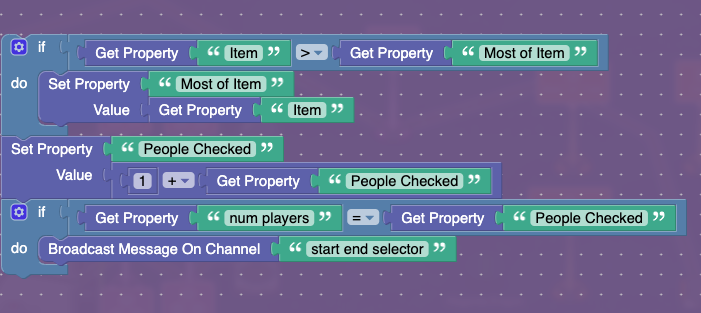
Wire a button to a relay (with an audience of all players) to the trigger, triggering it.
Place down a relay. Have it be triggered in the channel section. The channel is “start end selector”. Have the relay transmit, “end selector”. Place down a trigger and have be triggered by “end selector”. Copy these blocks down.
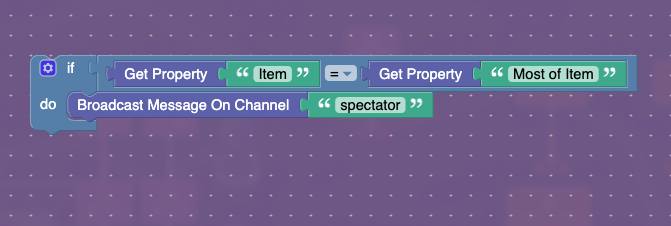
Now place down a team switcher and have it switch the player to spectator when recieving on the “spectator” channel. Place down an inventory item manager. Have it manage bait (or what ever item you are using) and update the “Item” property. This is what it should look like when done.
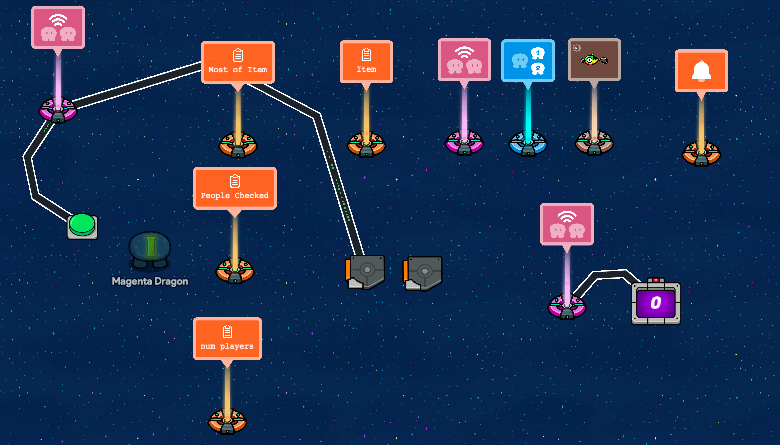
(Dont mind the notifcation, that was a mistake but Im too lazy to fix it)
Now wire the button that counts the votes to a relay (audience of all players) to a teleporter with a target group of cafe. Relay triggered → teleport player to target. Have a teleporter in your cafeteria. Have the group as cafe. (Make sure any teleporters can’t be seen in-game)
.
Reseting the system
Now wire the teleporter in the cafe (where the people get tped after the meeting) to a trigger. Put in these blocks for the trigger:
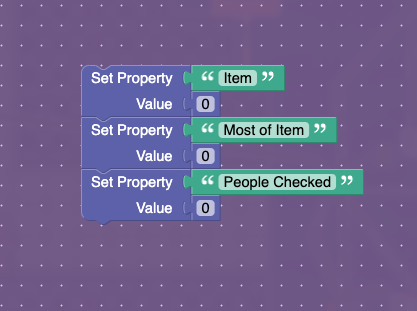
Now wire the trigger to a wire repeater (0.5 delay), repeating the pulse, to an item granter with -999999999 bait. Wire the same trigger to another wire repeater (0.5 delay) to the player counter, relay triggering it. Then wire the same trigger again to the counter reseting it. Here is what it should look like:
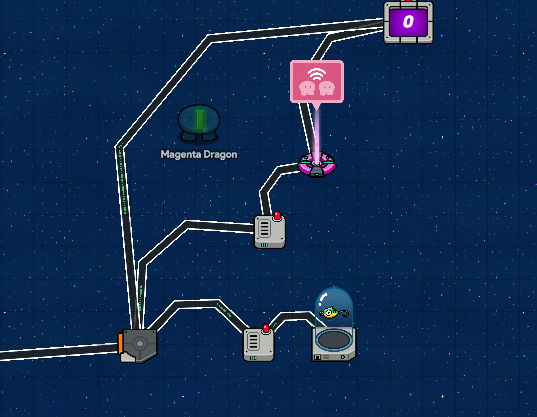
Sorry the teleporter isn’t in shot.
People who helped
Thank you @Grey_Stone, and @EggNoodle who helped make this!
Other voting guides
https://forum.creative.gimkit.com/t/how-to-make-a-voting-system-for-among-us-simplified/4560
https://forum.creative.gimkit.com/t/the-whomian-version-of-amongus-voting/5247
https://forum.creative.gimkit.com/t/the-ritheked-version-of-voting-2-0-difficulty/6664
The Ritheked Version of Voting (1.0)! ~6% Memory | Difficulty: 🟧
Beginner Voting System (Difficulty 🟩 or 3/10)
How To Create A Voting System in Gimkit Creative
How to make a voting system (old guide from last forum)
Thank you for reading this tutorial and I hope it helps you! If you any questions or comments, comment them down below!
How Difficult was it?
- 1
- 2
- 3
- 4
- 5
- 6
- 7
- 8
- 9
- 10
- 11☠️