I Need Help Making A WORKING Movie Theatre Screen

So I am making a movie theatre and I want to make a working screen so the player can watch like a 5-10 second clip of just like something moving around or like it involving pixel art or something and all I ask is the guide is kinda simple because I don’t really know how to use code but if there was like step by step images that would be so helpful!

Thanks :grin:

EDIT: IS THERE ANY POSSIBLE WAY THAT YOU CAN JUST make one with buttons and the “movie director” can jus push the buttons and it switches to different camera points because I’m tired of this stuff with like coding lol!
This is very stressful!!

1 Like

for the movie itself you can use this, but you will have to get creative with props and stuff since you can’t upload custom pictures to your games.

(also, sorry to break it to you, but there really isn’t an easy guide on how to make animations.)

4 Likes

Ok thanks :grin:

1 Like

you can also just have props appear and disappear continuously to make a looping prop animation

1 Like

Isn’t that what this guide does?

(this was in the resources guide)
edit: yeah sorry

That has no images :frowning:

1 Like

Please explain more :grin:
I’m intrigued…

1 Like

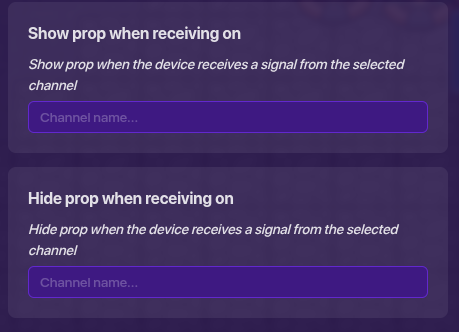
on the prop’s “All settings” you can set it to appear on whatever channel you want and also disappear the same way in a loop on a bunch of props

1 Like

I’m not really sure how to use channels but I will try to learn.
Thanks :grin:

1 Like

Here’s the official guide for channels by the Gimkit team

flag me if you need to if this is off topic

Thanks and no need :grin:

1 Like