GKC 3D Rendering

Hello, long time no talk. But I recently got back into GKC just to kinda mess around. So, I was wondering, is it possible to make a 3D rendering system.

I know there are few guides already made, but the ones I saw were made in 2023-2024, and most of them never came to a concrete answer, whether that be no or yes.

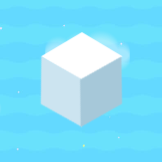
When I say 3D rendering, I’m talking about this:
MINECRAFT" Block ~ Snow Covered Grass ...

Now, I’m NOT talking about adding color, or it being textured/shaded. I’m also not talking about making it a physical thing to touch and walk on. I’m talking about having a blank sheet of a coded projection screen to display 3-4 cubes at a time that can rotate at least in some form while keeping its shape.

If this is possible, it opens up so many possibilities. I understand the task at hand as well. I just wanted to reach out to the community and see what ya’ll have to say!

3 Likes

Not without some advanced barrier/text art.
:sweat:

2 Likes

didn’t blackhole make one of these?

also i can’t see the photo

this would definitely take some code though

:+1:

kor said what he said for a reason


@AlexC thats because i’m in 8th

4 Likes

I dunno why you can’t see the photo lol. It works for me just fine.

1 Like

This is HIGHLY difficult, and it would take hours upon hours of work to do/complete. Overall, BH would’ve been your best bet at something like this.

@TaigaBiome it’s lightspeed that’s blocking the photos for cat

6 Likes

Didn’t BH leave the community? Or did he make a famous return.

Anyhow, I’m no stranger to tenacious work, and can stick to something I’m passionate about. But that doesn’t mean there’s a solution.

3 Likes

the way I’m thinking about this, is by using pixels set up by text. Since there is none closer (atp) to being able to project something.

Since Minceraft is set up using 16x16 pixels it can’t be to hard setting it up. But getting it to be dynamic with the plr’s camera movement would be hard. That’s what I’m trying to focus on.

3 Likes

Naturally, a xyz coord system would have to be put in to place, as that is what 3D shapes are all based on.

X, being the horizontal axis
Y, being the vertical axis
Z, being a lesser defined axis, serving as forward and back.

the text would have to be aligned with all times to represent a functional 3D shape that changes all of its axes based on the camera placement.

3 Likes

Haven’t seen you in a while lol.

Unfortunately, this is a duplicate topic.
I would say to mark a solution and close this one, and continue the conversation on this topic:

1 Like

I would agree with you to close this, but I’m talking about separating the player from the shape. Not including the shape with the player.

And, the way that I saw it, personally, is that the build isn’t physical, and only functions as a piece of art.

You could try using custom shapes and carefully tracing out a cube. Based on what you said about rotating, you can control when it rotates, how fast it rotates, and what direction.
Or are you talking about the shapes being procedurally generated?

Yeah, moving and being able to see the different sides of a shape at specific angles isn’t that possible to my knowledge. You could make it a fixed 6 sections and you could teleport to each cube face.

        #####
        # 5 #
#################
# 1 # 2 # 3 # 4 #
#################
        # 6 #
        #####
Each number is a cube face and separate section of map
Summary

Also, I haven’t seen that specific school blocker since school grades 6-8. Nostalgia~.

4 Likes

True, but how complex would switching to each section have to be?

1 Like

6 teleporters, 1 on each cube face, 4 Zones on each edge of the cube face. That way you can “walk” over the edges of the cube.

Edit: This would be a fun battle royal or pvp map. This probably isn’t what the OP was looking for, but this might be the closest thing to a 3D rendered object (on a large scale at least.)

1 Like

Oh. Nice creativity. Colored barriers could be added on the edges to help differentiate what side they will go to if they go there.

1 Like

Maybe we should add research tag?

3 Likes

School block application

It’s already been said, but thank you.

7 Likes

Wouldn’t this have a use of a “going in circles” perspective? Yes, I see the possibility!

You’d only have about 8 frames of a cube if you were only goin in a semi-circle, and 14 in a full one.
Aren’t zones an easier option when being explained to beginners?

Yes, they are more expensive in this case, however it only takes a few channels and about 60 barriers.

DO NOT use wires, and DO use channels if you know what I’m talking about.
channel name 1,channel name 2

2 Likes

Okay, I THINK I have a cool idea to add here

The concept is that we have a 3-dimensional object that appears to change in perspective, like all 3d figures do, when the viewer moves. We’ll find the player’s position and use animation to change the appearance of the figure.

Say you have the player walking past a cube.


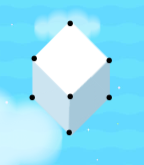
When the player jumps up, for example, they should see the top (white) surface more, and the bottom two (grey) surfaces less. Their forms will warp accordingly.

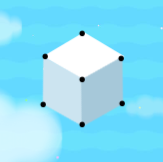
Here we see the points, or vertices,[1] on our cube:


Again, we want the points to move depending on the player’s position.

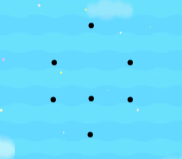
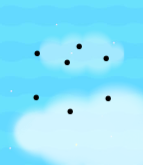
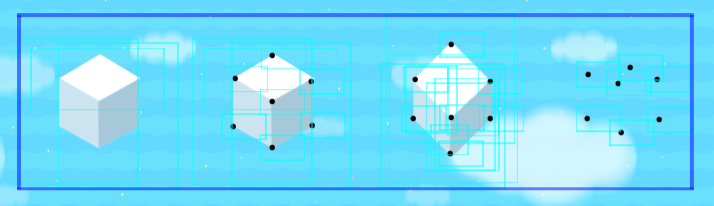
Here are some examples of the points of the cube if it were held at different angles:


Can you picture what they would look like?

Well YOU DON’T HAVE TO, because I made the first one, and oh my josh it took me like 45 minutes


no I’m not doing the other one

ANYWAY, if the player jumped, the original cube would probably look more like this, since the player is viewing it from a higher point.

The idea is that we make a ton of cubes from different perspectives and stack them on top of each other, all hidden on game start. Then, take the player coords, use small zones, or use triggers to detect the position of the player. Then, depending on that position, we hide one image of the cube and show another that corresponds to their position, creating the illusion of 3 dimensions.

Cons:

  • EXTREMELY high memory expense (literally that cube that took me forever to make costs 900 memory alone)
    • Making a single cube with this method would use up AT LEAST 10% memory. The smoother you want the 3d illusion to look, the more memory it will use.
  • Takes a long time to make
  • Even if this was executed successfully, it would be a very choppy animation
  • If using text, as I did, the animation would also look very strange and transparent whenever the image changes due to hide/show speeds. (check this out → Speed of show/hide)
  • If you use text it’s also very limited in size due to the 144-pt font cap
  • Layering nightmare

Pros:

  • pretty cool :D

Theoretically, yes, it’s possible.

If anyone’s wondering how I made the cubes, everything was done using text with periods (.) or unicode symbols (⬧ ⯀ ⮟ ⯅ ⯊ etc).
To be honest, there’s probably a WAY better and more memory-efficient way to do this, but I did what I could.


this all spent 6% memory total :sob:


  1. uhm did i use that right ↩︎

9 Likes