question, is there ANY way to make the cubes differently?
I’ve learned to use barriers at all costs, cuz yeah, show/hide speed.
But barriers are 3 times cheaper on memory too!
question, is there ANY way to make the cubes differently?
I’ve learned to use barriers at all costs, cuz yeah, show/hide speed.
But barriers are 3 times cheaper on memory too!
I would love to use barriers for this, but since barriers are limited to only circle and rectangle, we don’t have much to work with.
Obviously, circular barriers would be useless because we don’t want any curved edges (assuming this is for a cube and not, say, a cone). But even rectangles are very restricted.
The main shape you need for cubes is usually a rhombus/lozenge ⬧, which is really difficult to make with rectangles, especially considering barriers have a strict limit on minimum size (not a problem if you want a massive cube).
Then there’s corner rounding, one of the GKC features I hate the most. Our cube needs sharp edges, and the noticable corner rounding on barriers ruins everything.
BESIDES allat, barriers would be much better for animation and memory costs, of course – they’re just too unreliable.
Then again, we can combine text and barriers instead of relying on only text – maybe reduce our memory costs a bit. Although show/hide transitions would look VERY strange.
edit, @meepeygamer567 what’s the map called?
edit 2:
Do what exactly?
what???
hekk no I do NOT have enough free time to do that rn 
He makes a rare appearance here and there but has pretty much left the community since his announcement about him shifting gears to focus on academics.
He has actually. You can find the link to that in the Discord in the #creative-showcase channel and searching “3D Rendering Demo”
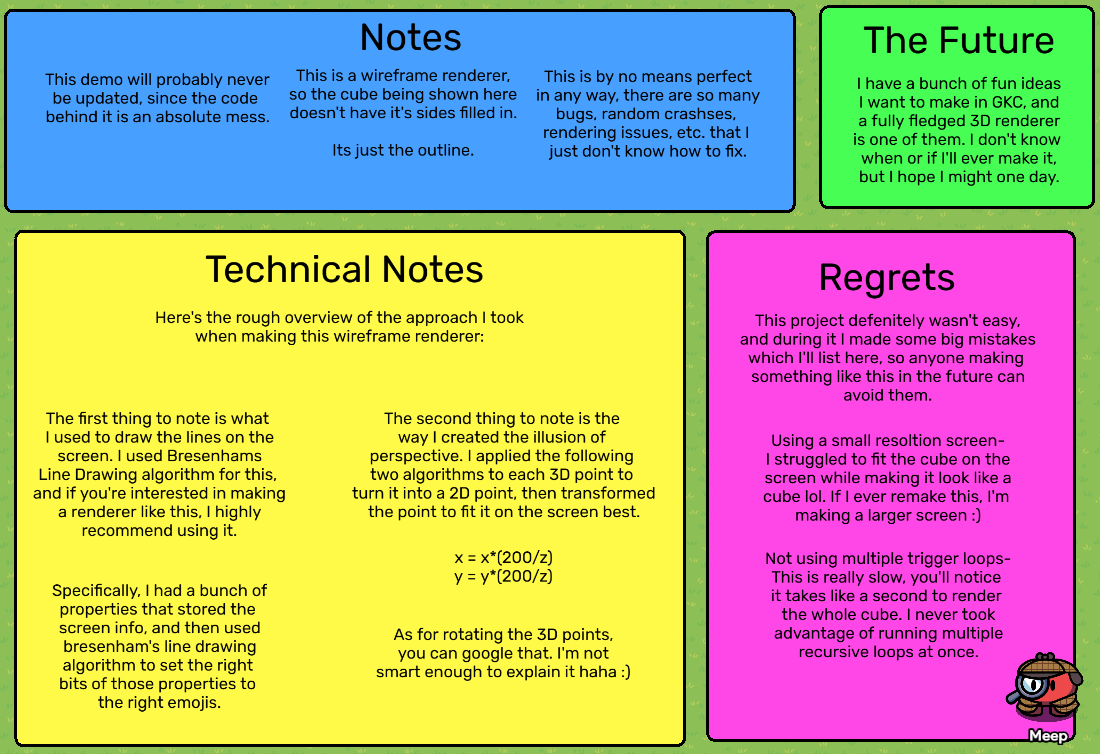
In this map, he actually left a few notes about the behind the scenes for this project. I’ve put a screenshot of the ones I believe would be most helpful for this particular project:
Some other things I’d like to note is that this method utilizes the text device and not a collection of barriers. The shape can be rotated through a series of game overlays the player can click on.
Look at Minecraft, the entire game is 3D rendering. But, you look at Gimkit, a game with only 2D gameplay, NOT 3D. I also think GKC doesn’t (currently, unless a support system can be built.) have the best capabilities and stability to manage such a large algorithm. It’s not impossible, but it’s a larger, more complex build than most.
again, to my point of Minecraft, the game is also made in Java/C++. Without making some sort of backend software or plugin, the best (in terms of smoothness and data crunch) way to do this is maybe making a custom coding software. One that is able to handle rendering, player tracking, vertices, and 3D Pos.
I was working on something like this a while back, but I lost willpower and deleted the world.
I’ll definitely take a look at BH’s notes. I do like his use of Bresenhams algo.
Wait how did you to that?
Overly promotional and an advertisement?
Render all the points and the planes(each face of the cube)