PLEASE use ASCII art responsibly.
Hello! Hopefully, you’ve read the title, and you know what this guide is about.
ASCII can be incredibly useful, and there are many different uses for it. This is mainly about how you can make your own ASCII art, since there are already a lot of guides utilizing ASCII.
Now, you may be just a tad bit curious. “ASCII that- ASCII this- What even is ASCII art???”
ASCII stands for “American Standard Code for Information Interchange”. ASCII has a ton of symbols that you’ve definitely used. Those symbols include letters, numbers, punctuation, math operations, just about everything an out-of-touch tech-illiterate wheezing possibly dementia-riddled old man could figure out by themselves if you told them that SHIFT could be combined with any letter for something new and exciting. [1]
Although it’s called ASCII art (Art made out of only ASCII characters), I will be including Unicode in the definition too. This is known as “Extended ASCII Art”. I’ll still refer to Extended ASCII as just simply ASCII though.
The methods of typing Unicode characters can vastly differ based on the device being used, so if you need help with that, then please search, for I’m too lazy to search up how to type Unicode and emojis on 15 different platforms.
You can use the shortcut, or you can manually copy and paste the characters.
All art taken from other websites will be credited. The ones without credits are mine.
And also do note that I am in no way, shape, or form an expert in ASCII art.
Table of Contents -
How to Make ASCII!
. 1.1 - What do you want to make?
. 2.1 - Creation
.. 2.2 - Emoticons | Emojis before Emojis Existed
.. 2.3 - ASCII Art | Art as in Pictures and Images
. 3.1 - Positioning
. 4.1 - Finishing Touches
Resources!
. Guides using ASCII Art
. Examples
.. 2.2 “Emoticons”
.. 2.3 “ASCII Art”
How to Make ASCII!
1.1 - What do you want to make?
This should be self-explanatory.
What are you going to make with your ASCII? Is it pixel art you’re looking for? Maybe you want a slightly retro-looking piece of art in your game? Cool ornaments on your background?
ASCII art can be hard to make on the go, so you need to make sure everything is planned out first.
What you need highly depends on what you’re making, but you’ll want to get specific with your goals. Having a clear result in mind definitely helps when you’re making something!
2.1 - Creation
First, put down a text device.
Maybe put a period or a dash in the first row if you want to make a prop. [2]
Now, start making whatever it is you want to make!
I would recommend going to Google Docs and setting the font to PT Mono for the actual art itself. Then you can just copy and paste the art into Gimkit when you’ve finished.
If the text gets cut off- don’t worry! You’ve reached the character limit for that text device. All you have to do is make another text device, copy in the next segment, and put that segment below the other part you’ve made.
When you’re making the art, know that there’s a lot of different symbols and characters available for use. But, there’s also a lot of symbols and characters that’ll end up as an error in many fonts.
ௌௌௌௌௌௌௌௌௌௌௌௌௌௌௌௌௌௌௌௌௌௌௌௌௌௌௌௌௌௌௌௌௌௌௌௌௌௌௌௌௌௌௌௌௌௌௌௌௌௌௌௌௌௌௌௌௌ
Oh wow. I didn’t expect that to load in. Quite surprising.
2.2 | Emoticons - Emojis before Emojis Existed
The subheading already explains it-
When emojis weren’t a thing, people would use text instead.
There are a lot of websites where people put a lot of different emoticons for others to use. Though they’re actually pretty easy to make.
I made one just now using a random symbol I found online!
"""
o(ت)o
Their name is Goob.
Let's all be as happy as Goob today and spread their love and kindness.
"""
If you want to make an emoticon, then you can think of an emotion you want to convey, and then look through a long list of all the existing Unicode characters to find what you need.
These emoticons can also be devoid of parentheses, instead opting to use some wonky and wacky smiley face symbol or whatever they have up their sleeves.
"""
ة ♬♩
- Choir
"""
2.3 | ASCII Art - Art as in Pictures and Images
The concept of an actual piece of ASCII art might sound very intimidating. I mean, isn’t it
really complicated, and really difficult, and really annoying to make?
Well, actually, it is.
HOLD UP! WAIT, DON’T LEAVE YET!
It’s all of those things you stated, if you don’t properly prepare.
And by properly prepare, I mean setting the font to something monospace. Trust me, you will regret it if you don’t.
[3]
What exactly is a monospaced font, though, you may ask? Great question, it’s a font where all the characters are the same size! You might already be able to see how that would be useful in the world of ASCII art.
Unfortunately for us, the only available monospace font so far is “PT Mono”.
However, if Gimkit ever decides to add new fonts, then the paragraph up there can be used for reference!
Here’s what happens when you don’t use a monospaced font! 
… ,* ’ , _ ,…,..,___
/ # \ . , ** ‘ ’ ’ ‘* ,
.* ##. \ ‘ ’ -,
'-.,_ # ,.* ^, /####^#~. \
‘~~-.,_ '^,_- __ # _=###### ;
', .’ ’ -. \ ’ …–-. \ . ..–.
/ ‘---- , / _ .. _ ’ ,__ _ ’ ; __ ..-~’ #- \
/ // / ‘’ ’ ’ ’ .. #= ;
.“ ., ’ '~ ’ ’ ‘* --.,.,__ ,..__ \ \ ‘| –’ ‘* * --,_ ,–/
’ ’ /* , * . ;
; ,’ ‘* -.,_ .. ‘’ ;
“ ;,. ‘’’’**–..------* . ㅤ ;
\ ..,.. ‘ |
'-. ,..,..,.., ,’
‘-. . , ‘’’----------`` /
–, ‘ , *’
```-- - -, ,‘,__ , ‘
(im not fixing this)
Although it may look okay, this took me days of trial and error to make. I suffered making this, all because the letters were all different lengths and nothing lined up at all!
Shrek is my arch-nemesis now, and nothing will change that.
A proportional font can be useful for more ‘organic’ ASCII art that actually only uses ASCII characters, and if that’s what you’re going for, then you can give it a try. However, that does make the art end up losing the style that most people know ASCII for- that being art like this:
"""
       (_    ,_,    _)
       / `'--) (--'` \
      /  _,-'\_/'-,_  \
jgs  /.-'     "     '-.\

- "Bat" by Joan G. Stark from the ASCII Art Archive
"""
Speaking of art like that, how do you make the kind of art you’d see in some really old thread on a forum that ended 7 years ago? Well, really, it’s quite simple. Just fire up your neurons and make something without Unicode or emojis.
Here’s a bunny I made without any fancy symbols.
"""
  nn
:(oo):
 n n)o
""""""

"""
Looks like a great barbecue snack!
I can put this little guy into my game by just copying and pasting him in, then decrease the font size!
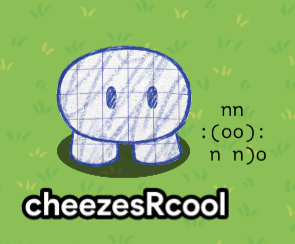
If you want detailed art, though, then you might want to look into all the different Unicode symbols available.
Once again, there are a lot of different symbols available, so you can make some really great ASCII art using whatever symbols you find, or just with the characters you already have!
I would recommend sticking to a certain theme in terms of the characters you use- sorta like an artist’s palette. Maybe you want to use just Braille, or you want to use only boxes, whatever you want to do!
You could also just use a image to text converter. The reason those haven’t been burnt to the ground yet is because they don’t steal from others! (Looking at a certain type of robot here.)
If you want inspiration, then please refer to the “Resources!” segment of the guide, specifically “Examples”, down to “2.3 - ‘ASCII Art’”.
3.1 - Positioning
You have your art, and you have a purpose in mind for that art.
Now, how can you put the art where you want it to be?
Simply, move it around using “Change Size”. If you want to change how big the ASCII art is, you can resize the text device itself or change the font size.
4.1 - Finishing touches
Great! You’ve finished your art, and you’ve put it where it should go.
Well, now what?
You’re basically done, actually! The only things left to do would be to polish your art a bit, change the font size, make the letters thicker, or whatever you want to do.
Resources!
Guides using ASCII art
Custom images with pixel-art in Gimkit Creative (REPOST WITH IMAGES)
Barrier Art (backgrounds+other thingys)
Dot Art In GKC for Custom Images
Examples
2.2 - “Emoticons”
(´∀`)
ᕕ( ᐛ )ᕗ
>°))彡
(╯°□°)╯︵ ┻━┻
°O°
(p_-)
ಠ_ಠ
( ͡° ͜ʖ ͡°)
:E
:3
8)
- Wikipedia

( 0д゚)
- Emoticon from Wikipedia, slightly modified
2.3 - “ASCII Art”
"""
        __,:,__               __,:,__               __,:,__
     ,ad88P`Y88ba,         ,ad88P`Y88ba,         ,ad88P`Y88ba,
   ad88888' `88888ba     ad88888' `88888ba     ad88888' `88888ba
 ,d88888P'   `Y88888b, ,d88888P'   `Y88888b, ,d88888P'   `Y88888b,
,d888P"'       `"Y888b,d888P"'       `"Y888b,d888P"'       `"Y888b,
:(["               ``":"''               ``":"''               "]):
`Y88ba,                                                     ,ad88P'
 `88888ba                                                 ad88888'
  `Y88888b,                                             ,d88888P'
    `"Y888b,                                           ,d888P"'
        "]):                                           :(["
     ,ad88P'                                           `Y88ba,
   ad88888'                                             `88888ba
 ,d88888P'                                               `Y88888b,
,d888P"'                                                   `"Y888b,
:(["               __,:,__               __,:,__               "]):
`Y88ba,         ,ad88P`Y88ba,         ,ad88P`Y88ba,         ,ad88P'
 `88888ba     ad88888' `88888ba     ad88888' `88888ba     ad88888'
  `Y88888b, ,d88888P'   `Y88888b, ,d88888P'   `Y88888b, ,d88888P'
    `"Y888b,d888P"'       `"Y888b,d888P"'       `"Y888b,d888P"'
        ``":"''               ``":"''               ``":"''
                   Normand               Veilleux

- "Border Pattern" by Normand Veilleux on Christopher Johnson's ASCII Art Collection

       _,    _   _    ,_
  .o888P     Y8o8Y     Y888o.
 d88888      88888      88888b
d888888b_  _d88888b_  _d888888b
8888888888888888888888888888888
8888888888888888888888888888888
YJGS8P"Y888P"Y888P"Y888P"Y8888P
 Y888   '8'   Y8P   '8'   888Y
  '8o          V          o8'
    `                     `
- "batman" by unknown on ASCII Art Archive

 _______________
| /~~~~~~~~\ ||||
||          |...|
||          |   |
| \________/  O |
 ~~~~~~~~~~~~~~~
- "Title Missing" by unknown on ASCII Art Archive

   -----|-----
*>=====[_]L)
      -'-`-
- "Title Missing" by unknown on ASCII Art Archive

                   YAao,
                    Y8888b,
                  ,oA8888888b,
            ,aaad8888888888888888bo,
         ,d888888888888888888888888888b,
       ,888888888888888888888888888888888b,
      d8888888888888888888888888888888888888,
     d888888888888888888888888888888888888888b
    d888888P'                    `Y888888888888,
    88888P'                    Ybaaaa8888888888l
   a8888'                      `Y8888P' `V888888
 d8888888a                                `Y8888
AY/'' `\Y8b                                 ``Y8b
Y'      `YP                                    ~~
         `'
- "Title Missing" by unknown on ASCII Art Archive

$$$$$$$$$$$$$$$$""$o$o$o$o$o$oo$$""$$$$$$$$$$$$$$$
$$$$$$$$$$$$""o$$$$$$$$$$"$"$$$$$$$o$"$$$$$$$$$$$$
$$$$$$$$$"$o$$$$""$oo $ ""      """$$$oo"$$$$$$$$$
$$$$$$$"o$$$$"   ""o  $oo o o       ""$$$o"$$$$$$$
$$$$$"o$$$"       oo$$$$$$$$$$o        "$$$o"$$$$$
$$$$"o$$$  $  o$$$$$$$$$$$$$$"$$oo       "$$$ $$$$
$$$"$$$"   "$$$$$$$$$$$$$$$$o$o$$$"        $$$o$$$
$$ $$$    o$$$$$$$$$$$$$$$$$$$$$$$$o o   o  "$$o"$
$"$$$"    o$$$$$$$$$"$$$$$$"" "$$$$$$"$$$$$  $$$"$
$o$$"    o$$$$$$$$$$o""$$$""""ooo"$$$$$$$$"   $$$"
$o$$"    o$$$$$$$$$$            ""oo"$"$o""   $$$o
o$$$     o$$$$$$$$$$                """""$    o$$o
o$$$    o$$$$$$$$$$$$o                   "o "oo$$o
o$$$  oo$$$$$$$$$$$$$$$$ooooooo$$$$$oo    $"$ "$$o
o$$$"  ""  $$$$$$$$$$$$$$$$$$$$$$$$$$$$o    " $$$
$ $$$       "$$$$$$$$$$$$$$$$$$$$$$$$$$$o    o$$"$
$$"$$o       "$$$$$$$$$$$$$$$$$$$$$$$$$$$o   $$$o$
$$o$$$o       $$""$$$$$$$$$$$$$$$$$$$$$$$o  $$$ $$
$$$o"$$o    "$""  "$""$$$$$$$$$$$$$$$$$$$oo$$$"$$$
$$$$o"$$$o        "     $$$$$$$$$$$$$$$$$o$$"o$$$$
$$$$$$o"$$$o         oo$$$$$$$$$$$$$$$$$$$$"o$$$$$
$$$$$$$$o"$$$$ooooo$$$$$$$$$$$$$$$$$$$$$$"o$$$$$$$
$$$$$$$$$$o""$$$$$$$$$$$$$$$$$$$$$$$$$"oo$$$$$$$$$
$$$$$$$$$$$$$o$""$$$$$$$$$$$$$$$$$""oo$$$$$$$$$$$$
$$$$$$$$$$$$$$$$$$o$o$"$"$"$"$oo$o$$$$$$$$$$$$$$$$
- Unknown, sent to ASCII Art Archive by John Barger


⠀⣀⣀⡀⠀⠀⠀⠀⠀⠀⠀⠀⠀⠀⠀⠀⠀⠀⠀⠀⠀⠀⢀⣀⣀⠀
⢾⣿⣿⣿⣿⣶⣤⡀⠀⠀⠀⠀⠀⠀⠀⠀⠄⠀⣀⣴⣶⣿⣿⣿⣿⡇
⠈⢿⣿⣿⣿⡛⠛⠈⠳⣄⠂⠀⠀⠀⠀⠀⣠⠞⠉⠛⢻⣿⣿⣿⡟⠀
⠀⠸⣿⣿⣿⠥⠀⠀⠀⠈⢢⠀⠀⠀⠀⡜⠁⠀⠀⠀⢸⣿⣿⣿⠁⠀
⠀⠀⣿⣿⣯⠭⠤⠀⠀⠀⠀⠃⣰⡄⠌⠀⠀⠀⠀⠨⢭⣿⣿⣿⠀⠀
⠀⠀⠹⢿⣿⣈⣀⣀⠀⠀⠠⢴⣿⣿⡦⠀⠀⠀⣀⣈⣱⣿⠿⠃⠀⠀
⠀⠀⠀⢠⣾⣿⡟⠁⠀⠀⠀⠀⣿⣏⠀⠀⠀⠀⠘⣻⣿⣶⠀⠀⠀⠀
⠀⠀⠀⢸⣿⣿⢂⠀⠀⠀⠀⠘⢸⡇⠆⠀⠀⠀⢀⠰⣿⣿⠀⠀⠀⠀
⠀⠀⠀⠈⣿⣷⣿⣆⡀⠀⠀⠁⠈⠀⠠⠀⠀⢀⣶⣿⣿⠏⠀⠀⠀⠀
⠀⠀⠀⠀⠘⣿⣿⣿⣷⣴⡜⠀⠀⠀⠀⣦⣤⣾⣿⣿⡏⠀⠀⠀⠀⠀
⠀⠀⠀⠀⢀⡿⠛⠿⠿⠛⠁⠀⠀⠀⠀⠘⠿⠿⠿⠿⢧⠀⠀⠀⠀⠀
⠀⠀⠀⠀⣾⠀⠀⠀⠀⠀⠀⠀⠀⠀⠀⠀⠀⠀⠀⠀⠘⣧⠀⠀⠀⠀
⠀⠀⠀⠀⠁⠀⠀⠀⠀⠀⠀⠀⠀⠀⠀⠀⠀⠀⠀⠀⠀⠉
- Copy-pasted from TextArtCopy
"""
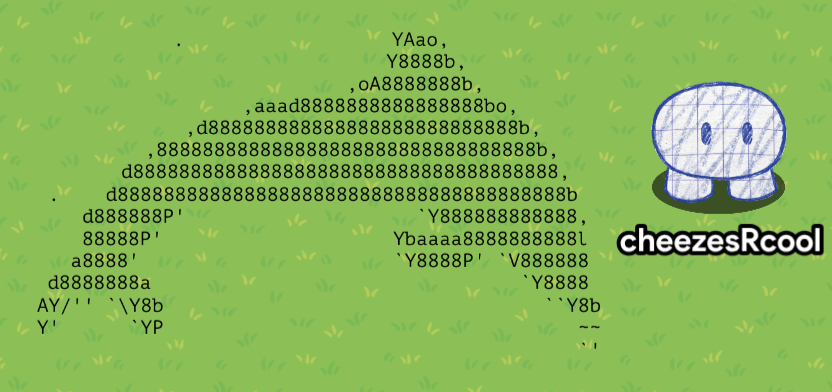
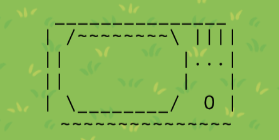
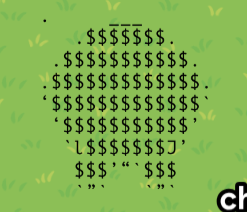
The advantage you get for making the art inside of Gimkit- it won’t look wonky if it’s in its natural environment.
Thank you for reading! Feel free to ask questions and alert me to whatever problems there might be in here!
- 1
- 2
- 3
- 4
- 5
- 6
- 7
- 8
- 9
- 10
This is a hypothetical situation. I don’t know if they would even be able to turn the computer on. ↩︎
All spaces at the very beginning of your text automatically get deleted. ↩︎
Also, make sure that you plan out a grid for all of your characters to go into, because Gimkit centers all of the rows. Put spaces in all of the empty slots (Except for the first row (and last row), put a tiny symbol nobody will notice in the first space.) ↩︎


