This is a repost of the guide by user @BlueBear
Since the user who made this original guide is not here to update it with images, I have decided to do so. None of this guide is my work, and please credit the above-mentioned user.
This guide will probably be flagged. I understand why. Please do think about the people that may need this guide WITH IMAGES in the future, though.
Credits:
For Guide Critiquers
I did not add an intro since this is not my original work.
Step 1:
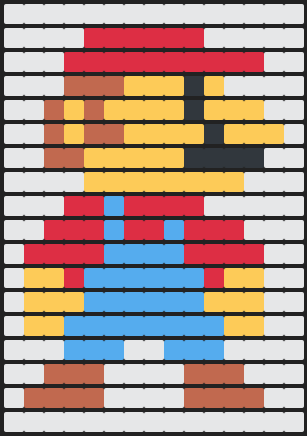
Load up a writing software, Google Docs, for example. You will create your pixel art with emojis ( 


 )
)
Important Note
Make sure to use a filler pixel, such as the white squares used in this pixel art by @BlueBear. This is important for proper formatting.
Quick Tip:
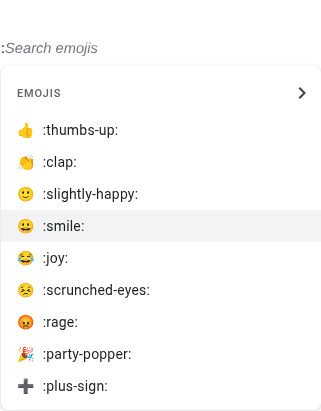
You can type emojis into Google Docs using a “:”
Step 3:
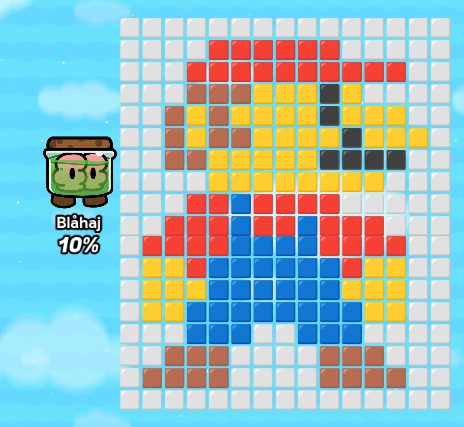
Now all you have to do is paste your pixel art into a text box. There is an issue that may arise, called the character limit. The easiest solution is to use multiple text boxes.
The bigger your pixel art, the more boxes you’ll need
This pixel art was made using 2 textboxes
Further Info:
Please do not use this to make inappropriate/rule-breaking images in gkc. I and @BlueBear are not liable for any misuse of this guide
I will be doing this a lot more often, as I feel the number of guides that are useless because of the image wipe is too high a number, and should be fixed.
Please do not comment saying, “good guide!” unless you have criticism. Use the  button instead.
Thx for reading!