I’m working on a Resident Evil-styled game inside of Gimkit and I’m trying to figure out how I can implement a health monitor, similar to what’s seen in real Resident Evil titles. I’m still relatively new to GKC so I don’t really know what I’m doing half the time, and I especially don’t understand how blocks and properties actually work. I already created an in-game overlay object that displays Fine by default, I just need to know how alter it mid-game to display the player’s health condition. If you have any advice or tips, feel free to share and I’ll experiment with it to see what works.
For context, the health monitor seen in classic RE titles displays your health via words and colors, instead of a traditional health bar. It works like this:
Fine displays in green when you are at or near full health. Caution displays in yellow if your health is getting low. Danger displays in red when you are at critical HP, usually one or two hits away from dying.
“Game” is still in very early stages, I haven’t even added any enemies yet lol. What I can gather from scrolling through the forums is that I may need to create a custom health variable/property and then link that up to the health monitor.
Thanks for reminding me of that though, it’ll at least save me from a pointless headache later down the road.
What you are asking for is a pseudo health bar. You can create one using text and an overlay, but to be damaged you can’t use normal damaging (i.e. damage taken by a gadget or a damager device) and you’ll have to use something that takes away “health” from your “health bar”
Hm… I could actually try that. Haven’t worked with repeaters yet but I would assume that they are similar to a “for” loop. I’ll bookmark your comment so I can get around to this when I have the chance. Thank you!
Alright, so I do need a psuedo-health bar. That’s what I figured looking at some other posts but I wanted input from others just to be sure, and you’ve done just that, so thanks
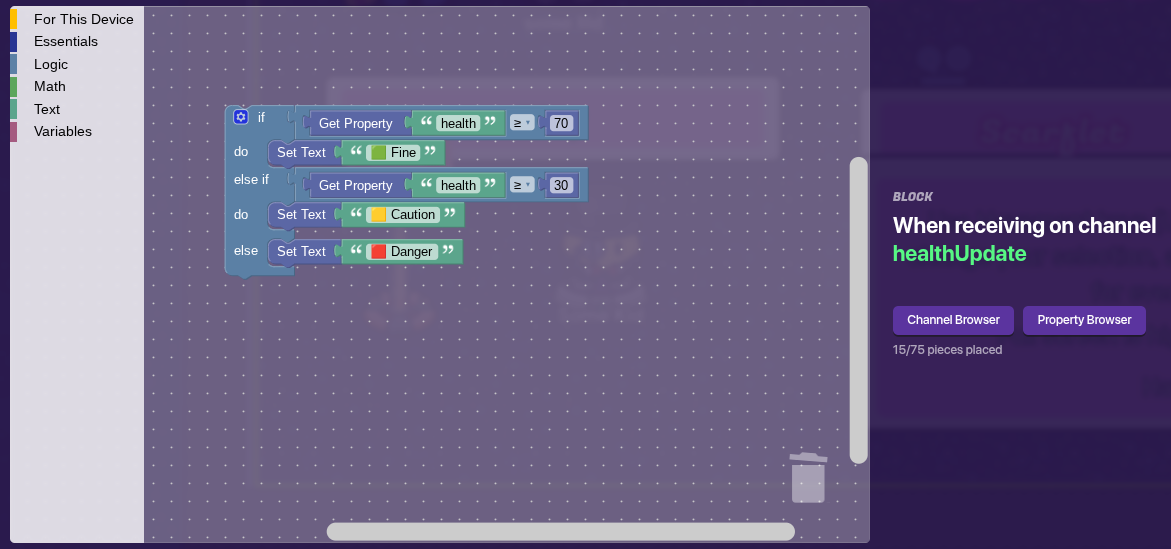
What you’d do is make the pseudo health system, and instead of whatever blocks they use for the health bar overlay itself, paste in this block to run when receiving on when the health property updates.
You can’t change the text color of game overlays, so the next best thing would be to add a colored emoji next to the status.
Constantly checking a value is almost never an optimal way to do things by the way. It’s usually better to have whatever you need run when it detects a change in the value.
Ohhhh, that makes sense. I would have preferred to change the background color of the text overlay to reflect health status but this will also do. First post on here and y’all have already been incredible. Thank you so much for the help.
I should have thought about that…constantly checking a value could cause performance issues.
Alternatively, you could save memory by using checkers to check if >70, >30, etc. This would then allow you to activate/deactivate different overlays, letting them have different background colors. And you wouldn’t have to constantly check, only when the property value changes.
That could work too I guess. Probably shoulda put it in the original post that I set the player’s max health to 60 in order to have an even split where each health condition ranges for 20 HP. Now that I think about it though, that may just overcomplicate this whole system. I’ll set the max HP back to 100 and experiment with checkers and psuedo-health when I have the chance.
UPDATE 1: I’m working on triggers that will set the player’s health to a specific number (and health condition) for testing purposes. I’ll be experimenting with this in the meantime, but will still take all your feedback into consideration. Thanks again
 to detect how much health the player is at.