Make an Overlay Timer Like Snowy Survival! Difficulty 1/10 or 🟦

I’ll teach you how to make a timer that counts down at the start of the game in this guide.

Place down a lifecycle, repeater and game overlay. The game overlay should hide when receiving “TimesUp”.

Make the repeater repeat every 1 seconds, and make it so that it stops repeating when receiving on a channel. When it repeats, it should broadcast message on channel “UpdateTimer”.

Wire the lifecycle to the repeater.

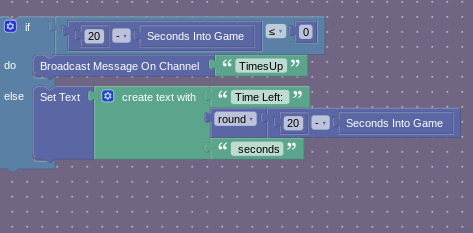
Create this block:

That’s all!

3 Likes

Can’t you just use the timer in the settings?

What timer?

My stats teacher has like an entire line for collecting data and I was first in line🤣

In map options.

That counts up.

There’s an option to count down as well, if you have a maximum amount of time.

Yes, but do you want your game to be 20 seconds long? I meant an overlay timer that will trigger an action when finished.

It also saves more memory (not much, but it still does).

Oh! Ok

Woah! This didn’t know that there was a seconds into the game block! I just used a trigger delay!

this is not working…

Where’s the “Round” block, I don’t see it in the categories?

Could someone describe what the blocks in the picture used to be? As of 2025, all photos were deleted so I have no context for what blocks to place.

use a trigger loop instead of a repeater (here’s why: trigger loops are more memory efficient)

Changing the Repeater to a Trigger Loop doesn’t help this person at all, since the problem is that the image for the BLOCKS is gone, and that displayed what the Overlay showed.
1 Like