My map is a top-down, and I want there to be a feature where once a pop-up is closed the screen shakes. Is this possible?
There used to be a guide on this but after the picture wipeout it doesn’t really work anymore and has block code in it. The OP is kinda inactive right now.
Welp. This is it:
2 Likes
Thank you! I’m gonna keep this topic open in case I need some pics… some guides are hard to understand without screenshots
I don’t think that would work, because doesn’t GKC do weird stuff if you have more than 2 camera points? Idk because I have never had a map in which there is more than one camera point.
1 Like
I have never also had a game with 2 points but I think it should work…
If I’m wrong… blame me.
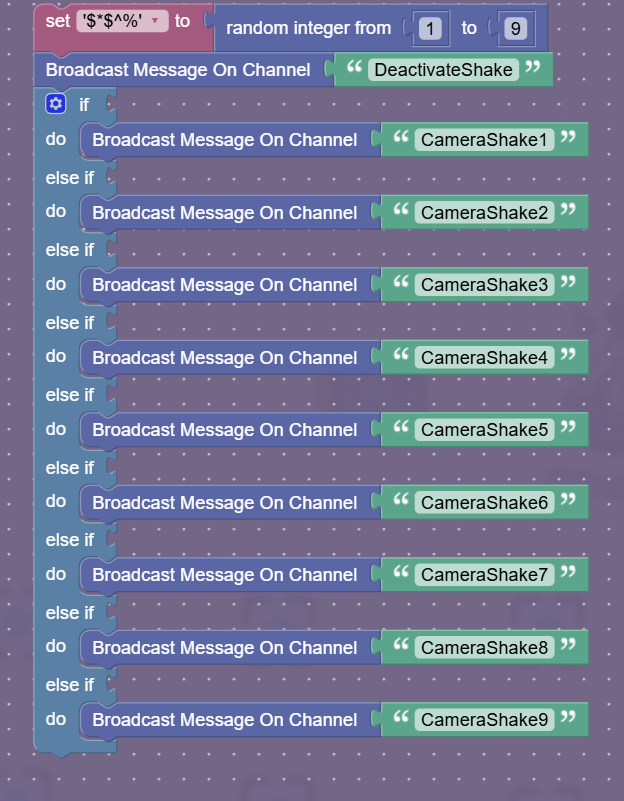
it’s probably something like:
Set '$&*$^%' to random integer from 1-9
Broadcast message on channel 'DeactivateShake'
If $&*$^% = 1
do Broadcast message on channel 'CameraShake1'
else If $&*$^% = 2
do Broadcast message on channel 'CameraShake2'
else If $&*$^% = 3
do Broadcast message on channel 'CameraShake3'
else If $&*$^% = 4
do Broadcast message on channel 'CameraShake4'
else If $&*$^% = 5
do Broadcast message on channel 'CameraShake5'
else If $&*$^% = 6
do Broadcast message on channel 'CameraShake6'
else If $&*$^% = 7
do Broadcast message on channel 'CameraShake7'
else If $&*$^% = 8
do Broadcast message on channel 'CameraShake8'
else If $&*$^% = 9
do Broadcast message on channel 'CameraShake9'
@Hdangerzones remember this is just a guess so it might not look very good in-game, but it should work
2 Likes
I can’t find a way to input $&*$^% = 1, or the following numbers… I have everything else.
How do I put in $&*$^% = 1 and the other ones?
I dont know what you’re talking about but if you want that to equal 1 you’re going to have to just put 1 not random integer from 1 to 9.
Talking about how to replicate this:
Sorry idk how to do block quotes  but if u scroll up for 5 seconds or so you’ll see the OG post @SeamlessMoon
you can use any variable name, that was just a random one.
for the if parts you use the logic block (number) = (number) block and have the first blank with the variable and the second with the number.
use the ` you use for preformatted 3 times in a row
good job and welcome to the forums! though it is kinda unecessary becasue I’m the one who reposted that…
2 Likes
I’ll try tomorrow I gtg now and will keep everyone updated later!
1 Like
here! I found this! How To Make Screen Shake [1/10] [REPOST WITH IMAGES]
2 Likes
@Hdangerzones you could simplify the block code even more with this code:
Broadcast message on channel: 'DeactivateShake'
Broadcast message on channel: Create Text with: 'CameraShake'
                                                 Random Integer from 1 to 9