Credit to ULTIMATE HIDE AND SEEK TAG for the idea.

Welcome to the forums, @roddy!
Make sure to check out new-user-must-read and forum-beginners!

2 Likes
I think in your case tho, you don’t need to have such an accurate one
1 Like
There should be a guide on this. Just search in game timer in the search bar.
Yes but none of them have the thing he is looking for.
So currently, I am almost done a guide on it.
You just update a property using a counter with a target value of 0 and starting value of 30. A trigger loop decrements the counter every trigger of one of the triggers. Then broadcast on a channel that updates the text via blocks. The block code would be:
Set text, get property, “[the property goes here]”
More info on trigger loops here.
Your back!? [1]
I thought you weren’t coming back until August. Unless it is August for you, which my clock is wrong on so many levels. Jk lol. ↩︎
1 Like
just coming on for a while probably
(at least the regular organization hasn’t completely left yet)
Here is the guide that you are looking for, @roddy!
Nope just checking in.
1 Like
isn’t @roddy using the text as a timer?
1 Like
WDYM, TrainGuy53?
since roddy is using the idea from ultimate hide and seek tag, the timer is used with a text device, so, i’m asking if roddy wants to use the text device as the timer, or a counter
That’s what I do in the guide, though.
ok never mind what is said then
What you need:
Text
Counter
Property
Wire Repeater
Trigger
Text blocks
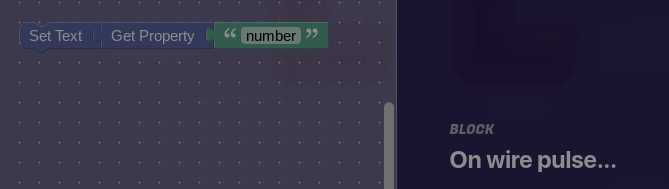
The name of the Property can be anything you want
Counter
Visible in game: no
Updates a Property: yes
Property to update: must be the same one from Text
Starting number: 30
Target number:0
Property
Name: same one from Text
Type: number
Wire Repeater
Delay: 1 second
Trigger
Visible in game: No
Colision enabled: No
Wires:
When countdown starts>Wire repeater
Wire Repeater>Counter (Pulse received, decrement counter)
Wire Repeater>Trigger (Pulse received, trigger)
Trigger> Wire Repeater (Triggered, send a pulse)
Counter> Trigger (Target number reached, deactivate trigger)
4 Likes