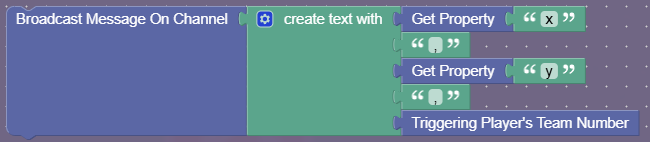
You can recreate color clash by using barriers on/off. One team wants to turn all them on, and vice versa. The way you want to do this is broadcast a message on the current coordinates. Each barrier activates/deactivates based on the channel. (e.g. if team 1 make it deactivate and vice versa)
I’ve made this concept several times, and all you need in block code is every time the player position changes, broadcast a message on a channel with current coordinates, and is it’s deactivating or activating.
For example:
X: 13
Y: 2
Team: Deactivate
channel: 132deactivate
Now that barrier at the position receives on these coordinates, and that should be it! Hopefully team Gimkit can incorporate more devices for this in the future.
Yeah this is pretty much the most effective way. But make sure to insert a period or something between the cords so that (13,2) and (1,32) aren’t the same channel!
sorry @SlimExtraterrestrial, i didnt rely on @bird, i asked him to explain for me, cuz i didnt understand, and he was the one online, thought u will be angry if i pinged you, sorry again
You are broadcasting on a custom channel. That channel could be anything! The X and Y values are broadcasted to tell the current position of a player.
We need to make color clash, so let’s place a bunch of small barriers next to each other. Those barriers need to be deactivated/activated when a player runs over them.
Are you following so far?
Since we always broadcast the player’s current position, let’s have the barriers’ activate and deactivate channels receive that! Of course, we run into an issue. How do we tell when to activate or deactivate? That’s a simple fix- put the triggering player’s team number block! One team activates the barriers, while the other deactivates the barriers.
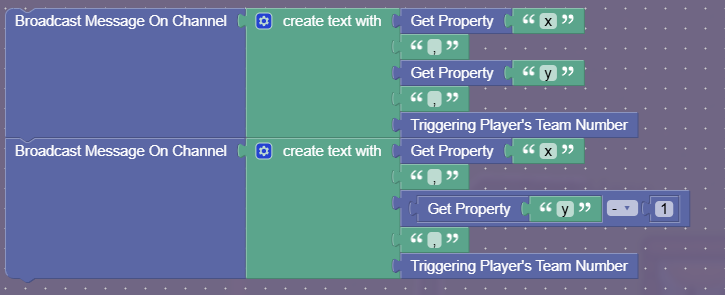
To avoid any missing of the channel-to-barrier, we can broadcast one block under the player too! This is what it would look like: