You can just use camera points that activate and deactivate via overlays with no block code needed.
@BubbaW do you need it that there is a game overlay/pop-up that opens up a button you click to view the camera point?
If you have more than 2 camera points in a level, it bugs out and they don’t work.
I was intending for when you interact with a button it would activate the first camera point and then allow you to switch between the cameras by using the game overlays… I did put a good bit of cameras in so if I need to I will lower the amount of them. Sorry about not clarifying in my main post.
Doing that shouldn’t require block code. The problem is having too many camera points due to bugs.
I’m not saying that it doesn’t work… the block code from the guides I tried to look at wasn’t possible to look at due to what I said earlier… really I just need someone who has used those guides before to tell me how to do it.
Are you tryna make like security cameras?
Oh wait nvrmnd lol, i didnt read thoroughly
What you can do is you buttons and a teleporter that teleports the player to different place where the camer is set up, while keeping them somewhat out of sight.
What guide? If you don’t say, nobody will know. This should be possible without block code though. And you can do what Nagi said.
I am coming to say… although has been stated multiple times, your in luck, There is absolutely NO NEED for Block Code =D No more Depress- er just a lot easier of a time setting up. Just a on screen button and a link of wires or channels going from 1 cam to the next
Ain’t no giggity way people flagged my post for moderator attention
Im sorry about not putting the guides I was talking about down(I was tired and forgot)…
https://forum.creative.gimkit.com/t/how-to-make-a-security-camera/66187
https://forum.creative.gimkit.com/t/how-to-make-a-security-camera-system/98126
These were the three main guides I found when I searched… hopefully this could help a bit.
Just let me know if I miss anything and… truly I’m sorry for all of the problems.
Speaking of the links.. one of the guides I just linked was just bumped.
Edit:If the links have issues let me know and I can try to fix it.
This will be the last post for this topic… I have figured it out fully and I would like to be able to show how I made it(making a mini guide on how I did it)
Devices I used:
1x button
1x counter
1x property
1x trigger
3x game overlays
10x camera points(you determine this value don’t worry)
Start off by placing a button that is not visible in game. Name the message to whatever you want and set the When button pressed transmit on → openCameras
Next place down the three game overlay’s, make sure that you wire the button to each overlay so When button pressed → show overlay and set the settings to this:
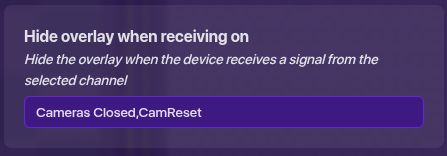
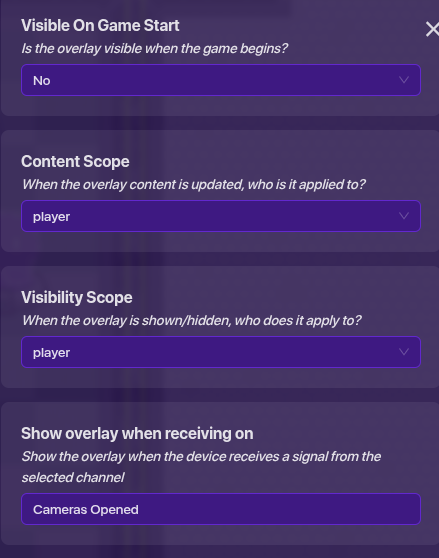
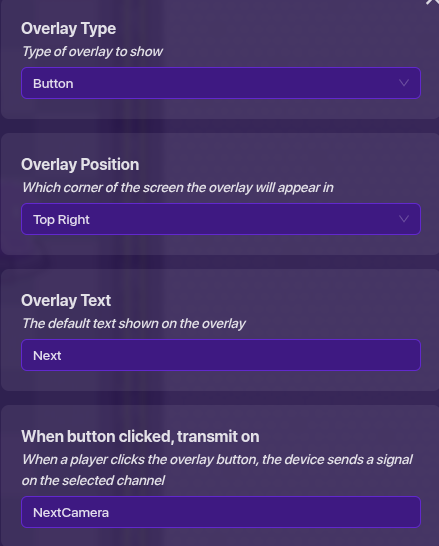
You will have to change the overlay text and when button clicked,transmit on to whatever your channel is, the position is for you to choose, the show overlay when receiving on will change based on what your channel is that you are naming, the hide overlay when receiving on will be set to Cameras Closed,camReset(you probably only need the camReset channel but that is for you to decide.)
After that you can take a property and do these settings:
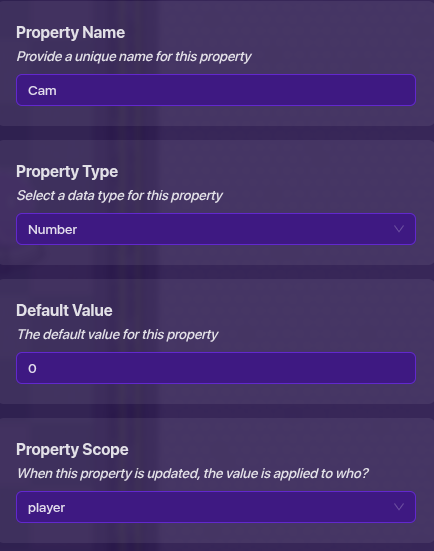
You can change the name of the property to whatever you want.
Next take a counter and make it not visible in game and wire the “Next” game overlay to increment the counter and wire the “Back” game overlay to decrement counter. Make sure the button updates the “Cam” property.
Now place a trigger that is not visible in game and does not collide with players, and put in the trigger when receiving on: NextCamera,PreviousCamera Make sure the scope is set to player.
Now for the hard part… the block code. Create a new block for when triggered. And use these blocks…(use as many as you have cameras… the limit on cameras is 10 cameras)
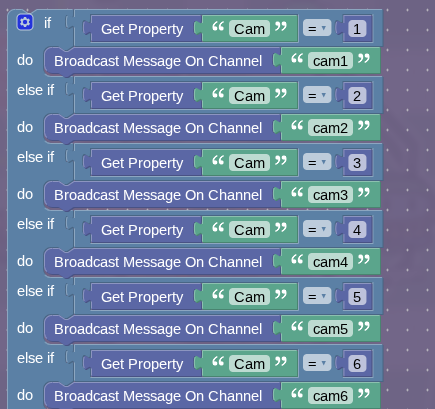
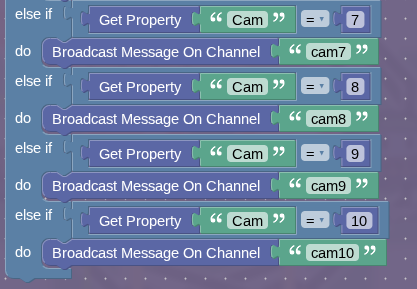
For each camera point you have you need to configure it to these settings:
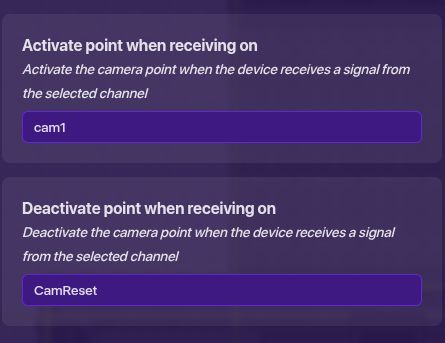
You just change the cam1 to whatever number camera it is: cam1,cam2,cam3, etc
The camReset is the channel the close camera game overlay sends a signal through… make sure you have it in the When button clicked, transmit on → camReset
Once you do this you should be able test it and it will work
This is what I managed to create that actually worked.
Some things to note: the system does not have a maximum or minimum property amount… so if you get to the last camera and try to continue, the system will continue and you will have to click the back button however many times you clicked at the last camera plus one more.
Hopefully this could be used to help other people out who need a more accurate system for security cameras… if it would be ideal to make a new post with this as a guide then I will… otherwise it will stay here.
You should make this into an actual Community Made Guides
You should make the guide on a new post.
Mark a solution to one of the post above !
Alright I’m going to create a new post for the guide… so don’t bother responding to this topic anymore
Here, I can move this to help so you can mark a solution for you to close this.
This topic was automatically closed 3 hours after the last reply. New replies are no longer allowed.