Props in Detail: Chapter 1 - Rocks

Welcome, Welcome, Welcome!

To Props in Detail: Chapter 1 - Rocks

As you may or may not know I am @HelloSmartie. This is my first time making a guide in the forums so please tell me what I can improve on.

I accept constructive criticism!

no you don’t

Just a side note but I am not doing the Season Ticket Rocks, because I currently don’t have the Season Ticket.[1]

loser, imagine not having season ticket.

Here is a scroll that my advisor gave me, it shows all the information that will be discussed in the upcoming guides I will be creating that is related to this guide.

Catalog of Contents

Chapter 1 - Rocks (This Guide)
Chapter 2 - Dirt and Moss(Click Here to Go to it)
Chapter 3 - Coral and Shells (Decided!)@fred_beans Will do
Chapter 4 - ???

There will be a poll at the end of the guide if I should make another guide about other props.

Now I will explain why I am making this guide.

Ah, you finally understood what I was doing,
But this still doesn’t explain the purpose

Explanation

The main reason, other than my benefits, is to widen the more in depth detail to props other than devices, block code and terrain. Which gets more guides on then props, by far.

How exactly do you benefit from this?

Now lets finally move on!

Here is some basic information about the Props!
We’ll get into what you can do with rocks later in the guide.

The Rocks

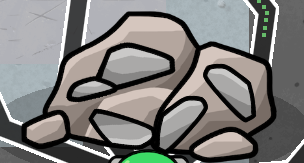
These are the rocks, that are currently in GImkit Creative:

1LRocks
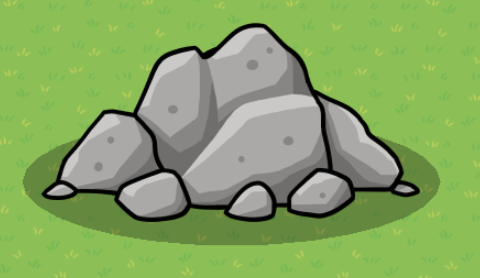
This is one type of Rocks[2]

Let’s call It 1LRocks, [3]
The color of the rock has a light grayish tone. Like a mountain rock or stone you would see in the wild.

2LRocks
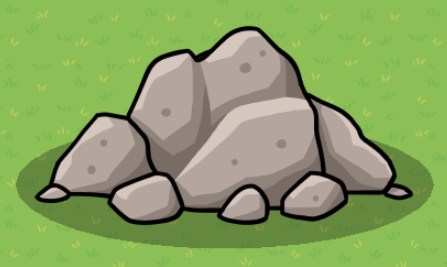
This is another type of rock.
Lets call it 2LRocks

It looks quite similar to the previous rock we saw, 1LRocks.
Everything is similar except the shade of the rock. Which happens to be a brownish-tan color. Maybe the average rocks you see in the wild. Just very big.
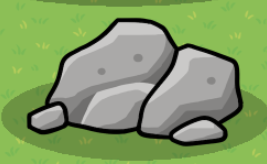
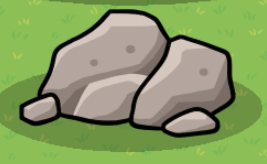
1MRocks


A little bit more than half the size of a Large Rocks. Same color scheme as the 1LRocks

2MRocks


Also a little more than half the size of a Large Rocks. Same color scheme as the 2LRocks

Enough about the bigger Rocks. Lets move on to the Rock. [4]

1SRock
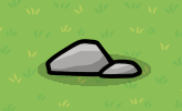
Very small, but not the smallest. It has the same color scheme as the 1LRocks. You see the pattern?

2SRock
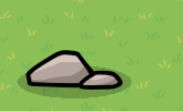

This is the same rock as 1SRock but it has a different color scheme. This color is more closer to the 2LRocks. These could be something you used to fill places up and not look bland.

1SSRock
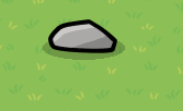

This is Super Small. It is the previous one but the rock is alone and the shape is a little bit different. The color scheme is the same as the 1LRocks.
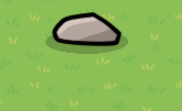
2SSRock


This is also very small. The color scheme is the same as the 2LRocks


WOW!

Ahem, *clears throat

Now what is the purpose of these rocks while decorating a game?
Well, rocks are natural barriers. [5] Barriers look unnatural in a game environment, where it’s mostly nature. Walls also look way too ugly. Walls also take up tons of memory.
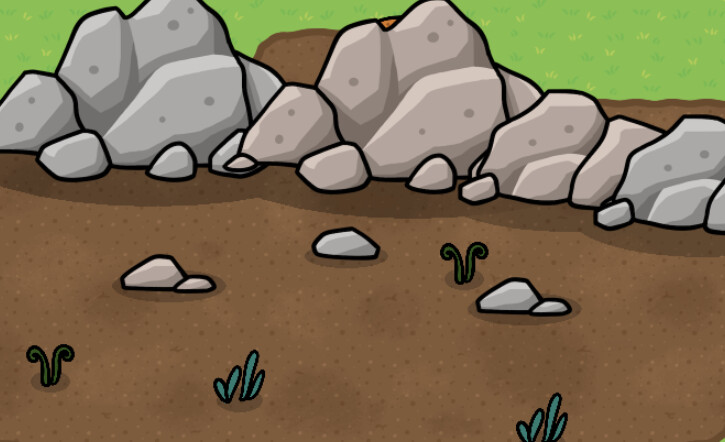
Sure, this doesn’t look the absolute best piece but after some work and adding more props,
you can turn a boring and bland park into a masterpiece!

Now, where can you put rocks?
Rocks can basically go everywhere. Especially SS an S Rock(s). Making a waterfall can also be useful in a nature park/reserve.

Extra Stuff

If you want to make a minable rock then tint the color of the rock and wire to the item granter to give an item.

Here are some credits:
How to make a mineable rock (Please Reply With more ideas) [WIP]

Should I make more chapters?

  • Yes
  • No
0 voters

Did you like this guide?

  • Yes
  • No
  • Meh…
0 voters

  1. I might add the Season Ticket Rocks later to the post ↩︎

  2. there happens to be many things named Rocks ↩︎

  3. The format will be -number-size-name- ↩︎

  4. you see there is no s at the end of Rock The format will be the same though. ↩︎

  5. Custom ↩︎

11 Likes

Hey smartie, great guide! Do you know if I could make one of these?

3 Likes

sure… its up to you..
Just put me in the credits…

are you going to do one of the chapters?

1 Like

yes, if I do, it will be ch. 2 I think or another one-

3 Likes

yo this is awesome please make more!

2 Likes

Smartie, I swear this a ABOSULTUEY W INSANELY GOOD W GUIDE THAT IS REALLY GOOD

^^^ [1]
Well maybe not that good as mentioned above, but it’s still a great guide!

10/10


  1. Guess I went a little too overboard ↩︎

6 Likes

Thank you all!
This is still my first guide.
So, I would absolutely like constructive criticism.

Kormorant

@Kormorant Are you guaranteed doing Chapter 2 cause I want to start the other ones.

2 Likes

great first guide!

a couple ideas:
you could look a little bit into tinting the rocks- or putting rocks behind the rocks- or changing the size of rocks- or even combining rocks with terrain? i dont know if these would actually help though

mandatory formatting guide

extra formatting options for the uninformed!

[1]

Headings!

you can make this using a hashtag and a space (# exampleText)
there are SIX different sizes of heading!

exampleText (# exampleText)

exampleText (## exampleText)

exampleText (### exampleText)

exampleText (#### exampleText)

exampleText (##### exampleText)
exampleText (###### exampleText)

you can also make this using h1-h6 wrapped in the left and right arrows!

exampleTxt

<h1>exampleTxt</h1>

however, it seems like if you put text under headings using html formatting (that ^) then all formatting for that text just doesnt work

heading6
**bold**

bold

<h6>heading6</h6>
**bold**

**bold** //why does this one work?

[2]

heading6

bold

<h6>heading6</h6>

**bold** //??????

Dividers!

you can make these using three asterisks in an empty row! (***)
examples above this and directly below this sentence


Footnotes!

i used to refer to these as tooltips but it turns out theyre actually named footnotes
you can make these using one caret (^), one left bracket, whatever you want inside, and one right bracket!

^[]

[3]
also images can go into the tooltips
[4]


Images!

you probably know how to put these in
but you can actually change the sizes to a number outside of 100, 75 or 50!
simply go to the text version of the image

![2025_12_05_0dl_Kleki|690x431, 50%](upload://8Z7cJoamPD5uiGyRpwYgOg29ujL.png)

find where the size is typed in;

690x431, 50%]
or
width x height, current size of image]

and change the percentage!

![2025_12_05_0dl_Kleki|690x431, 10%](upload://8Z7cJoamPD5uiGyRpwYgOg29ujL.png)

you can also crop them via the size (they wont stretch)

![2025_12_05_0dl_Kleki|690x200, 50%](upload://8Z7cJoamPD5uiGyRpwYgOg29ujL.png)

Strikethrough!

you can make these by using two tildes (~) on both sides of your text!

~~exampleTxt~~

exampleTxt
[5]
theres multiple ways of doings this, though markdown uses less characters

[s]exampleTxt[/s] bbcode
<s>exampleTxt</s> html
~~exampleTxt~~ markdown

the rest of these will just be extra things you can make using markdown (and maybe bbcode or html)

More Formatting Options!

Superscript and Subscript!

[6]

Normal text for comparison<sup>exampleTxtSuper</sup>

Normal text for comparisonexampleTxtSuper

Normal text for comparison<sub>exampleTxtSub</sub>

Normal text for comparisonexampleTxtSub

Small Text!

jk apparently “< small >” but with no spaces is blocked

Marked Text!

<mark>exampleTxt</mark>

exampleTxt

Deleted Text!

<del>exampleTxt</del>

exampleTxt
[7]

Inserted Text!

<ins>exampleTxt</ins>

exampleTxt


  1. if it matters at all for you; i just copy & pasted this in since i dont have the energy to constantly retype this everytime somebody makes their first guide or has bad formatting ↩︎

  2. two slashes (//) make a comment in c sharp ↩︎

  3. exampleTxt ↩︎


  4. ↩︎

  5. :.|:; ↩︎

  6. some of these might tell you “< aa >exampletxt< aa > is not allowed!” or smth like that dont ask me why that happens but idk how to fix it ↩︎

  7. fun fact: this is actually how i used to do strikethroughs :sweat_smile: ↩︎

6 Likes

I’m not exactly sure yet, but yeah, I think I can do that (the problem is in I’m in the middle of at least two other guides, so…)

4 Likes

Nice Guide, maybe this can help with outdoorsy kinda games…

Side Note: I can’t believe we made so many guides to the point that the latest guides are literally about rocks or they get flagged for being a dupe :pensive_face:

7 Likes

I actually used your formatting options to make this guide!

Toaster, yah I had to simplify it to Props. There is so many topics that are dupes nowadays. [1]

Thanks Kormorant! Do it whenever you want!


  1. I actually hate decorating ↩︎

2 Likes

If I make a game with one of your guides, should I put you in the credits?

3 Likes

Hope I didn’t cause any disturbance from my edit to your guide @HelloSmartie.
Just make sure, that if you intend to make more of these, they aren’t Community Made Guides, but rather Art with the art-guide tag on it.

Although since this is your first guide, I guess I could provide some constructive criticism for you!


First of all, your grammar is unmatched. I am a big fan of well-conveyed knowledge, and that is quite literally what this guide does perfectly.


Your formatting is simply splendid! I like how you added a table of contents to this guide!
But.
Did you know, in future edits, you can link your table of contents to other guides! I’d love to see this when you get to editing it!


Humour-
Now I will say, this guide was not funny at all, but it had a LOT of personality, and that’s one thing a lot of older forumers like to see (yes, I know I’m an unc).


Final Rating:
9.5/10

The only reason this wasn’t a high 9.8/10 was that:
(1. No guide is perfect :3 (except for GimAI’s replies (ifykyk))
(2. It’s a WIP. I prefer people finish their guides before posting them (for obvious reasons).

Thanks for reading!

Also, if you want access to the season ticket props, I recommend heading to the Wixsite and requesting them in code-sharing!

8 Likes

great guide!

kinda funny that we’re making guides on rocks lol

may I ask why you closed the polls already?

4 Likes

Rock use ideas:

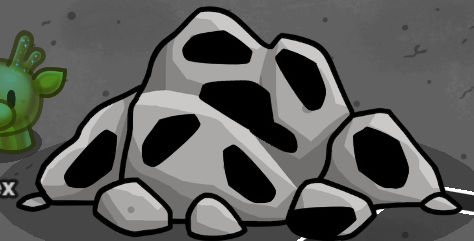
Iron Ore:

(Would probably look better if you switched the tan and gray rocks.)

Coal Ore:


These are both from an unreleased map I made while in 7th and 8th grade.

Edit: You’re welcome. [1] [2]


  1. I’m just assuming you’re thanking me for the idea made with only rock props ↩︎

  2. Why is my name the only one of the 3 that isn’t an @? I mean, there’s no need to now, I saw your post already, but why make my name not an @? ↩︎

5 Likes

yep just put me in the credits!

@Suspnded_Arr0w_Shaft what do you mean that its unfinished?

@TheCatIsCrazy I opened them again

Thanks AlexC

6 Likes

The chapters you haven’t made yet on rocks

Also, would you like me to create a #prop tag for this series?

3 Likes

I think I can start working on the dirt & Moss guide later today, as I’m going to finish one of my other guides today as well

5 Likes

yes please add the #prop tag
thanks @Kormorant

@AlexC uh here a pinged you now…. I just thanked u so I didn’t want to ping you.

2 Likes

The guide attached to the main body post has some color id’s for rocks.

3 Likes