Previous Parts
Making a 4-Bit Computer in GKC (Chapter 1: CPU, Part 3: Registers and Beginning the ALU)
Making a 16-bit Computer in Gimkit! (Chapter 1: CPU, Part 2: Logic Gates)
Making a 16-bit Computer in Gimkit! (Chapter 1: CPU; Part 1: Instruction Set and CPU)2. 3. 4. 5. 2. 3. 4.
Making a 4-Bit Computer in GKC
Chapter 1: CPU, Part 4: Negatives? and Half-Adder
Negative Numbers?
In the last guide in this series, I briefly touched on signed and unsigned numbers. Basically, signed numbers support negative numbers, but how? Computers can’t read a “-” before a number like -1011011, so how do they do it? It’s simple: the Most Significant Bit. The MSB (Most Significant Bit) is the first digit in a binary number. For example, in 011011, it would be 0. In signed numbers, if the MSB is 0, the number is positive, while if the MSB is 1, the number is negative. But, signed numbers don’t use the usual method of converting binary to decimal. For an unsigned number, 0001 would be
0 × 2^3 + 0 × 2^2 + 0 × 2^1 + 1 × 2^0 = 1
1010 is
1 × 2^3 + 0 × 2^2 + 1 × 2^1 + 0 × 2^0 = 10
But, for signed numbers, if the MSB is 0, convert normally, but if the MSB is 1 you must use the Two’s Complement. You invert all the bits, add 1, convert normally, then add the negative sign. For example,
1011:
- Invert bits: 0100
- Add 1: 0101
- Convert: 5
- Add negative: -5
To convert negative decimal numbers to signed binary, you don’t move backwards. You first convert the absolute value to binary, invert the bits, then add 1.
For example,
5: - Convert: 0101
- Invert: 1010
- Add 1: 1011
In 4-bits, unsigned binary numbers range from 0 (0000) to +15 (1111). 4-bit signed binary ranges from -8 (1000) to +7 (0111). Notice they have the same range, but the minimum and maximum are different.
How does the ALU know whether the operands are signed or unsigned?
With the new introduction of signed numbers, adding 2 numbers can yield 2 completely different results. For example, 1000 and 1011 yields 19 if unsigned, but -13 if signed, but both in binary is 10011. The ALU doesn’t inherently know if they’re signed, it just does the math blindly. The fact that 1000+1011 is always 10011, no matter if they’re signed or not, help us a lot. The ALU sees the output has exceeded the 4-bit limit, and outputs 0011, and 2 flags: a Carry Flag and an Overflow Flag. One of these flags are to be used in unsigned arithmetic, while the other is to be used in signed. These 3 outputs (0011, CF, and OF) go to the CU, and the CU knows what the output should be. If the CU expects a signed value, it takes the OF, but if its expecting an unsigned value, it takes the CF.
I’m very sorry If my explanation stinks, I’m really bad at teaching :((. I will try to clarify questions.
Half-Adder
Okay, now we’re starting to build the ALU. A half-adder takes 2 inputs, A and B, and outputs Cout (carry out) and Q, where Q is the result and Cout is the carry. Here is the truth table for a half-adder:
| A | B | Q | Cout |
|---|---|---|---|
| 0 | 0 | 0 | 0 |
| 0 | 1 | 1 | 0 |
| 1 | 0 | 1 | 0 |
| 1 | 1 | 0 | 1 |
Using the same method as the 2-4 decoder, we can figure out the boolean expression(s) (logic gates) used to go from A & B to Q or Cout.
Q = A⊕B (⊕ meaning XOR)
Cout = A·B (· meaning AND if you don’t remember)
Block Code:
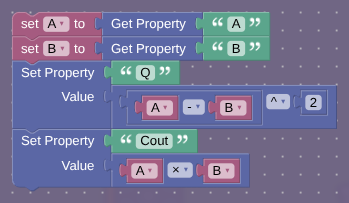
(btw A+B-2AB = (A-B)^2, and the second one uses less blocks)
Note: in the next part we will finish the rest of the arithmetic operations in the ALU
also I kinda overestimated how long each guide would take
