This guide for tracking the number of players in rooms. I made this for my among us map, but this could possibly be used for other stuff too. I am making this guide, because I notice no one else did, and also because people are trying to use waypoints and not finding any other methods right now.
Devices:
Counter x (number of rooms, example 4)
Repeater x 1 (A trigger loop could work too.) HOW TO MAKE A TRIGGER LOOP (With Effects)
Pop-Up x 1
Property x (number of rooms, example 4)
Zone x (number of rooms, example 4)
Button x 1
LifeCycle x 1
Setting Up Devices:
Repeater
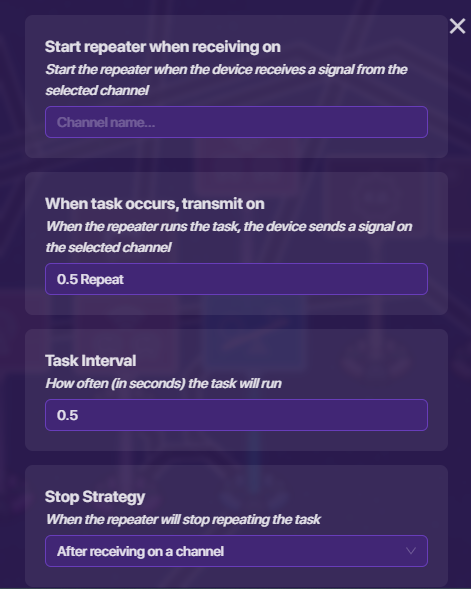
Make the repeater’s Task Interval set to 0.5. For “When Task Occurs, transmit on”, make the selected channel “0.5 Repeat”. Make the stop strategy “After receiving on a channel”. Leave the channel blank. It should look like this:
LifeCycle
Place the LifeCycle beside the repeater, make it transmit on Game-Start. Then connect a wire from the LifeCycle to the repeater. Event Occurs → Start Repeater

Counter and Property
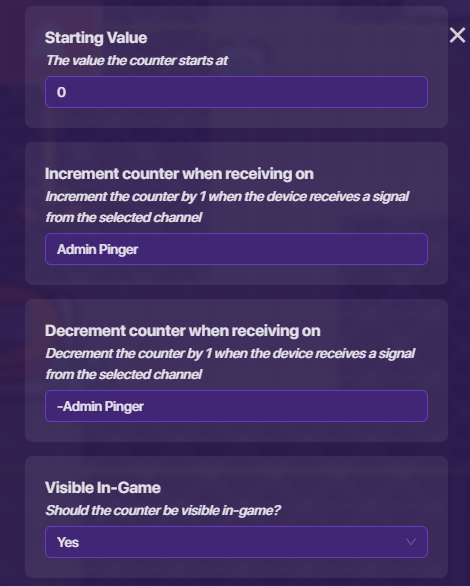
Place the counter next to the room, you want tracked, for example: I want Admin to have the ability to track the number of players. So, this counter will be for Admin. ALL Counters you place for this should have the starting value of 0, and make sure the count scope is GLOBAL.
First, make it where the counter tracks a property, we will make it the property named, “Player Count in Admin”.
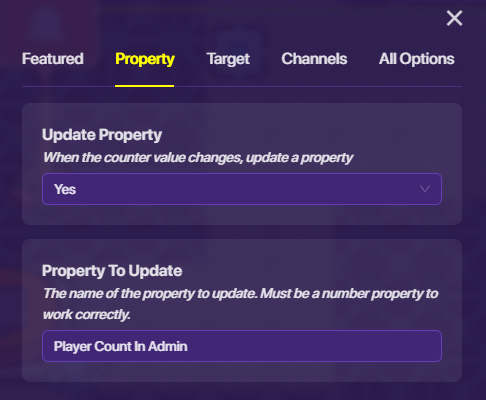
Then, go to channels, make it increase on (room name example Admin) Pinger, and decrease on -(room name example Admin) Pinger.
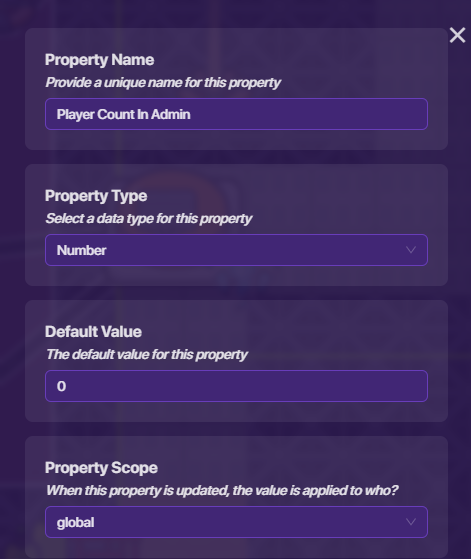
Now, place a property with a Number Type value. ALL Properties you place must have a default value of 0, and a property scope of GLOBAL. Name the property “Player Count in Admin”.
Zone
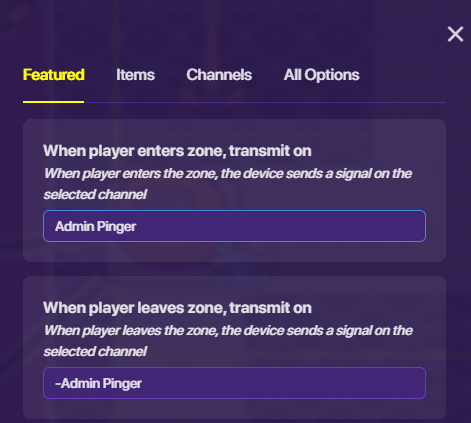
Place Zones equivalent to the number of rooms you want tracked. I have 4 on the map I am demonstrating with. But, I will just do the one I placed in Admin. The zone most cover all of the floor and OVERLAPPING wall. For the channels, make “when player enters zone” it transmits on “(room name example Admin) Pinger”, and “when player leaves zone” it transmits on “-(room name example Admin) Pinger”.
(I suggest not making the zone visible-in-game.
 )
)
Pop-Up and Blocks
Place a Pop-Up. You can make the header say whatever you want LOL. Now, go to blocks, click, when receiving on a channel, make the channel “0.5 Repeat”. While still under blocks, grab a “Set Content” block. The, go to text, and grab a “create text with” block. (If you already did my process with more rooms, then click the blue settings button on the block, move an “item” block with the others.
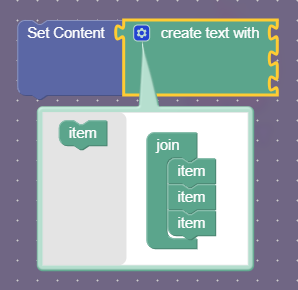
There should be 2 or more holes on the block for connecting. Then, go back to the text section and grab a blank text, and place a get property block under it. Then, grab the property in the property browser, and place it on “Get Property”. Name the blank text: “(the name of the room, example Admin):”.
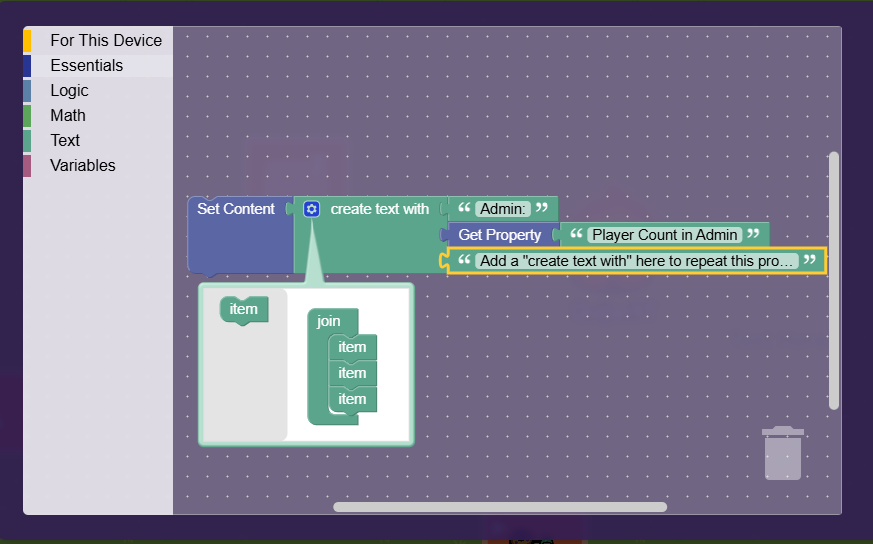
Let me know if I need to describe anything differently. I tried my best explaining this! I also please rate this guide!
Difficulty
- 1
- 2
- 3
- 4
- 5
- 6
- 7
- 8
- 9
- 10