Forsaken is an asymmetrical horror game heavily inspired by Dead by Daylight.
In it there is a mechanic where you can fix generators to decrease the round timer. This guide will teach you how to make them!
This guide was originally made for Forsaken generators, but I later realized the same principals could be applied to tasks from Among Us. You can make the same build, but replace the props with ones appropriate for Among Us tasks. You will also want to set every prop and device with a scope option to be player, rather than global. I will be using Forsaken terminology (generator, k!ller) rather than Among Us terminology (task, impostor).
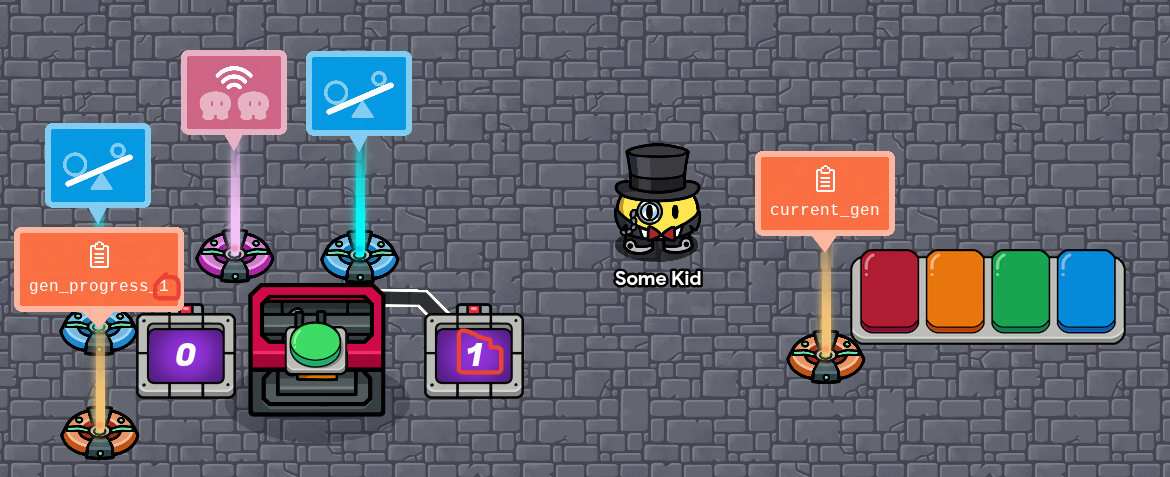
Each instance of a number circled in red or the letter ‘x’ should be replaced with the number of the generator you’re working on.
- You’ll need a questioner, 2 properties, 2 counters, 2 checkers, a relay, a button, and the prop you’ll be using for the generator. (There is an electrical generator prop, but it requires the season ticket at the moment.)
-
Set the names of both properties. Both should be number properties. Current_gen should be player scope, and gen_progress should have global scope.
-
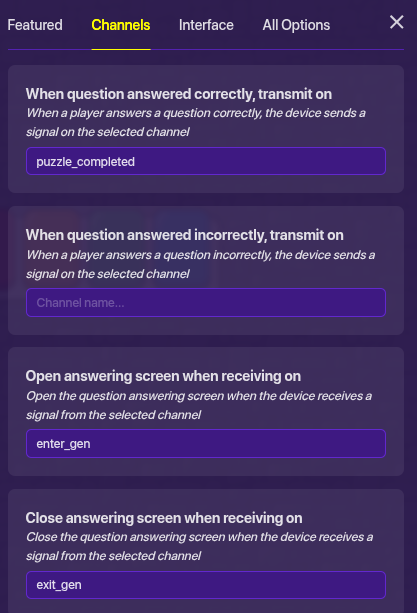
Change these settings in the questioner:
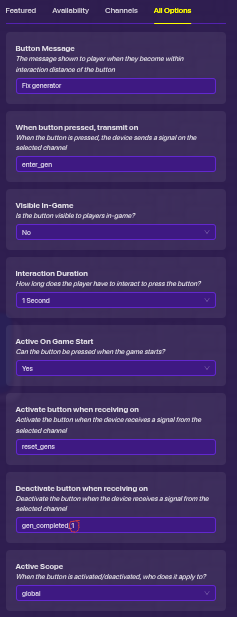
- Give the button these settings:
-
Wire the button to one of the counters, such that when
button pressed -> reset counter.
Give that counter a starting value of x. Have it update the property current_gen. Set the counter to not be visible in-game and to have player scope. -
The other counter should have these settings:
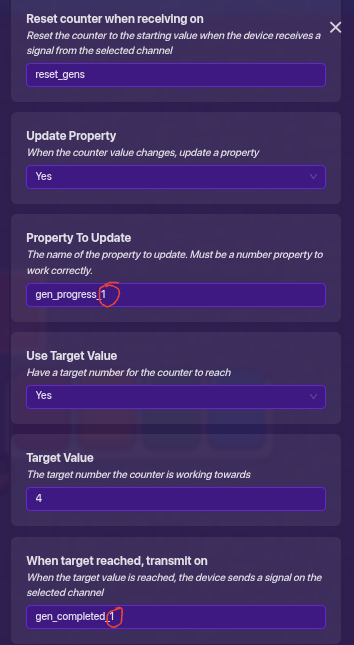
You can change the target value of 4 to the number of questions that need to be answered to complete the generator.
Additionally, it should increment when recieving on gen_puzzle_completed_x.
- Give one of the checkers these settings:
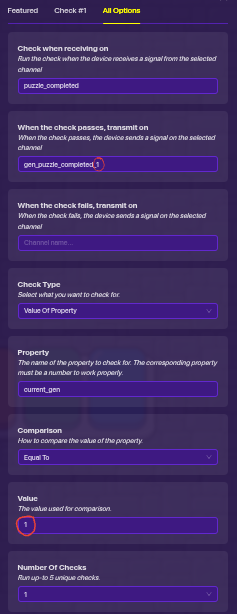
- The other checker should have these settings:
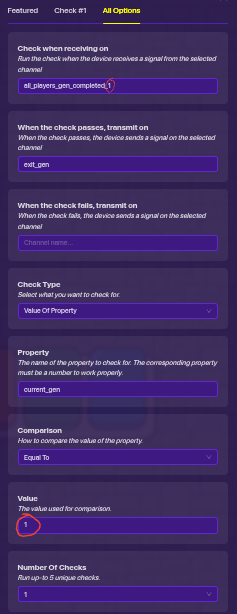
- Have the relay set to relay to the channel all_players_gen_completed_x on behalf of all players when recieving on gen_completed_x.
This system will broadcast on:
- puzzle_completed when a question is answered.
- gen_completed when a generator is finished.
Additionally, you can broadcast on reset_gens to reset the progress of all gens and allow them to be used again if they were previously completed. If you’re doing Among Us tasks, you’ll have to have a relay set to transmit as all players to broadcast on reset_gens.
That’s it! You’re all done… or are you?
There are a few optional functionalities you can add onto this mechanism if you want.
Ability to hide generators
Sometimes you might want to hide the generator if you have more than you’ll use on the map.
-
Set the prop to be hidden on hide_gen_x and to be shown on reset_gens.
-
Wire the prop to the button such that
prop is hidden -> button is deactivated.
That’s it! Now, when you broadcast on hide_gen_x, the generator of that number will be hidden, and players won’t be able to work on it! Broadcasting on reset_gens will make them visible again.
Making only 5 of your generators appear
Or is it?
In Forsaken, some maps can have up to 16 spots where Generators can spawn, but only 5 of them will ever appear in one match.
-
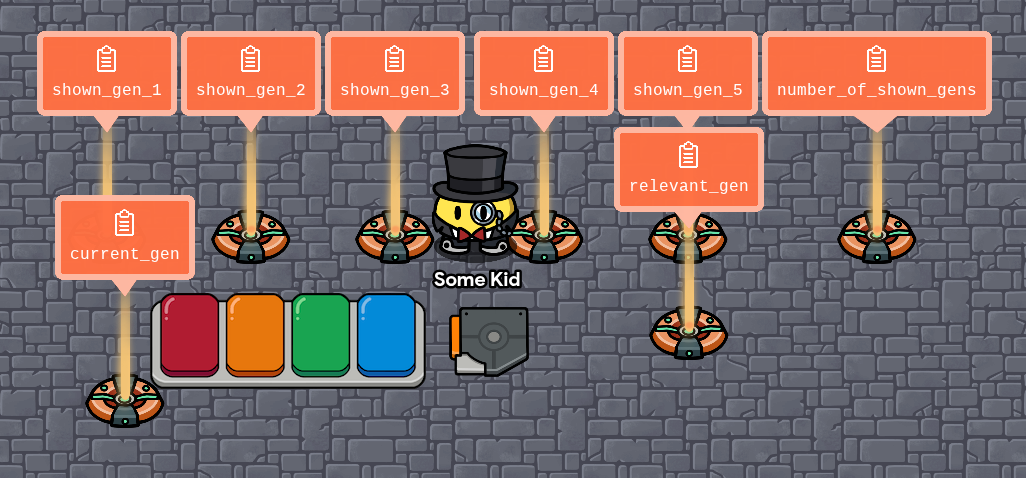
You’re gonna need… hold up lemme count… 1, 2, 3, 4, 5, 6, 7. You’ll need 7 new number properties. Set each one to their respective name. They should all have the default settings otherwise. Oh, and also a trigger.
-
Change these settings in the trigger, and make sure it’s not triggered by being stepped on.
For Among Us tasks, have the trigger instead transmit to a relay, which relays as all players, and said relay should then transmit to the questioner block. -
Add this block to the questioner:

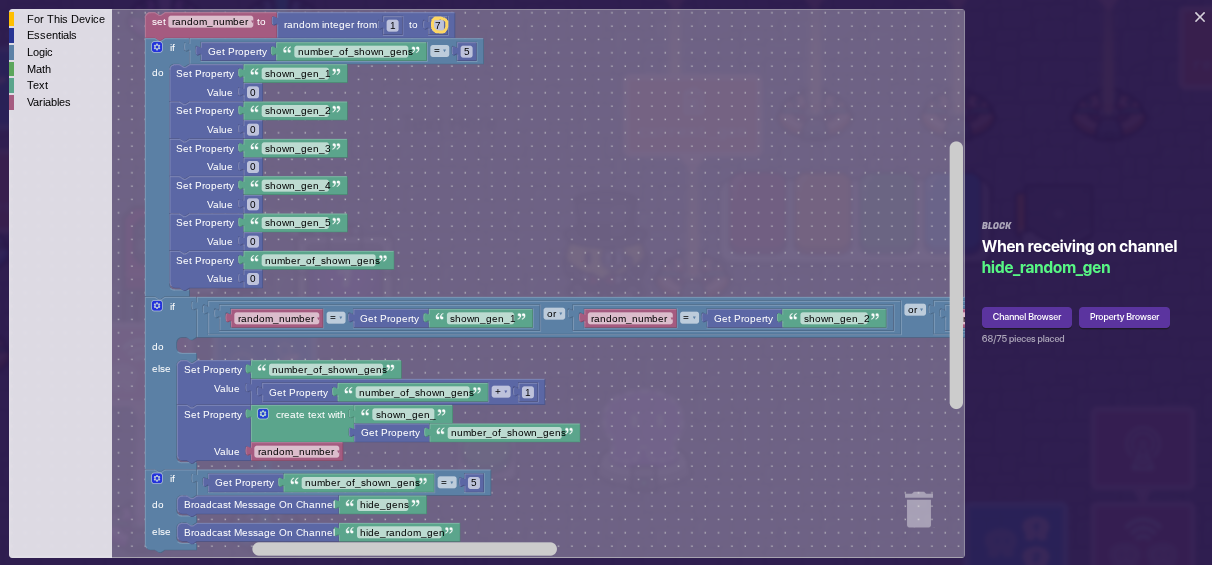
Replace the 7 (circled in yellow) with the total number of generators you have.
The long block that gets cut off looks like this. Put both of the large conditionals into the slots of the ‘or’ block.
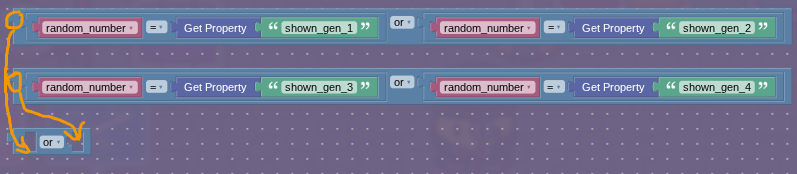
- Add another block to the questioner:
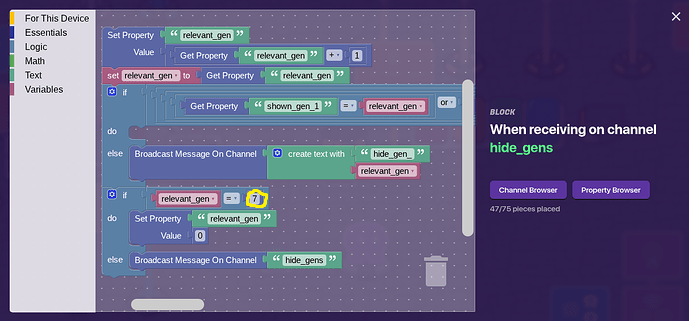
Again, the 7 circled in yellow should be replaced with the total number of generators you have on your map.
The long block that gets cut off looks like this. It’s the same as the last one, but with an additional ‘or’ for the 5th shown generator.

That’s it! Now, whenever you broadcast on reset_gens, only 5 of your generators will be shown to players, and they won’t be able to access the others.
Progress bar
You can do this two different ways. The easy way only shows if a generator is completed, while the hard one can show how many puzzles have been completed. However, the hard way requires you to piece together a fairly large block for each generator.
The easy way
-
Create a prop or barrier to act as the progress bar. make sure it has collision turned off.
-
Make it inactive on game start. It should deactivate when it recieves reset_gens, and activate when it recieves on gen_completed_x
The hard way
This will only work if you have the number of puzzles per generator set to 4.
-
Set the gen_progress_x property to broadcast on gen_progress_update_x when it is updated. Make sure it broadcasts on start.
-
Create a text device and put it over your generator prop, and add this block to it:
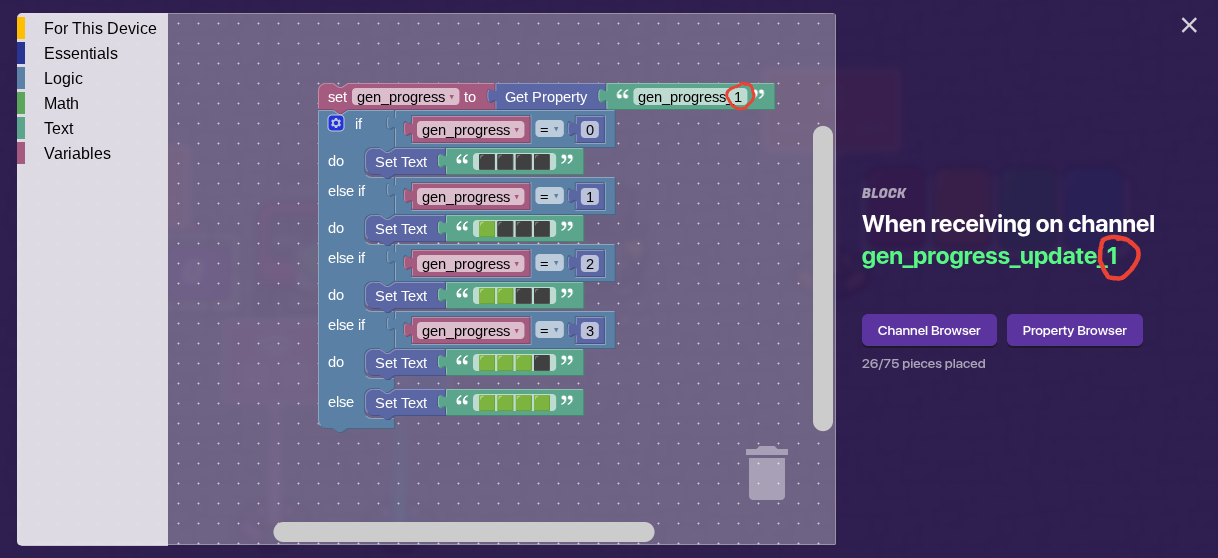
You can set the font size and outline to be anything you want!
Make sure you include the text when you copy it to another generator. Unfortunately, you can’t copy and paste blocks, so you’d have to completely recreate this block for each generator. 
If you added the ability to hide generators, apply the same settings you did to the prop to the progress bar you created.
Making the evil scary unable to use generators
-
Replace the channel the button broadcasts on to attempt_enter_gen.
-
Add this block to the questioner, replacing the number circled in yellow with the team number of your k!llers:
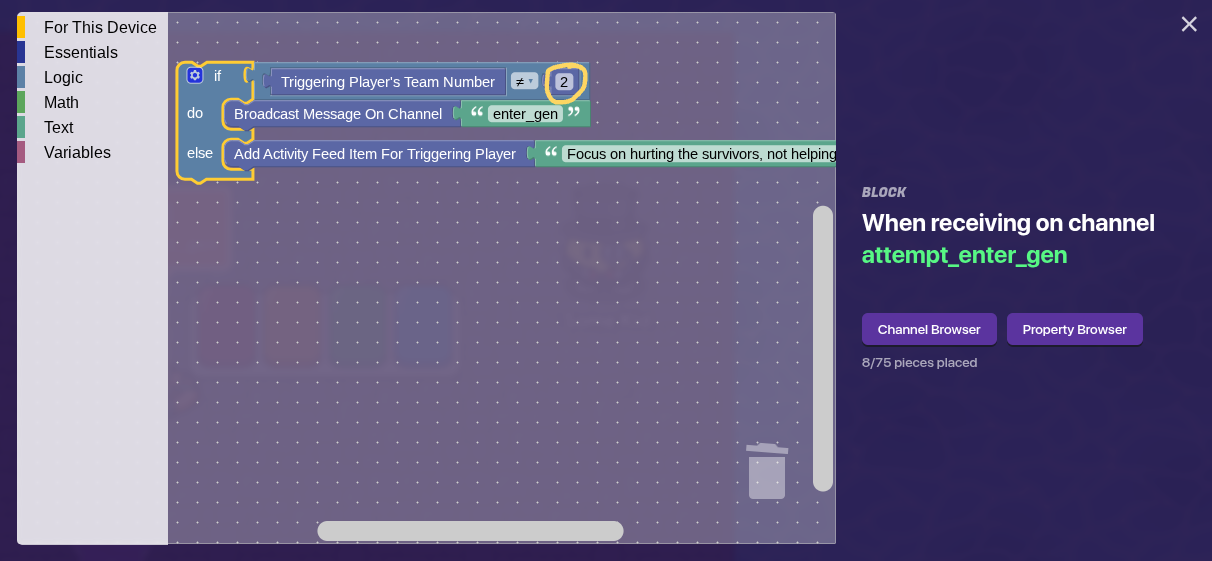
You can replace the text in the activity feed message with anything you want. This will be the message that is shown when the k!ller attempts to enter a generator. If you want, instead of sending an activity feed message you can broadcast on a channel that will send a notification to the k!ller, using a notification device.
Note: This is absolutely NOT the most memory efficient way to do this, but it’s way easier to make.
To add more generators, copy and paste the gen_progress property, checkers, prop, button, counters, and relay (everything on the left side of the overview). Then, change all the numbers circled in red and numbers that were denoted by an x during previous steps to the number of the generator. Finally, add any wires that were in your original generator.
Be aware that checkers can be buggy. Sometimes, when copied they’ll behave as though they don’t exist, and when you reload the map it will be as if they were never placed. To remedy this, you might have to make a new checker and copy the settings onto it.
How difficult do you think this guide is?
- 3/10
- 4/10
- 5/10
- 6/10
- 7/10
- 8/10
- 9/10
I hope this guide helps! Feedback is always welcome!