Intro
This is a quick guide I decided to make because I saw that there were many people that didn’t know how to do this and there weren’t any other guides.
The Guide
PreparationDevices you'll need
- 1 Barrier
- 1 Relay
- 1 Lifecycle
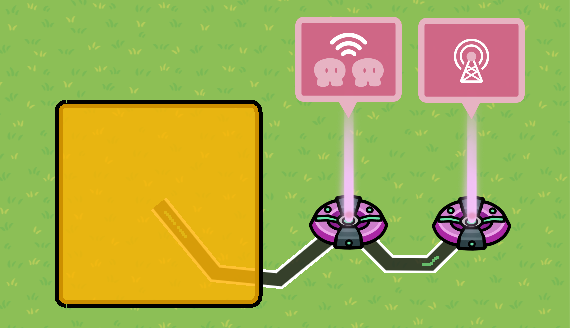
LayoutPlace down all three devices in places similar to this:
Wire Settings
(Lifecycle) Event Occurs --> Trigger Relay (Relay)
(Relay) Relay Trigger --> Activate Barrier (Barrier)
How to make Bullets Collide with it (if needed)Extra Items Needed
- 1 Prop Barrier of your choosing
Place the prop(s) on what sides of the barrier needs to block bullets.
Wires
(Relay) Relay Trigger --> Show Prop (Prop Barrier)Don’t forget to layer the prop to beneath the barrier. You can also only use the prop too.
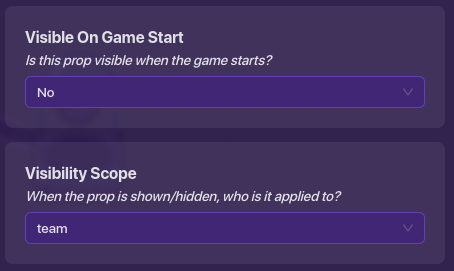
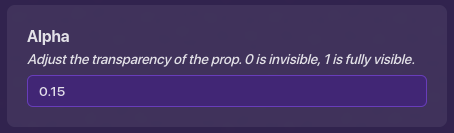

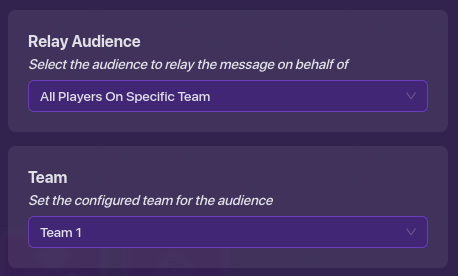
ConfigurationChanged Relay Settings
(change the team number to which team you want the barrier to be active for.)


Conclusion
Thanks for reading, I hope it helped. I usually get caught up in making a guide when I see something that I can do in a help post, this is the one that triggered me to do this: