This is a team version of my other Community Guide
This is very easy to make, because it is basically copy paste the whole time.
this guide is also made for just 4 teams so if you want more of less, add more of them and/ remove some.
Here me we go
Iteam you will need:
Zone
Spawn Pad
2 Triggers
2 Counters
2 Lifecycle
Wire Repeater
Relay
Team switcher
and that is how to do one team. depending on how many teams you want depends on how many things you get. you just multily what it is to how many you need.
So 2 teams would equal, 2 zones, 4 Triggers, 2 Relay
3 teams, 3 zones, 6 Triggers, 3 relays, so one and so forth
Lets get started
First grab Both of your Trigger
(optional) Assigen one as Trigger 1, and one as Trigger 2
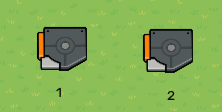
Wire Trigger 1 to trigger 2
Triggered - Trigger
Then Wire Trigger 2 back to trigger 1
Triggered - Deactivate Trigger
Second grab your Zone and Spawn pad
Place your Spawn pad on your zone
Change your Spawn pad from
*Allowed Team: Any Team - Allowed Team: Team 1
(this will be Team 1’s Spawn area)
Third grab your Counter
Wire from your Zone to your Counter
Player enters zone - Increment counter
Then go to Trigger 2 and wire from Trigger 2 to your counter
Triggered - Decrement counter
Then go to your zone, wire your Zone to Trigger 1.
Player enters zone - Trigger
(this will help with the player counter)
Go back to your counter and go into it
have your Starting Value 1, and go to your Target tab. switch NO to YES, and have Target Value to zero
at the momeny your creation should look like this.
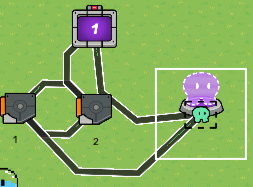
Its not done yet.
Step Four
Grab your Life Cycle, Wire Repeater, and Relay
On your Life Cycle change
Game Start - Player Knocked Out
On your Wire Repeater change
Any Team - Team 1 (or any Team your assigning to)
On Your Relay change
All Players - All Players On Specific Team then
*Team 1 - to what ever team your assigning it to (For now I’m keeping it at Team 1)
Next Wire your LifeCycle to your Wire Repeater
Event occurs - Repeat the wire pulse!
Then your Wire repeater to your Relay
When the wire repeater receives a pulse… - Trigger relay
Set Five Connect your Relay to your Counter
Relay trigger - Decrement counter
At this point your set up should look like this
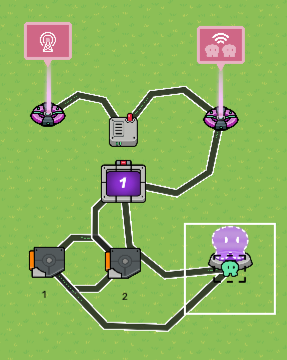
NOW TO ADD MORE TEAMS
you must do Sets 1-5 but switch the team.
So if it says Team 1 Switch its to Team 2, OR 3. If your doing 2 teams (like I will show in this guide it should end up looking like this
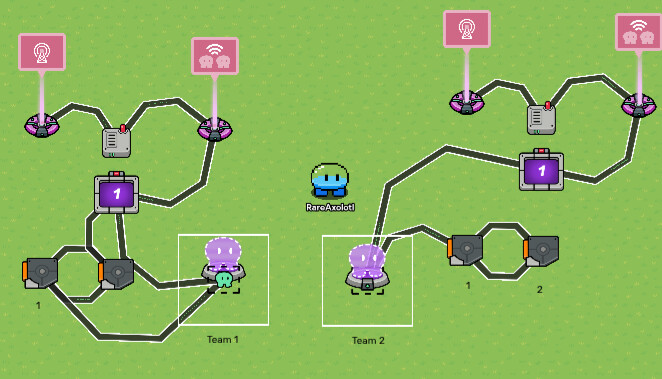
Step Six Depending on how many teams you want depends on how this works
Grab Your last counter and set it it to zero, and Target Value to one less than your teams so 2 teams - set counter to 1. 3 teams - set counter to 2. and so on and so forth
Next Wire your Team counters (the counter on your team) to the Counter you just made.
Target Value Reached - Increment counter
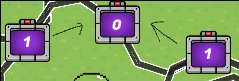
Set Seven grab a Trigger and End Game.
Wire your Counter (the one in the middle) to your trigger
Target Value Reached - Trigger
Go on your trigger and under Trigger Delay and make the Value 1 (1 second delay)
Wire your Trigger to your End Game
Triggered - End the Game
Step Eight Grab Another Life Cycle and Team switcher.
Change your LifeCycle from
Game Start - Player Knocked Out
Then your Team Switcher from
Random team - Specific Team
and then make sure the Team in the Spectators team
Finally wire your LifeCycle to your team switcher
Event occurs - Switch player to configured team
Finally FINALLY: from your to zones wire them to a teleporter
Player enters zone - Teleport here
(so they don’t stay in the zone and mess it up)
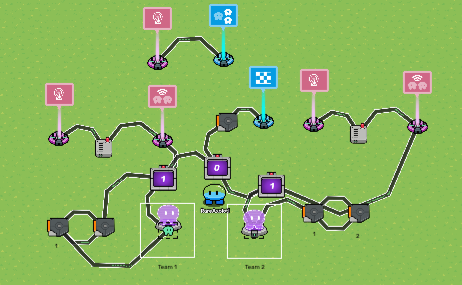
NOTICE!!!:: when creating your thing, don’t repeat steps 7 or step 8. you will add to step seven depending on how many teams you have
AND there you have it. Last team Standing. In a summerie how it works is as players get Knocked out they go to the spectater team, and there team size goes down untill there team is gone. the teams will go down untill there is
ONE LAST TEAM STANDING!!!
Happy playing
Was this a good guide?
- Good guide
- Amazing Guide
- horrible guide
- MOST AMAZINGLY AWESOME GUIDE EVER EVEN BETTER THAN YOUR LAST ONE!!!
(I can see how you vote, vote wisely >:)
Thank you to
@Jhan
@Y0ur_L0cal_Weird0
@JEFX_OFFICIAL
for helping me with all my random questions I know they may have been wired but they helped create this.
