You can make a property called “clicks”. They can be added onto via a counter (incrementing by 1) and you can use a checker and item granter to spend them. Make sure the “clicks” property is player-scoped and you’ll be good to go!
5 Likes
Visual aids since bird got here first lol


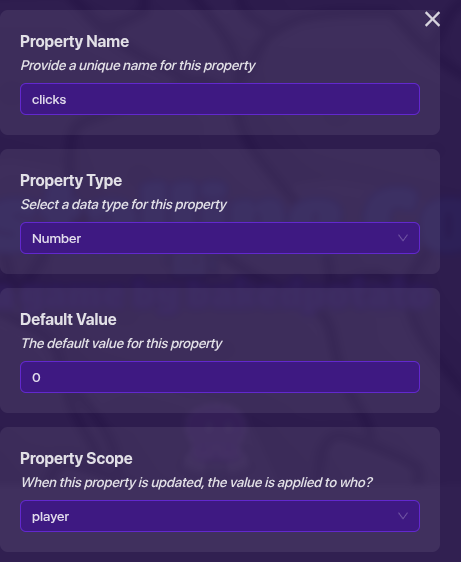

(the block code is inside the game overlay, when the channel “click” is being transmitted on)
Gimkit block code is an amazing thing, ngl
I tested it out on my end, it works fine.
(Also, lil tip: to get rid of the fact the : and the numbers stick together, add a space after the : in this block code.)
3 Likes
The system doesnt work.
What part of it isn’t working? Could I see your overlay settings, code, counter, and property settings (sorry for asking for so much T-T just trying to help)?
2 Likes
When I press the game overlay the game overlay doesn’t change only on the first click the game overlay changes to “Clicks:0”.
Oh, well go to your property and under the “Broadcast when property value changes”, make it broadcast a channel that runs the block code in your overlay (or use wires to run the wire pulse block if that’s you make it). I suggest also setting the “Marked as changed at game start?” to yes.
2 Likes
It still doesn’t change the click number. The number stays at 0 whenever I click. Here is my block code:

1 Like
And you have your clicking overlay attached to your counter, right?
Also there should be a space after the colon in "Clicks: ".
3 Likes
Yes the clicking overlay attached to the counter.
And could I see your counter settings please?
3 Likes
How do you put block code in the counter? I can’t figure it out. You also look like and very cool person, how can I be like you?
1 Like
The block code goes in the overlay, not the counter (which can’t hold blocks so don’t be ashamed on not figuring that out haha).
Oh, ummmm. I don’t really know, to be honest. On one hand, anybody can become like me. I started out knowing very little about GKC, and I couldn’t get a fishing system to work with a guide. I just didn’t understand any systems or properties and my block code wasn’t phenomenal. But I had one thing nobody else had: passion. I wanted to be something.
I think that’s why I took up the name “Here_to_help” on these forums. For reference, I started out on the old forums back in May 2023, but when they started these it was like a new start. I could be somebody, I could be me. I already had a decent background in block code from Scratch, and I started to really just work on that. I wasn’t the best creator or anything, but I was surprisingly good at blocks and got a lot of energy from helping people. Eventually, people started recognizing that, yata-yata, gimvengers and over 2.5 years of this place and here I am today; all because I just simply wanted to help people. I found it rewarding.
However, I also know that nobody’s journey is the same. You might take inspiration from me, you might admire me, you might wonder how in the world I’ve become who I am, but at the end of the day, I’m just as human as you. It’s not a limit, it’s something we share. It’s ordinary and special at the same time.
So go out there and find your own path! Why be me when you can be YOU! Don’t strive to be like somebody else, strive to be better than your current self. Because at the end of the day, it’s your feelings, your satisfaction, your smile that makes you sleep well at night, and that’s what’s important.
So make yourself happy :).
6 Likes
 Anyways, here is the counter settings: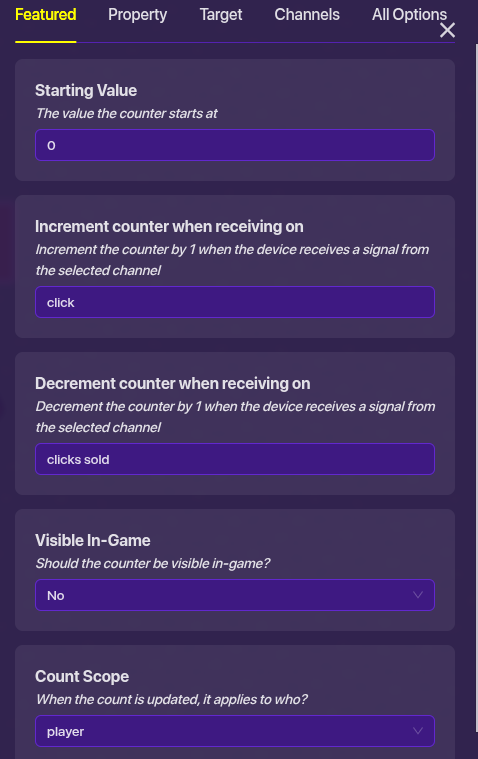
- You don’t need the decrement because clicks sold won’t be broadcasting for every click spent
- Could I see under the property tab? And your property settings?
And to save yourself some time you could just use block code instead of a counter because I think that’s probably where the issue is occuring.
4 Likes
as well as being able to adjust, like a base gain or a multiplier
@Zappy_Zaptos go to jhans
2 Likes
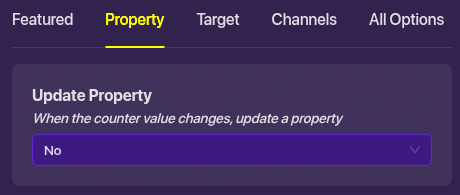
Oh, well you need it to be updating your clicks property.
4 Likes
What would be the block code?
Sorry I was careless I just realized it.