How how hooooowww please help answer
Here you go, please search before posting.
4 Likes
Is this a top down or platformer?
Top down also thx for ur help last time
1 Like
The guide I previously posted is shown as top-down.
2 Likes
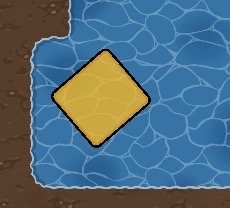
What confused me was step one what barriars look like that mine look like yellow block
I doubt the color matters, it just has to be in the same shape.
3 Likes
- Add a gate console prop (green or gold it doesn’t matter except for aesthetics)
- Add a barrier DEVICE and change the size to the size you want it to be (button on the bottom-left hand corner).
- If making a gate to be opened by a green keycard, you can navigate to the “appearance” section in the top menu, and click on the color bar under “barrier color”. There’ll be some arrows by the “B” in the RGB menu below the numbers. Click these until you get to HEX. Input “#59b239” (sorry that’s the closest I could get) to change the color to green-ish.
- OPTIONAL: If making a gate to be opened by a goldkeycard, you can do the same thing in step three and put in “#FFD700” (sorry that’s the closest I could get) to change the color to gold-ish.
- Add a vending machine device. Under “Purchase Action” select “Transmit on Channel”.
- Set the “Required item” to your keycard, whether it’s green or gold.
- Leave the “required item” at 1 unless you need more to unlock it.
- Scroll to the “When Item Purchased, Transmit On” section, and put “OpenGate”
- Go to the “Trnasmit on Channel” section, and in the box that says “Item Name”, put “Open Gate”.
- Go to the “Appearance” tab on the top menu (you may have to select the three dots to access this menu) and put “no” in the “Visible In-game” section.
- Wire the vending machine to the barrier (Item purchased > deactivate barrier).
- Place the vending machine by the gate prop.
- OPTIONAL: Press the “Change Size” button in the bottom-left hand corner, and adjust the circle. If you’re in the circle, you’ll be able to open the gate.
That’s it!
4 Likes
You can adjust the size.
Yes, i’ve noticed 
2 Likes

you should mark a solution so this topic can close.

@Gaming-Phoenix bruh no one can spell your name right 
6 Likes
Ohhhh let me fix that real quick
1 Like
This topic was automatically closed 3 hours after the last reply. New replies are no longer allowed.