DISCLAIMER!!!!
Chances are, there’s probably a slightly more efficient way to do this. I’ve theorized using a Number Property to only use ONE Property overall, but I couldn’t get it to work, which is why I turned to the True/False Property. However, if any of you DO find a more efficient way, I’ll be glad to let you make a guide about it. Just don’t forget to credit THIS guide and quote this disclaimer so people don’t call you out for making a duplicate guide.
Hello fellow Gimkitters. I haven’t made a guide in… A YEAR?? Seeing as my school year is ending this month, I might as well make a guide 
So basically I was going around, answering questions (like most others here), and all of a sudden, I found an actually interesting question:
How do I give different characters different shield values?
This person wanted to give different roles in their game a different amount of shield for each role, as a sort of health modifier. And after like 2 hours, I FIGURED THIS SYSTEM OUT!
When you can, MAKE EVERYTHING PLAYER SCOPED!!!
Step 0.5: Materials (with image)
For EACH role that you make, you’ll need:
2x Triggers
1x Button
1x Property
1x Health Granter
1x Lifecycle (you might not need duplicates for multiple characters, but just in case)

Step 1: Roll Call (making the property)
Alright gang[1], we need to make sure that the property is IN ORDER! Simply make a True/False property that defaults to true.

Step 2: Trigger Action Season 1 - The Property Awakens
Before we let our first trigger have its glory, it needs a sidekick. That’s where the BUTTON comes in. This, of course, will be how we activate the unfolding shenanigans of the shield. The only setting you need to worry about is the transmitting channel:

NOW we can let the first trigger shine. We’re going to use a cool trick I learned from @Monoreuk (I still owe him chocolate); WE’RE PUTTING TWO CHANNELS IN ONE SPOT! As you can see here, putting a comma in between channel names actually SEPARATES them. We also need to set the trigger delay to 1 second, as having no delay makes the shield grant during the respawn (meaning it won’t give the shield at all).

And for the trigger’s blocks? When it’s triggered, it’ll be running two things: first, it checks if the property is false, in case it was. This is to turn it on after the next group of blocks. Then, it checks if the property is true. This allows the trigger to send a channel (c1HealthGrant in this case) to the NEXT step, and turns the property false. Having the property false until used is just so nothing messes up.

Step 3: The Name's Shield. Grant Shield
This step is probably the easiest[2], so let’s get it over with.
Simply make a health granter that grants ONLY shield, and it receives on the channel that was sent out from the first trigger (again, in this case it’s c1HealthGrant)

Step 4: Trigger Action Season 2 (Final Season!) - It's Rewind Time
So you know those shows that end on the first episode? Like, the end of the final season loops back to Episode 1. Well, that’s what this trigger does. You might ask, “Well Coolcaden26, how does the trigger know when to activate if the Health Granter can’t send signals?” I thought you’d never ask. We’re going to be using the legendary thing I like to call… THE LIFECYCLE! You might think that the Lifecycle, not being able to scope to the player, would ruin everything. However, in my testing, I realized that, since everything else is player scoped, the Lifecycle would simply only correspond to the PLAYER. We’re going to keep the Lifecycle’s settings the exact same, and just have a channel to send out a confirmation of getting KNOCKED OUT.

Alright, the second (and final) trigger is going to receive the Lifecycle’s signal and, as an added bonus, a 0.5 second delay JUST IN CASE.

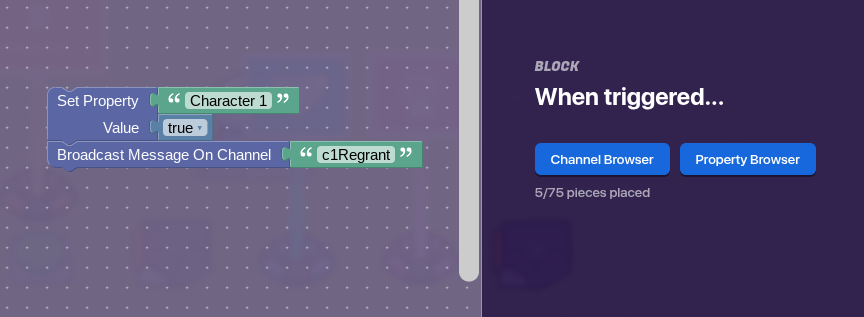
And FINALLY, TO END THE SERIES, we are going to have this trigger SEND BACK TO the other trigger. In the blocks, this trigger will set the property to true, and send that c1Regrant channel from Step 2, which will repeat this cycle ALL over again. Recursion, anyone?
Thanks for reading my guide. If you want the original context, here’s the mini-guide I made for the Help Topic.
- 1/10
- 2/10
- 3/10
- 4/10
- 5/10
- 6/10
- 7/10
- 8/10
- 9/10
- 10/10
- 1/10
- 2/10
- 3/10
- 4/10
- 5/10
- 6/10
- 7/10
- 8/10
- 9/10
- 10/10
