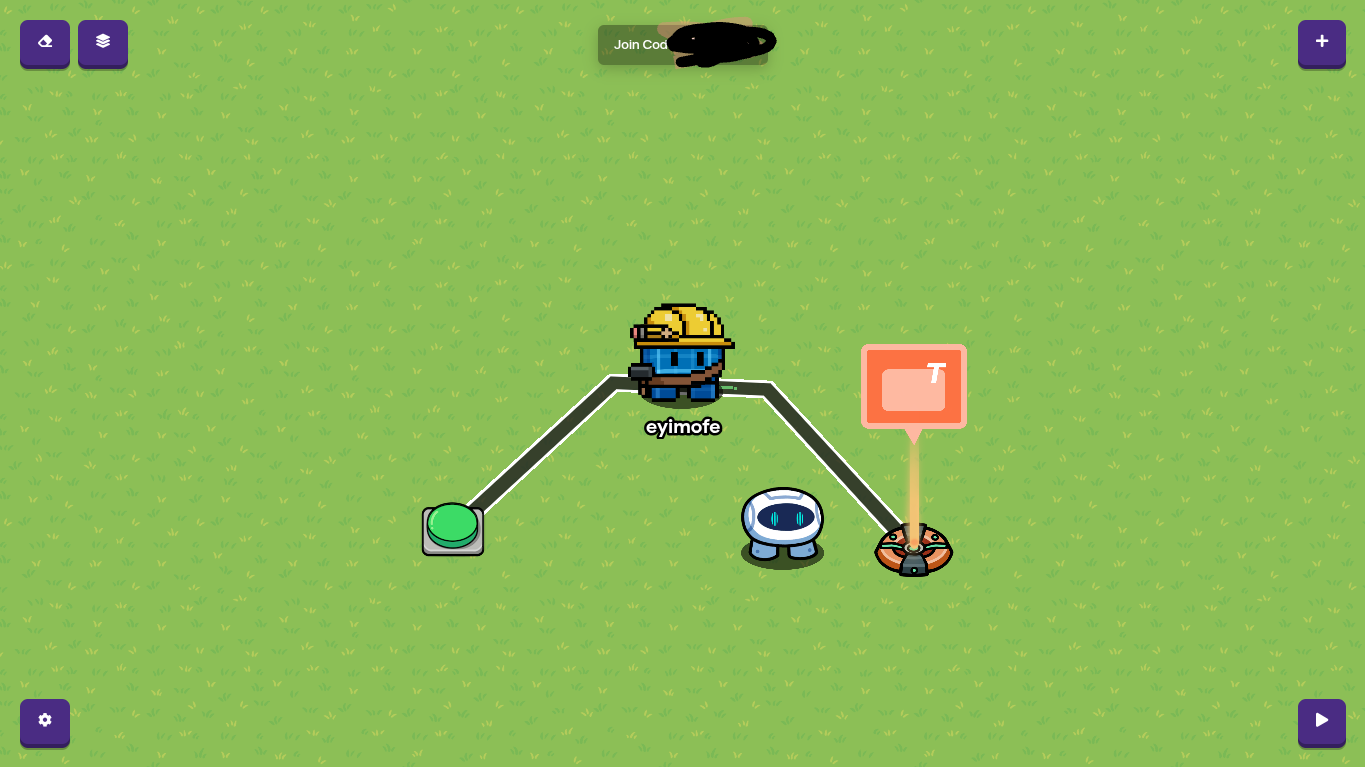
Easy guide: How to turn a Sentry into a character! 2/10 difficulty!

DISCLAMER: THIS GUIDE IS A 1st,any feedback will be appreciated.
Bumping tool(owner only):
Hello, and welcome, ladies and gents! For this guide, we will be learning how to transform sentries into characters!
Step 1:

Guide

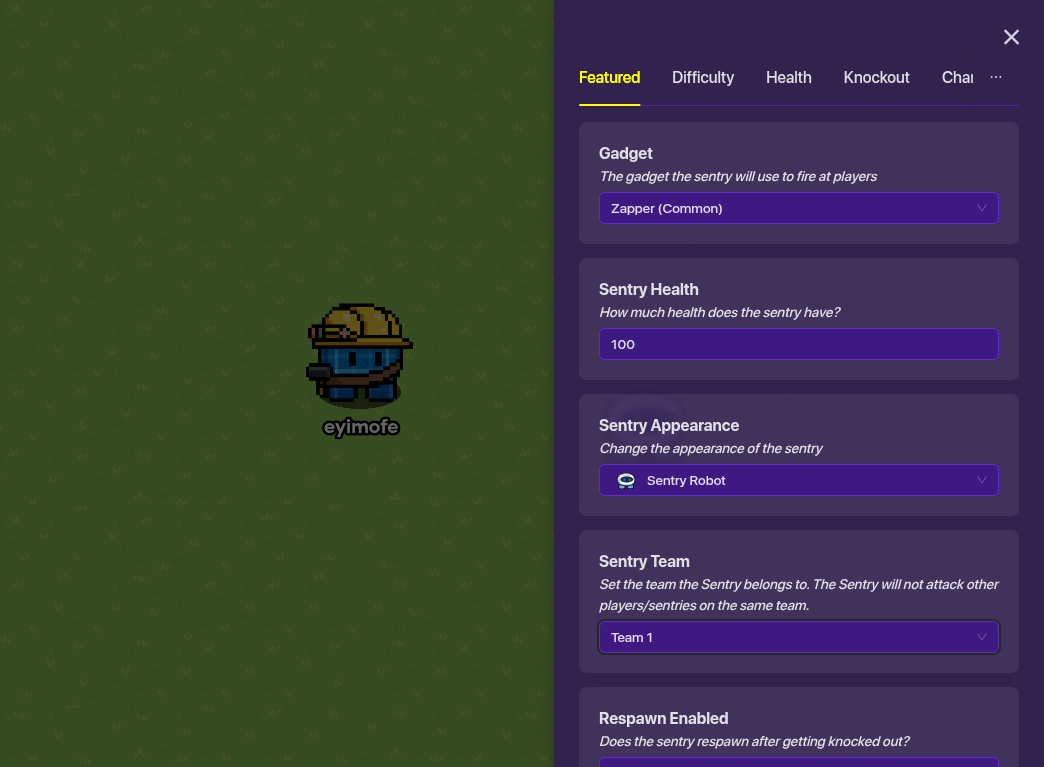
For the first part of this, You can do whatever.(As in pick any custom sentry/sentries.) You (if you want)can place a sentry(or two) and set it to team 1.(If you want) (In the average gimkit creative game, all players are on team 1, which is the reason for this.)But sometimes, you can make sentries for each team! (example: Farmer Sid for team 1, default for team 2.)
Step 2: You can either use a trigger,button,or zone for this part, but I will be showing a zone. Put a zone RIGHT ON the sentry. Not next to, not In front of, RIGHT ON. Otherwise, the zone won’t work.(actually it will be just be a little weird)

For Zone

You can make the pop-up have any text! Go wild! And yes, I DID blur the code. did you really think I didn’t read the guidelines? I know not to show codes, especially because of griefers.

For Button

Place a button right next to the sentry, and connect the button to the pop-up when you do so.

For Trigger

You can make a trigger activate the sentry, or you can place props around the sentry, then the trigger will make the sentry become available!

Don’t worry, you can still give this a shot!

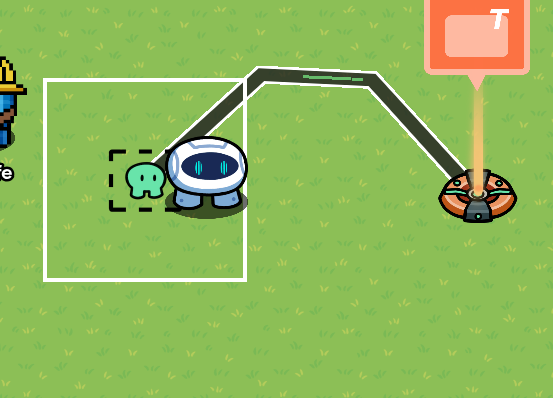
Step 3: use a wire to connect the zone to the pop-up, and make the pop-up give a prompt.


[1] **I will probably make a part 2 on this guide,specifically on how to make the Sentry give a quest.

Good job!

Yay we’re almost done,keep up the good work!!!

Step 4(optional): you can make the sentry/pop-up give the player a quest, and the player has to complete it to get a reward![2]

Background

If you want it to look better, you should set up props and change the landscape!

This can work for solo people, since they start on team 1.

uh-oh… not a recommendation…I would recommend you set up a counter system for memory, to add and see how many characters you can put in, to make sure you don’t use too much memory, since you still need memory for things like props and other devices.

  • 1/10
  • 2/10
  • 3/10
  • 4/10
  • 5/10
  • 6/10
  • 7/10
  • 8/10
  • 9/10
  • Caramel
  • Caramel apple…?
  • CARAMEL APPLESSSSSSS YEAHHHHHHH
  • Ramen/noodles YESSIRRR
0 voters

Good job! You-yes,you!-have now finished a basic tutorial on how to transform Sentries into In-game Characters!
[3]
Thanks to @potato123 for helping me make corrections, and @tacky_stars and @RiFF_NickZ for guide reviews… also @Heliolatry. Thanks to @all for reading.


  1. extra ↩︎

  2. like me WANTING A…WHATEVER! ↩︎

  3. as a reward, here is a caramel apple ↩︎

7 Likes

Uhm, I presume this guide isn’t finished?

2 Likes

yeah, I am still editing it right now.

Okay, okay, here are my opinions and guide criticism.

A Very Nice Tour

I like how you’re nice of all that and having patience of touring!
I rate that a 10/10

Badge Achievement :🥇

Nice performance, and nice tones! :star:

Grammar

Okay, dude I know we’re not in like 2016 but seriously, your grammar is normal. Just some corrections. The first sentence you said, “Hello and welcome, everyone! I decided to give making guides a shot.”

Should be “(Come on, you can do this!!!) Hello and welcome, everyone! I decided to give it a shot at making guides.”

Second grammar correction, “You can either use a trigger,button,or zone for this part, but I will be showing a zone. Put a zone RIGHT ON the sentry. Not next to, not In front of, RIGHT ON. Otherwise, the zone won’t work.(actually it will be just be a little weird)”

Should be..

"You can either use a trigger, button, or zone for this part, but I will be showing a zone. Put a zone RIGHT ON the sentry. Not next to, not in front of, RIGHT ON. Otherwise, the zone won’t work. (actually, it will be just a little weird)."

I rate that a 8.5/10

Badge Achievement :🥇

Accurate Grammar! :slight_smile:

How You Explained

You actually cooked on this one. I liked how you told beginners to use a specific device in a **(specific name of it.) And adding pictures so beginners can get a better understanding,

What are the Negatives of it? Just grammar. That’s all cause the more bad grammar you use, the more confusing it is, but so far so good!

I rate that a 9/10

Badge Achievement :🥇

Tour preformist! :bookmark:

Details

I liked how detailed your tour is! All of the pictures, and the text is in the right place!

Badge Achievement :🥇

Detailist Expert! :left_speech_bubble:

I rate that a 10/10

FINAL RESULTS
Annnnnnnnd....
I rate this a.........
...............

9.4/10!! Nice job! Barely no negatives here!

[1]

Thanks for reading!


  1. I hate voting, cause it’s not my style.. ↩︎

2 Likes

Please make sure to finish a guide before publishing.

Good. It would’ve been easier (in my opinion) to just edit it before publishing.

6 Likes

idk

maybe read next time brocaroni and cheese

3 Likes

it’s…Almost done?

alright,next time, I won’t do this again.

I assume this is for a collaborative gamemode?

Also, if you have the season ticket, you can just use the character device instead

errors

sentries

You said “optional” later

2 Likes

I know, but I made this guide for people who DON’T have the season ticket.

alert: your poll doesnt work

1 Like

oh, how do you make it work?

NPC guide, dang,
now that I think about it, I haven’t seen any of these about actually making an NPC.


The poll is broken
And could you format the guide a bit? using drop-downs and stuff.

And humor, WE WANT HUMOR

and a intro/outro

yay
better hurry though, if you’re a basic user, you only have like 2 days to finish this

5 Likes

alright, edits coming your way! :0

3 Likes

Time for some guide criticism!


Misplaced Tag:
The ideas tag is rather meant for Help topics.
The idea-catalog tag is meant for Community Made Guides

But onto that,

This guide isn’t really worthy of an idea-related tag, as it’s not really giving me any ideas, but rather info on how to build a character.
This category doesn’t change the final rating


Grammar:
I like discernibly correct guides[1], and unfortunately, this just isn’t it for me.

*Hi there!

*sentries

There are a couple more that I don’t feel like pointing out.

Small suggestion:
If you replace the “and’s” in your article with an ampersand[2], it gives off a much more formal approach.

Grammar rating:

6.2/10


Approach:
This guide doesn’t exactly have a clear voice. It’s more or less a monotone, “Do this. Now do that.”
Guides with a favorable approach [3], tend to stick out better to the audience, boosting the amount of likes you’ll get and the overall positivity of the readers.

Voice rating:

4/10


Formatting:
Now I am a bit stubborn on this part, so never expect a perfect rating from me on this category.

The formatting in this guide is not good. Not a “could be better.” More of a “please work on that.”

Now I know there are a lot of people with formatting guides for guides[4], but I’m not one of them. I know someone will show up later and give you one, or I wouldn’t be surprised if one hasn’t been made while I am typing this reply.

Small suggestion:
Drop-downs can either make or break your guide. Turning your whole guide into a bunch of drop-downs is not visually appealing. Breaking them apart with text is a great way to solve this issue.

Formatting rating:

3.4/10


Final Rating:

… (drumroll)

5.1/10

Sorry about the low score. It’s just the way the stone rolls.

An improvement:

I don’t like W.I.P.s at all, so my final rating may be a little biased. W.I.P.s are often abandoned due to running out of editing time, which creates either and (1. Unfinished guide, or (2. Unneeded clutter due to finishing the guide in a separate topic.

Thanks for reading!


  1. grammar-wise ↩︎

  2. & ↩︎

  3. humour, personality, charm, etc… ↩︎

  4. heheh a guide on how to make a guide ↩︎

8 Likes

Alright, guess it’s time for some editing! :slight_smile: [1]


  1. pls don’t take until like 6 o’clock ↩︎

5 Likes
corrections

Hello and welcome, everyone!

I decided to give making guides a shot

#1 or number one

newline before this, and consider putting each step into a dropdown
or just make it “Step 1:”

For the first part of this, you can do whatever you want. (doesn’t make sense anyway)

I am really tired, I just want ramennn… (why is this here?)

If you want, you can place a sentry (or two) and set them to team 1. (If you want???)

which is the reason for this.)

why is this here…

You can use either a trigger, button, or zone for this part

but I will be showing you a zone.

Actually, the zone will work, it will just be a little weird

what the… so off topic

Use a wire to connect the zone to the pop-up, and make the pop-up give the prompt.

yay we are almost done, keep up the good work!!!

Step 4 (optional):

You can make the pop-up give the player a quest,

to get a reward!

It works for solo players, because they start out on Team 1

Why?

You - yes, you! - have now finished a basic tutorial

3 Likes

Thanks for the corrections.

Finished up the editing

1 Like

Alright, I will do a post-revision review when I’m done with some of my homework.

2 Likes