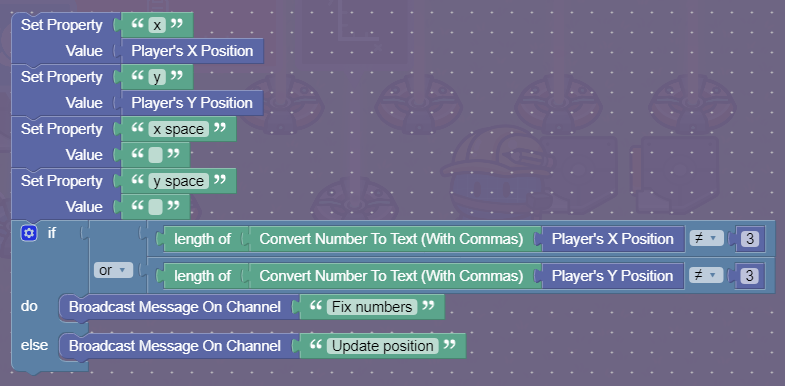
So, I’m trying to display player coordinates on an overlay, but whenever I broadcast to run my trigger’s blocks, it won’t display a number lower than 100. I’ve looked through the code, and there’s only 1 time I set the properties for my x and y coords, but maybe you can find out what’s wrong?
Code for Player Coordinates
Code for Trigger 1
Code for Trigger 2
If you need any of the property’s settings, let me know.
chunky
July 24, 2024, 3:34am
2
Can I see the overlay code?
Overlay code is just set text to All player positions property.
Try setting it to just the x and y properties so we can narrow down what trigger is causing the problems.
Can you also explain why the extra spacing is needed. (I’m guessing its for deciphering the save file)
Already did that. It’s something in the triggers.
Here is a guide that can help!
Hi! this is a guide on how to make a coordinate-tracking system, like the one used in don’t look down/dig it up!
[Screenshot 2024-05-21 at 5.41.37 PM]
Now, select the wire repeater, and set its delay to 0.2 Seconds
[Screenshot 2024-05-…
1 Like
It’s simple, so you might as well store that code somewhere
chunky
July 24, 2024, 3:02pm
9
Wait. does it track all player positions? because the overlay can’t hold that much text
Yes, and it works fine until you go to coordinates lower than 100.
chunky
July 24, 2024, 3:26pm
11
Well trigger 1 deals with numbers less than 100, so the problem would be in there. Maybe the text has two spaces?
Found a problem: In trigger 1the or statement should be an and statement and the broadcasts are in the wrong place. I don’t know if it will fix it, but I’ll check.
Edit: it worked!
system
July 24, 2024, 7:21pm
13
This topic was automatically closed 3 hours after the last reply. New replies are no longer allowed.