Cool lighting with text! [🤏 Mini Guide] (Accidental Duplicate)

Hello Forumers!
This is probably something simple that anyone could make but I wanted to show everyone this cool thing I found!

Devices Needed

1x Lifecycle
1x Trigger
1x Text

Step 1: The Trigger Loop

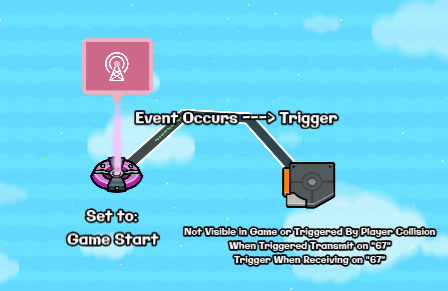
In this step what you are doing is making a trigger loop [1]

The 1st thing you want to do is wire a lifecycle set to game start to a trigger that is not triggered by collision and isn’t visible in game
Next what you do is make the trigger trigger when receiving on channel 67 [2]
Make that same trigger transmit on 67 when triggered
Set the Trigger Delay to how long you want it to be before the colors change in the lights

You are now done with Step One!

Step 2 : The Text

In this step, you will make the text change colors!

Grab a text device and resize it to however big you want your lights to be
The text I used for this is ❆
IMPORTANT: [3]

ALSO IMPORTANT: This text has to have no stroke around it

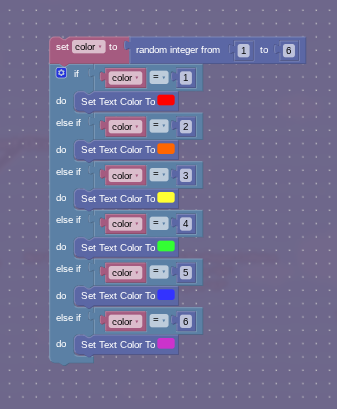
Now go into Blocks and make a new block for receiving on 67
Now make this:

Set color to random integer from 1 to 6
if color = 1
do set text color to red
else if color = 2
do set text color to orange
else if color = 3
do set text color to yellow
else if color = 4
do set text color to green
else if color = 5
do set text color to blue
else if color = 6
do set text color to purple

You can use as many colors as you want, up to 17 I think.
Try to use the most vibrant colors possible

You are now done!

Uses
  • Little signs at summits
  • A different way to make neon signs
  • Lights
  • Decoration for a Christmas tree
How Difficult was This Mini Guide?
  • 1/10 or :blue_square:
  • 2/10 or :green_square:
  • 3/10 or :green_square:
  • 4/10 or :yellow_square:
  • 5/10 or :yellow_square:
  • 6/10 or :orange_square:
  • 7/10 or :orange_square:
  • 8/10 or :red_square:
  • 9/10 or :red_square:
  • 10/10 or :purple_square:
0 voters
How Good was this Mini Guide?
  • Amazing!
  • Pretty good
  • Okay
  • Could be better
  • Terrible
0 voters

I will add a GIF tomorrow


  1. never use repeaters ↩︎

  2. you can use anything, don’t judge me, I wanted to add some comedic effect ↩︎

  3. USE A UNICODE CHARACTER THAT ISN’T AN EMOJI BECAUSE EMOJIS DON’T RECOLOR ↩︎

1 Like

may we have images

k

2 Likes

Yes of course, I am working on it!
Though, I cannot get a gif because gif compressors are all blocked

nope :<

I’ll do that tomorrow! :grin:

1 Like

Is this one unblocked for you?:

If so, then you could try to get your hands on a non-school device.

1 Like

I like the organization, and I like the uses bit.

I would suggest adding more visual representation of the wiring and channels. That doesn’t have to be only images. It could be preformatted text, or something of the nature.

The reason for this is that many people understand things differently. Take this post I made for example:

I explained the same thing in different ways multiple times, so the solution could be more easy to understand for a wide variety of people.

:+1:

2 Likes

Okay, I will do that when I add pictures!

You did a good job on the guide layout, however, you might want to add more explanations.

Also, this guide is duplicate to Kat’s guide, specifically the section I added in her guide:

But it’s fine, this guide can stay as it is, as it’s still a great tip for more people to see.

hi jackieee

5 Likes

sorry, I searched before I posted but I didn’t see that :sweat_smile:

Oh, he’s right.

Yeah, this is a dupe @TheCatIsCrazy. Your best bet is to just leave the guide here. There’s no real reason to delete, per say, since now other users can avoid making the same mistake in the future.

hai yoyo :3
1 Like

I’m sad cuz I spent like 30 mins trying to come up with something original :frowning:

but I did for like 15 mins :cry:

1 Like

Much better. But, it has been stated that this guide is a dupe. Next time, please search before you post just in case such a guide has already been posted ^_^
(@Blackjack I has question. Read my bio)
1 Like

@TheCatisCrazy just move this to help and mark a solution :slight_smile:

1 Like

This topic was automatically closed 3 hours after the last reply. New replies are no longer allowed.