I making a game and I need cutscenes but I’m not good at it.Yes I have checked all topics and they are outdated or make no sense.
What about Zappy’s guide?
You’ve probably seen it already, but it has pictures and I think it has an alright explanation. I might be able to help go more in-depth with some of the instructions if ya need.
2 Likes
Yes I have but I cant understand it.
1 Like
What parts can’t you understand?
(Looks like I summoned the guide creator himself; he might be able to help)
Put each frame where you’d like it to appear in the animation. It might be on top of another frame, if you want just an arm to move, for example, or a few steps ahead if it’s a gim walking or something similar. Zapps is making an image for ya. (Ignore my rampant nicknaming Zaptos)
1 Like
How to make a cutscene!
Materials
1 teleporter for each frame
1 wire repeater for each frame
1 cutscene frame for each, well, frame lol
Instructions
- Set up however many frames you would like
- Assign each frame a wire repeater and a teleporter
- Wire each wire repeater together, each wire repeater teleports to it’s teleporter
Something like this
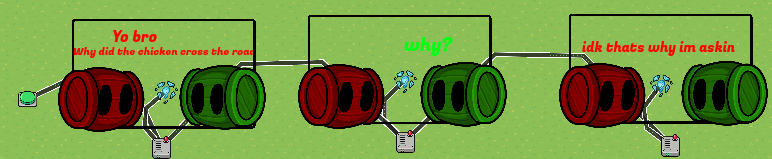
Notes
1.I know this seems rushed, that’s cuz it is
2.The button is just there to show that the cutscene starter, you may replace it
3.Don’t forgoet to teleport back after the cutscene is done
4.This mini guide is for pretty big animations to save on memeory
5.The barrier outlines are just there to show where the screens at
6.Don’t forget to set player’s speed to 0 then back to 1 after cutscene, can’t have them escape
4 Likes
I don’t know where to put the stuff like frames and the codes.
I can explain anything u need
Yep, it’s easier making cutscenes like that
They wont cuz their speed will be 0, check the notes.
1 Like
wait so you teleport the player to each screen?Like are they supposed to walk around?
2 Likes
Or you could use a camera view over the animation. That’d work, right? I’ve only made one animation before lolz
Sure i guess you can lol
WE’RE ALREADY INNOVATING
Teleporters, see them between red and green guy?
2 Likes
Is still a little confused how do you move the player to each screen?
1 Like
Okay thank you for your help
This topic was automatically closed 3 hours after the last reply. New replies are no longer allowed.