Sometimes, you want to make text that looks kinda like someone’s username, wether it be for a shopkeeper, sentry, or mayyybe crediting someone that helped make your game by putting it under an NPC with their skin. (nudge, nudge)
Here’s how you would do that!
Place down text (what else?) and set it to be whatever you want the username to be.
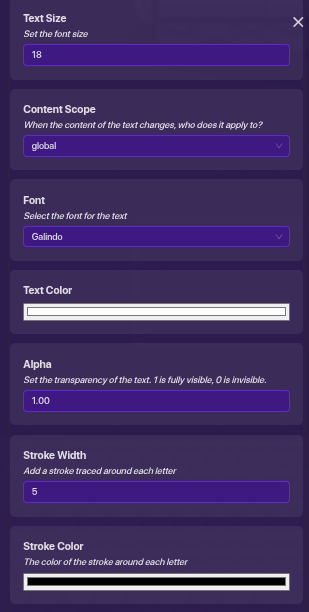
Set the font to be Galindo. It’s not going to be perfect, but this is the closest font you can get.
Set the text color to be a plain, pale, pasty white.
Set the strok- I mean letter outline width to be 5, and set the color for it to be black.
This is kinda cool, but I’d think anyone could really easily figure this out? I mean, it’s just changing text settings. I don’t really think we need a guide on this, but take that with a grain of salt . Unless others state the same though, I think you’re good to go for now.
Other than that, neat, I suppose. It’s pretty close.
Great guide!
Hey, I has idea.
If you were to make it so that the text content was set to your username by somehow using blocks, you could make a possible clone of yourself.
Except for the fact you’d still have to find a way to match your Gim’s skin.
cool [1]
I couldn’t find any other guides like this and that’s rare out of ten (ten being awesome 0 being terrible) I would rate it a 8.5/10
it works very well
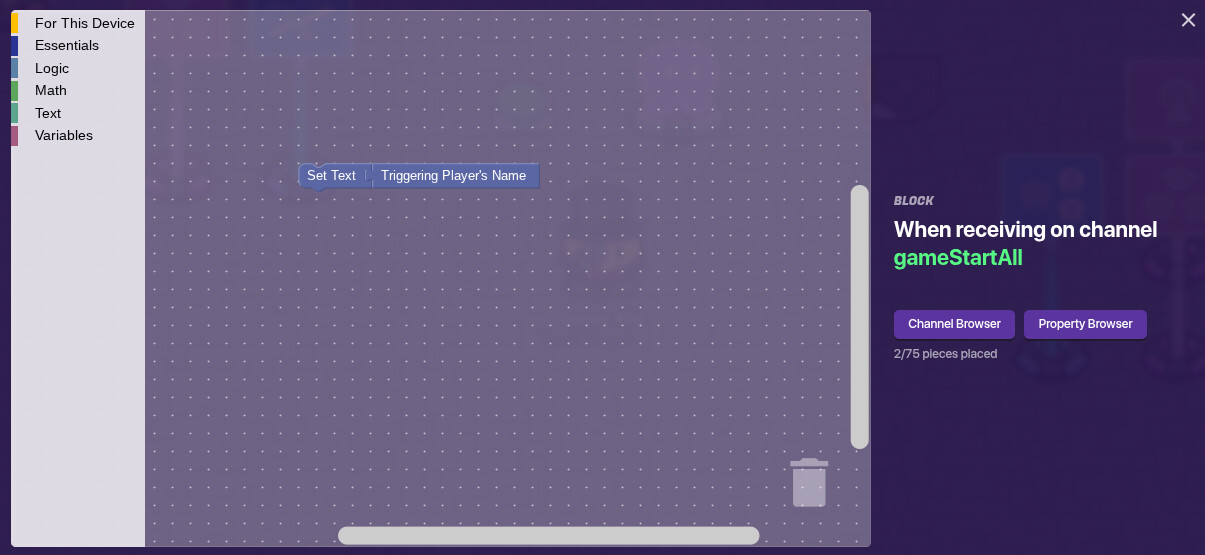
Great guide, if you really want it to be something else…just a side addition, have the text display the actual players name. And set the text to player scope so it shows each players name from their own perspective.
It’s pretty crazy how much attention this guide is getting considering how small it is.
If you wanted to set the text to match each player’s name from their perspective, you’d need the following:
lifecycle (game start) → relay (all players) → text block (player scope)
Here’s the block you’d put in the text:

 . Unless others state the same though, I think you’re good to go for now.