So recently, I saw a guide ( I know, right?) on how to make a combination door. But, I found a bug. The door worked if the combo you entered the right digits in each spot, but it also worked if you went over. And I’m making this guide to fix that. (This is my first guide, so if I need to improve it or something, just ping me.)
The guide
Materials needed
- 1 barrier
- 4 counters
- 8 item granters
-
10 repeaters (I’m joking, don’t worry)
- 10 buttons
- 1 checker
Instructions
Placing the stuff
First, place all your stuff. (Because how are you going to build the combo door without the stuff?)
Then, place four buttons above the counters, these will increase the counter. Place four more buttons under the counters, these will lower the counter. Change their messages to whatever you want (preferably having it make sense). Place the 9th button in front of your barrier, it’s the enter button (for entering the code ).
Wiring it up
Wire each of the buttons on top to their respective counter, and do the same for the bottom buttons. Set the item granters to each have an item matching only one other item granter. Set 4 of the item granters to give 1 item, and set their matching item granters to give -1 item. Wire each top button to an item granter that adds an item, and the lower buttons to the item granters that remove items. This won’t work unless parallel buttons go to parallel item granters.
Mechanics
Place the checker (if you haven’t already), and set it to four checks. Set each check to check for the different items you used, and set the amount to the respective digit of your code. Then, you wire the enter button to the checker, and the checker to the barrier. Set the second wire to deactivate the barrier if the check passes, and if you want, you can wire it to a notification if the check fails. Add the last button, this will be the reset button. Wire it to the checkers, and set the button to reset them (I know, right?).
Final product
Once done, your combo door should look something like this! (without the text)
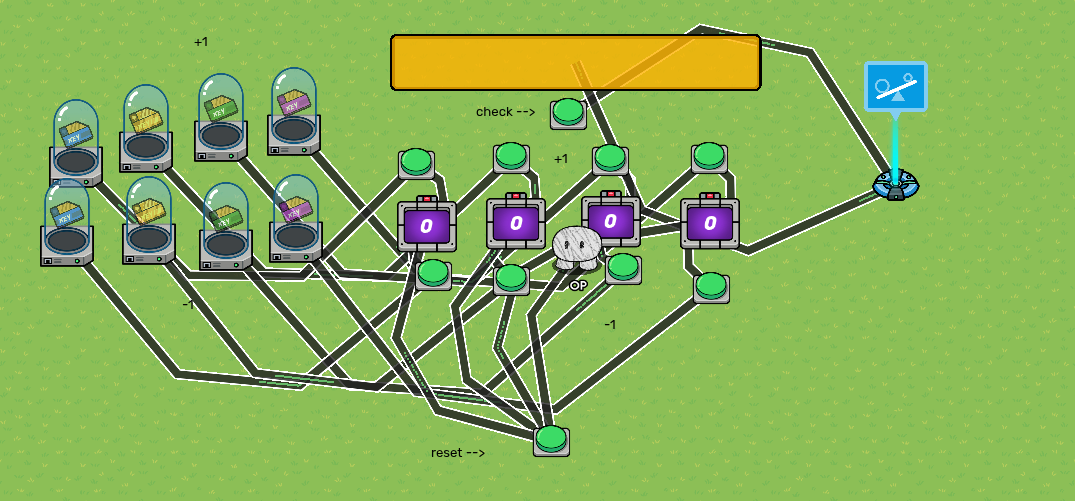
And it should work something like this!
[1]
And there you have it, a fully functional combo door!
the gif is too beefy it won’t upload ↩︎