Welcome to my guide!
PICTURES AND MORE IDEAS COMING SOON!
After you’ve read some animation guides cough cough @Zappy_Zaptos cough cough and you have some GKC animating skills down, it’s time to really have some fun with this new ability.
Here are some fun ideas that you could implement into your games, accompanied by an easy tutorial on how to create them! I’ve put several different ideas, from
Stimulators to Simulators
Crazy to Lazy
Wild to Mild
OR SOMETHING TOTALLY IN BETWEEN
And yes, I know there are already so many idea catalog guides, but I haven’t seen any animation ones like this!
Cutrtain-esque Animated Intro Screen
For a fancy animated intro screen, place two any color square barriers big enough to cover the screen for the player (I like deep red to give a curtain effect!) and make sure they touch so that there isn’t a gap in the closed curtain.
Make sure these are above the player in terms of layers, so there should just be one solid color covering up the whole screen. To open the curtain at the start of the game (or whenever you want!), animate those to drag apart, and then have them disappear so that there’s no more curtain.
It might take a bit of practice to get this smooth, but for a simpler one, it’ll be no big deal! You can have this lead directly into your main game, or have it lead into a title screen!
Tranquil Rainfall
This one is a bit harder as it requires repeaters and has a more difficult art and animation concept. To make the rain, you’ll have to have a ground on which the rain will fall. This will prevent rain from piling up at the bottom of your screen…
To draw the rain, utilize barriers or text symbols. (⛆)
For the mechanical side, you can use counters to time the effect perfectly. I’m not going to go too deep into this since there are already so many rainfall guides, but this would be a great addition to a relaxing game.
im sowwy ⊂((・▽・))⊃ hug for u
Growing, Blooming Flower
For a growing, blooming flower, you can prioritize emojis, emoticons, kaomojis, or PBT art.
You can animate the stages of a flower’s (or any plant’s) life cycle, and time a delay so the flower doesnt grow instantly! (unless you want it to)
Bonus: after the seed has just been planted, maybe make a small dirt mark so the player knows where the flower will grow!
Great for farmchain-esque creations!
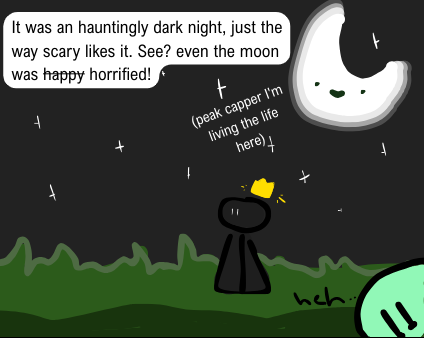
Horror Room
Dedicated to @Scary_Friend :>
For a static horror room theme, make a large barrier and set it to dark gray (not quite black.. yet) for the wall (top layer!).
Next, for the floor, create a real black barrier (Not needed if in platformer, any eerie default floor will do!).
You can create a creepy flicker effect with some white patches/lines using barriers and hide/show them at certain times using a timer (plenty of guides for that)
And finally, for the beloved glowing eyes effect, create two prefferably red barriers (eye-like shape or just tall and skinny for that classic gim eye vibe). For the glow, copy those multiple times and have them grow outwards and outwards getting less and less opaque.
You can even drop the iconic crown on there if you want!
Confetti Party Time!
For this one, you can use a similar mechanic as the rainfall one, but use colorful barriers or text emojis. (


 )
)
To have a player-choice confetti blaster, wire the effect to a button, trigger, zone, or anything you like!
Make sure to have it stop after a little bit, because we don’t want the party to go on forever… or do we???
You Lose Cutscene (if Gimkit's isn't enough on it's own)
For an effective You Lose Cutscene (if Gimkit’s isn’t enough on it’s own) you’re going to want to do the same covering up the screen with a barrier thing as the curtain (but one barrier, not two!) You can set up any text, art, or design you want!
Sorry my explanation isn’t thorough, but remember this is for ideas and not a how-to.
Rotating Coins
For a simple but beautifully animated rotating coin design that definitely “1-ups” basic collection systems! To draw the different frames, you would take advantage of our handy custom shapes tool, or PBT art.
The trick here isn’t actually “rotating” the coin, it’s more of making it slimmer down the center and growing it back out again! It sounds weird at first, but once you’ve got those basic frames down it will look like a real coin spin!
As a bonus, you could add a similar “glow” to the coin as the one for the eyes in the horror room! This’ll really tell your player “I’m here.”
Thanks for reading! Please feel free to like if you enjoyed, and glad you read this while you can! (Probably going to either 1 get flagged down or 2 become inactive quickly)
100% Open to feedback, ideas, or tips!
How would you rate the quality of this guide?
- 1/10
- 2/10
- 3/10
- 4/10
- 5/10
- 6/10
- 7/10
- 8/10
- 9/10
- 10/10
- cheddar cheese

 I be watching here while people are coming into this topic just to vote for cheddar cheese