I have been trying to make a chat mode in gimkit creative for like 6-7 hours, and nothing seems to work. any ideas?
2 Likes
You can’t really have a chat… The best you could do is create overlays that say things like “Hi!” or “Got it!” that show a notification to everyone… Or you could create a keyboard, but it’s limited to one area…
Keyboard guide in case you need it:
2 Likes
Yeah, like @Papyrus said, the most you can do is have a bunch of pre-made messages you think will be most vital to the game, then make an overlay that makes it so that when they click the overlay it takes them to a pop-up that has a bunch of options for things to say, then make it so that whatever they click broadcasts as a notification. It sounds complex, but it’s not too much coding .
@buildmaster67 You joined 8 hours ago and you have the AUDACITY to say this??
WHY BRO WHY 
This gen is cooked bro
6 Likes
I’m sorry I just had to-and ya very cooked
I think it is POSSIBLE, but it would take a lot of time and lots of testing. but definitely be worth it because no one has EVER really done it before(from what I’ve seen-at least not in gimkit creative). also, I just figured out you can share gimkit creative projects, so that multiple people can work on it at a time- but I don’t think were aloud to share codes on here- but anyways I DO think its possible
A chat isn’t possible, like in yesterdays topic I said we can only make quick chat.
With current Gimkit devices and limited coding we can’t make a fully functioning chat.
Do you have a season ticket?
1 Like
yes, and I think it is possible- and I’m at least going to try first before I say its not

thanks I’m going to keep trying- I think I have a idea that might just work and if anyone else has ideas I’d like to hear them
1 Like
I do have something to say - making a open ended chat is possible, just harder to do than normal messaging. I have a single player working keyboard in one of my maps right now, give me a bit to get home and I could very definitely get simple multiplayer working.
4 Likes
that would definitely be helpful
ok so here’s my build of a keyboard:
(it’s a physical keyboard so youre going to have to find a way to get people to and from this) (code’s invalid)
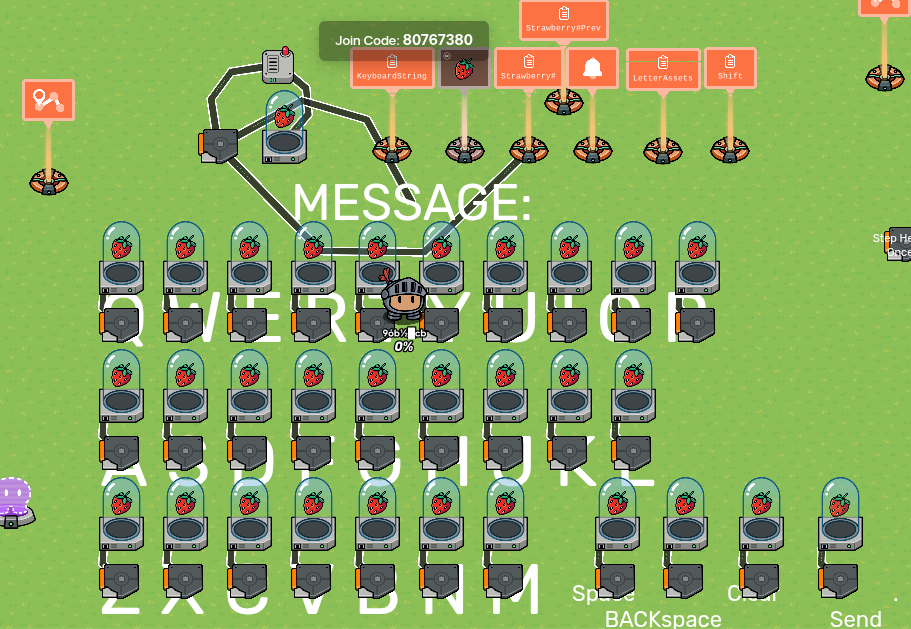
important things to know:
- all of the triggers connected to strawberries broadcast on channel “KeyboardLockOut”, deactivate on “KeyboardLockout”, and reactivate on “ReactivateKeyboard”
- strawberries all give different amounts, like so:
- waypoint is not important
- the IIM updates the property Strawberry#
- ctrl-c + ctrl-v this into the property “LetterAssets” EXACTLY (QWERTYUIOPASDFGHJKLZXCVBNM qwertyuiopasdfghjklzxcvbnm ) (the white spaces are important)
- properties “Shift” and “Strawberry#Prev” dont exist
- wire from “Strawberry#” to trigger triggers the trigger when Strawberry# is changed
- trigger sends a message on “ReactivateKeyboard” and has a 2 second delay
- wire repeater has a 0.1 sec delay
- item granter by itself grants -70
- do your best copying this code for the white text that says message (it runs off of a wire pulse from the trigger):
I might actually make a guide on this this is a bit more complex than I thought


to make this multiplayer make sure that every property besides LeterAssets is player scoped and make sure that the triggers only turn off for one player at a time. Happy Gimkitting!
6 Likes