
I still haven’t clicked the play button yet and other people can see what I did (This is the waiting room)
This is only you editing the map, if you publish the game people cannot see this. There is no current way to hide it when editing though.
i believe that’s because it’s in editing mode for you, it’s common when you play your own creative map with others
Ok thank you, I didn’t know that before, but when I want to play with close family/friends, they see it and I’m trying to make it so that they can’t see it. Is there any way to fix that or not?
Using a showcase link or publishing it should work.
- Wires don’t show up in-game
- Spawn pads are automatically set up to not show in game
- for teleporters, use this setting.
set it to “no”
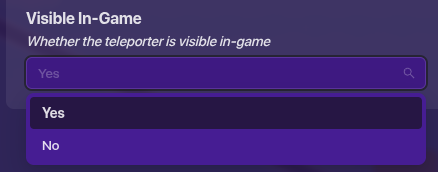
not sure if you were asking about them showing up in game or not this is just my take on it
Have you been using a showcase link for those games?
I’m not super aware of how the pre-game works, but I believe using a showcase link will make the game behave similar to like it is to when it is published.
When you’re editing your map and invite someone with the j0!n code, they can see the wires and devices too, but that’s the only way for anyone to see that stuff. When it’s published, they’re invisible like most devices, both pre-game and in-game.
This topic was automatically closed 3 hours after the last reply. New replies are no longer allowed.