How To Make The Among Us Reactor Sabotage (5/10)

Hey guys! It’s me, YourAvgGimkitDev! Yes, the one that made “Among Us (S.K.E.L.D.)”!

I noticed that there aren’t any guides AT ALL about Reactor Mechanics so I decided to make one. (LandynSPEEDO802 was going to make one but ended up deleting their map and couldn’t edit.)

This is my first guide on the Gimkit Forums, so I hope you enjoy it!

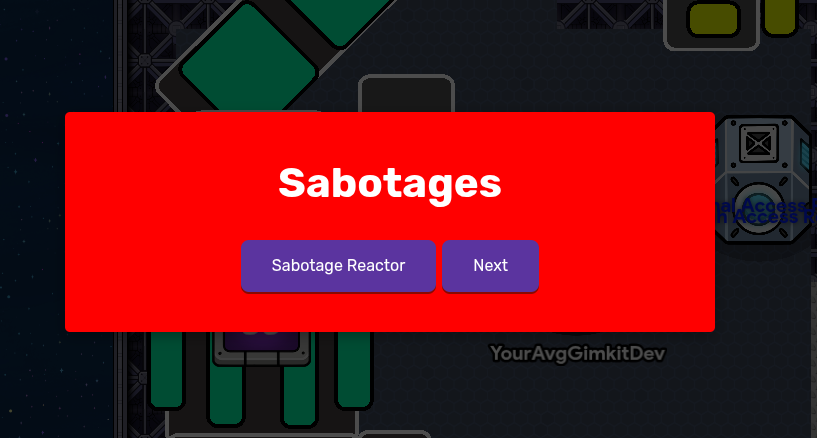
Before we start, You should make a sabotage interface using a Game Overlay and Popup.

Make the Overlay text “SABOTAGE” and make it into a button

And for the Popup make the first call to action “Sabotage Reactor”

Then wire it like this:

Button Pressed (Game Overlay) ----> Open Popup (Popup)

That’s our first step done! Now to the real part and materials!

Materials

1x Repeater (bear with me)
1x End Game
1x Property
2x Counters
1x Button
1x Waypoint

Now let’s get started!

Repeater

I know, the repeater is the MOST hated device in the game, but it’s not that bad.
First we place the device and copy these settings

Task Interval: 1 second

Stop Strategy: After receiving on a channel
leave it blank
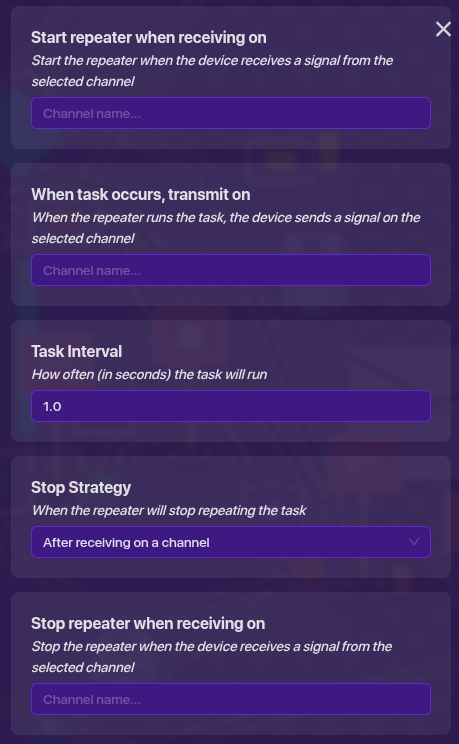
and that’s it!

End Game

Used to make the ship go explode

just place it ._.

Property

Place a property then copy these settings:

Property Name: MeltdownTimer, etc.

Property Type: Number

Default Value: 60

Keep the scope on global
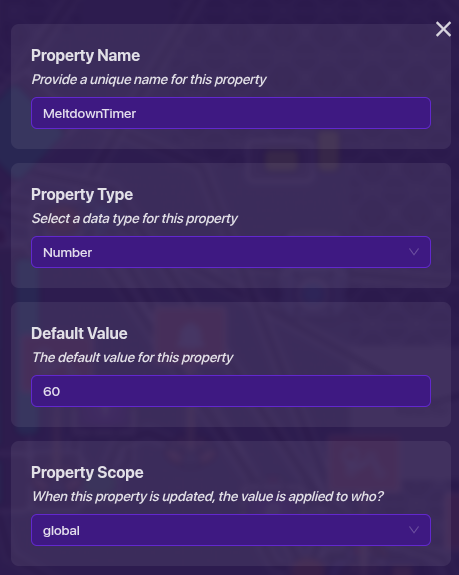
and that’s a third one done!

Counter #1

This will show how much time is left till it a severe meltdown

Place a counter and copy these settings:

Starting Value: 60

Keep it visible and count scope on global

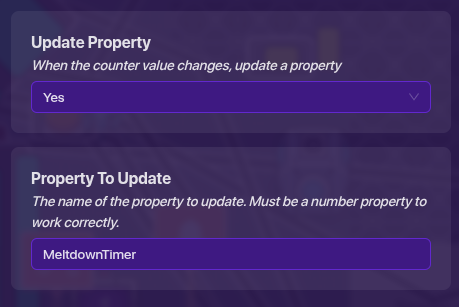
Update Property: Yes (Use the property name you used earlier!)

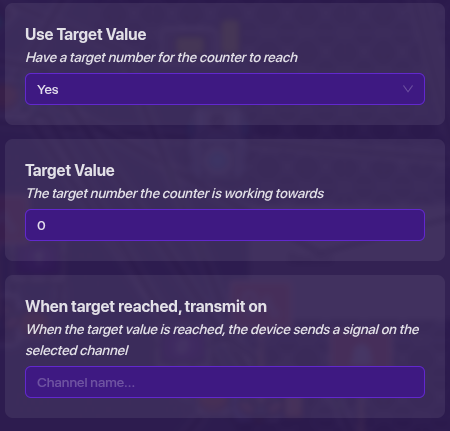
Target Value: Yes (Make it 0)
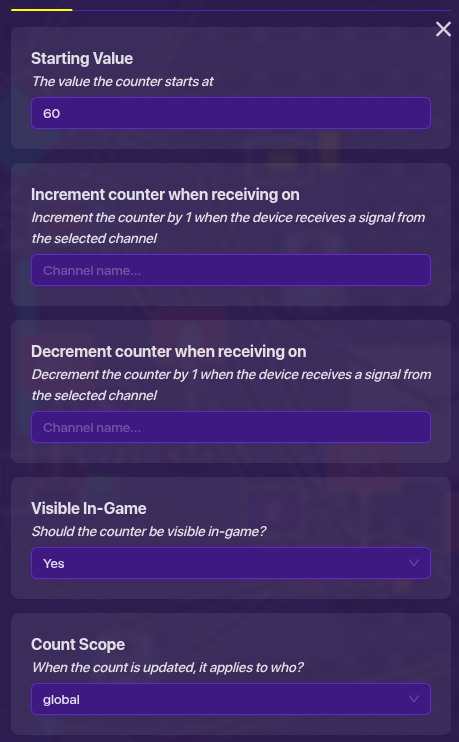
and another done!

Button

Will be used to fix the meltdown and avoid a severe meltdown

Place a button and copy this:

Message: (Anything you want)

Visibility: No

Active On Game Start: No

Scope: Global
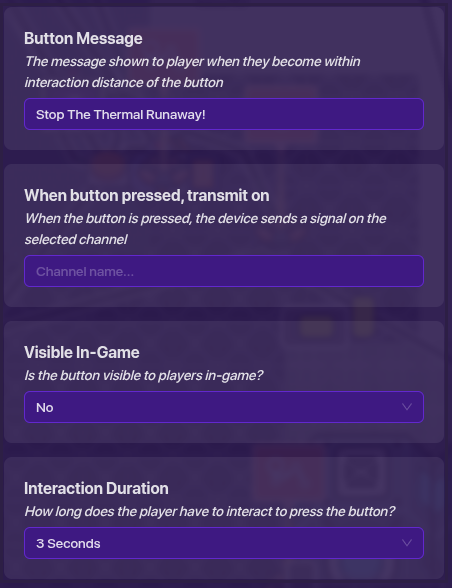
once again another one done!

Waypoint

This will show everyone where to go

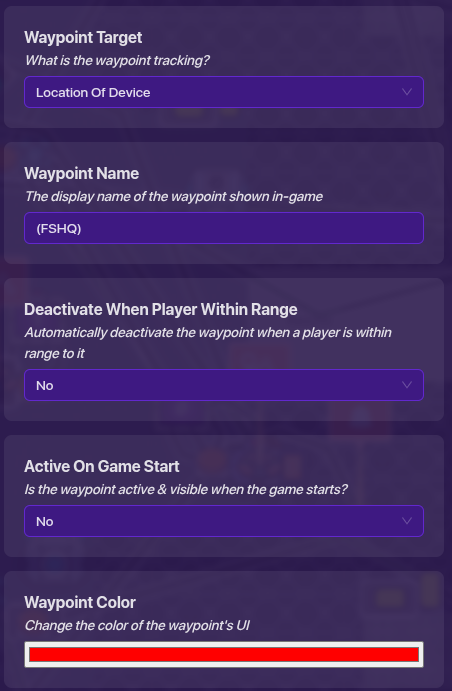
Place a Waypoint and copy:

Waypoint Target: Location Of Device

Name: (Anything you want)

Deactivate Within Player Range: No

Active On Game Start: No

Scope: Global
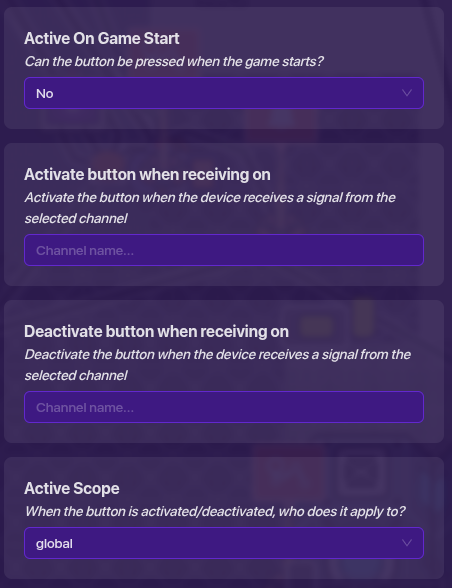
and another one done again!

Counter #2

This will be used to activate the button and deactivate the button

You should know this by now…
copy this:

Starting Value: 0 (just wait)

Visibility: No

Scope: Global

Update Property: No

Target Value: Yes (make this 0 too)
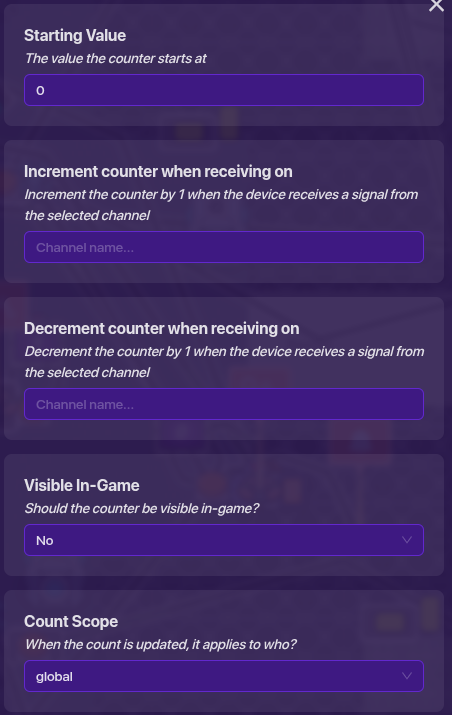
and that’s all!

After following all those steps, IT’S TIME FOR THE- (holy ref right there)
Time for wiring!

Wiring
Popup

Primary Call To Action (Popup) ----> Start Repeater (Repeater)

Primary Call To Action (Popup) ----> Activate Waypoint (Waypoint)

Primary Call To Action (Popup) ----> Activate Button (Button)

Primary Call To Action (Popup) ----> Increment Counter (Counter #2)

Repeater

Repeater Runs Task (Repeater) ----> Decrement Counter (Counter #1)

Counter #1

Target Value Reached (Counter #1) ----> End The Game (End Game)

Button

Button Pressed (Button) ----> Reset Counter (Counter #1)

Button Pressed (Button) ----> Stop Repeater (Repeater)

Button Pressed (Button) ----> Decrement Counter (Counter #2)

Counter #2

Target Value Reached (Counter #2) ----> Deactivate Waypoint (Waypoint)

Target Value Reached (Counter #2) ----> Deactivate Button (Button)

And after that you should be done!

It should look like this:
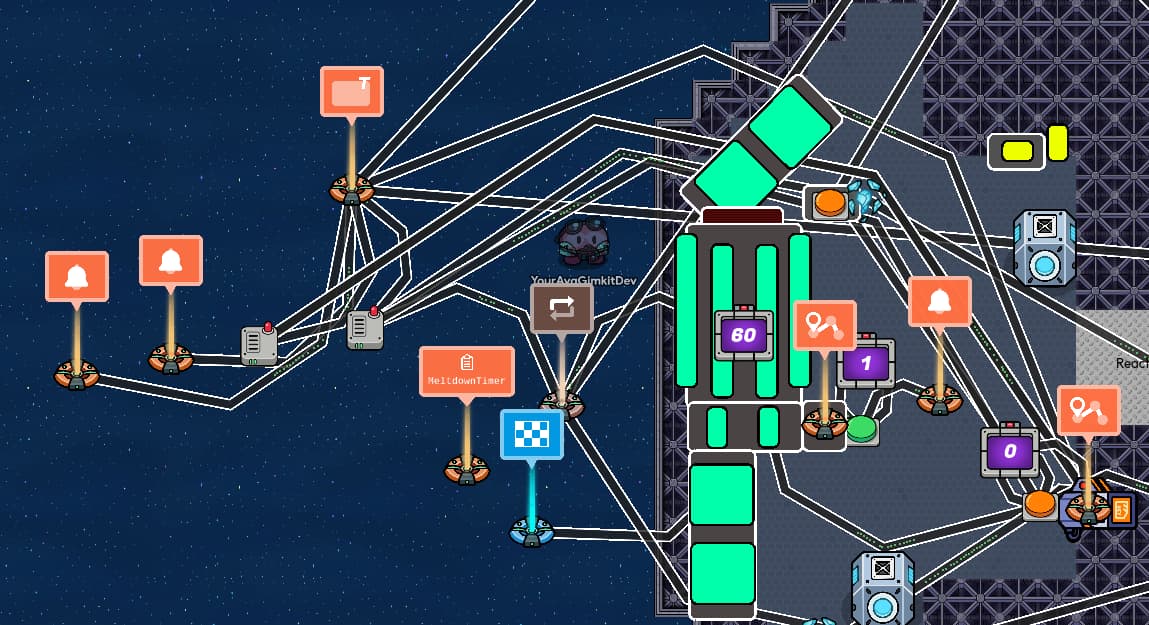
(Some extras I put for my map you don’t have to)

Don’t criticize me for using Repeaters plz it’s my first guide and I don’t want hate.

Thank you for tuning in!

Vote how hard it was from a 1 to a 11!

(I’m still working on integrating pictures)

  • 1
  • 2
  • 3
  • 4
  • 5
  • 6
  • 7
  • 8
  • 9
  • 10
  • 11💀
0 voters
5 Likes

sharp inhale

tears in eyes

No hate here for using these, as repeaters are certainly new-user-friendly, but they are wildly inefficient.

Try checking these out for alternatives.

They aren’t always bad, but in the case of bigger mechanics like this, memory-savers are some of the best things you can use.

You can also replace wires with channels, as they don’t take up any memory.

Props for having the courage to post a guide on your first day active, though! :]

I recommended it for the replies (repeater drama convos are interesting okay) before realizing that most users don’t read 100+ reply topics lol

I do think that repeaters are acceptable when a newbie’s making a very memory-light map with limited knowledge, but loops are 100% better literally every other time

You’re all good lol
It’s not an argument, it’s an intelligent conversation
Repeaters certainly warrant that :]

5 Likes

lol ok I’ll look at it later and thanks for the suggestions

2 Likes

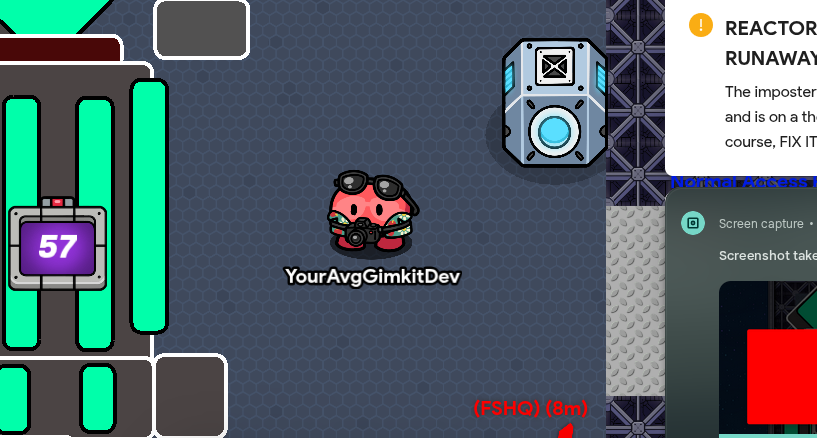
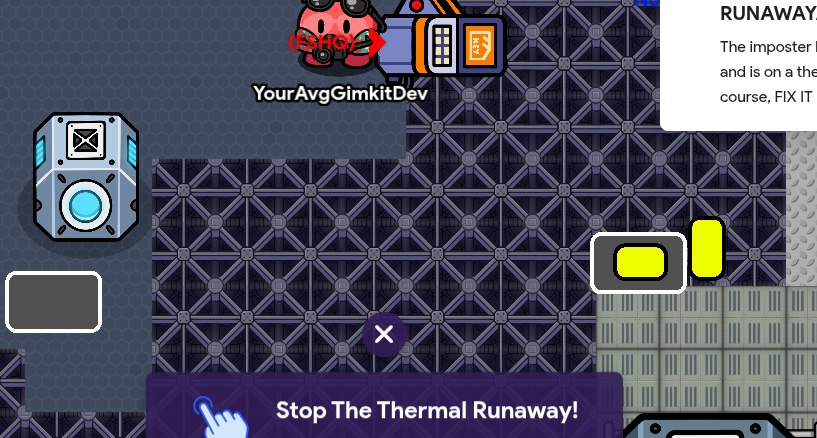
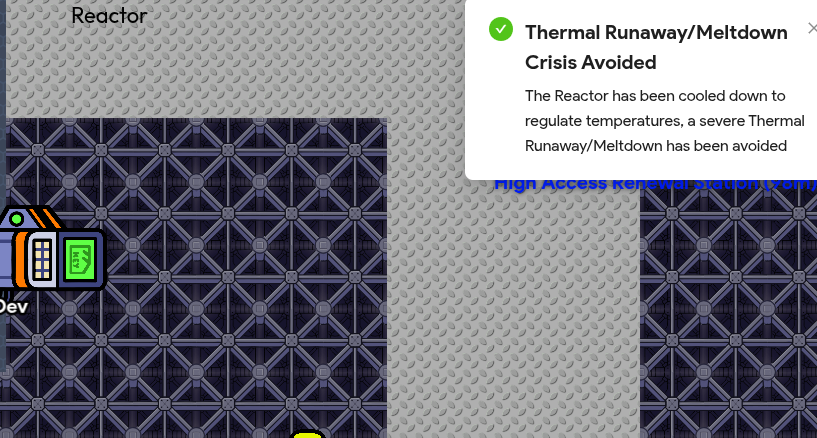
btw some images on how it would work in a finished product

ignore background things

2 Likes

nice guide, but maybe add some pictures for people who rely on visual demonstration.

3 Likes

Yes but I think you have to be a certain trust level.

3 Likes

if i’m right, only Tl2 and up can edit guides

1 Like

Yep

Each trust level has a different amount of editing time, though. I believe you have around two weeks right now (?)

You can always check the TL Guide to confirm lol

Edit: found a thing

You have three days, then.

Okay, there’s been an issue
I can view the site, the topics, the accounts, but for whatever reason, my 'ministration has the signup and login sections blocked off specifically? So I’ll just be looking on from afar, ha

If the situation changes, I’ll definitely make an account as soon as possible

Thanks for trying to include me :]

4 Likes

Since you still have editing time, I would suggest editing those pictures into the finished product part of the guide!

Great guide, by the way.

uhm, what? You mean you’ll edit the images in before then? Why wait? It only takes a minute and your editing time is limited.
[1]

flag this and move on, guys


  1. not sure if you were replying to me tho… ↩︎

2 Likes

I will eventually, probably before March 25th I think.

1 Like

Yeah I’ll edit the images before then or sooner.

1 Like

Repeaters will always be less memory efficient than a trigger loop, especially in this case. Here, all you need to do is have whatever was wired to the repeater wire to the trigger instead, and have the trigger broadcast to trigger itself on a 1 second delay. Then, you can add any additional channels to the “when triggered, broadcast on channel” field.
The devices topic you cited is from before fleet was super experienced, and Blackhole recommended a better method in the second post.

The reason the repeater is so strongly disliked isn’t because it doesn’t function well, it’s just the absurd memory cost that makes it outclassed by every other method of looping something.

Baked is really cool

Agreed.

I would agree (you should see some of my earlier maps. There’s a screenshot somewhere on the forums where I have three, count 'em, THREE repeaters in the same frame.)
But in this case, the use is incredibly simple since basically all you have to do is replace the repeater with a trigger. Also, it’s a guide. Guides have to be held to a higher memory standard because you don’t know what game they’re being implemented in.

Holy cow I’m yelling at an innocent person. I need to stop arguing with people on the internet for no reason. I’m so sorry :sob:
You made art for me too…

1 Like

One day I will rewrite the guide and have more pictures and use trigger loops.

1 Like

Thanks, this guide is really helpful.
I’m also very new, also I got a message from @discobot… does anyone know who he is?

3 Likes

He is an assistant I believe, he will show you the basics to The Gimkit Forums.

2 Likes

Okay, thank you for the help!

2 Likes

Thanks! Sorry, if I was a li’l mean. Your guide is great, and your explanations make sense.

1 Like