WARNING: Uses 1165 Memory!
Hello! Today i’m going to show you guys how to make a chug jug from Fortnite. For those who don’t play fortnite, the chug jug heals players every time you use it but it can be saved up. (PS: I am making the chug jug from chapter 6 not the chapter 1 chug jug)(if you know you know)
Step 1
Grab an inventory item manager and set it to whatever item you want to be the chug jug. (I did plastic bottle) Set maximum hold to 1 and wire it to a checker. Set the checker to check if the player has 1 of whatever item you picked. Set it to run on Channel A if the check passes.
Step 2
Get a property device. Set it to # and name it Chug Jug Number. Set the default value to 205 and set it to player scope. Next pull out a item granter and set it to Grant on Channel B
Step 3
Grab and overlay device and set it to button. Set the text to use. Set The button to not be active on game start but activate on Channel A and deactivate on Channel B. Set Channel A to transmit when the button is pressed. Set the button scopes to player.
Get a health granter device and set it to Grant health when the button is pressed (do 5 health)
Step 4
Grab another overlay device and set it to text. Make it not visible on game start and both scopes to player. Add a block to the overlay that goes when receiving Channel A.
Set the block code to this:
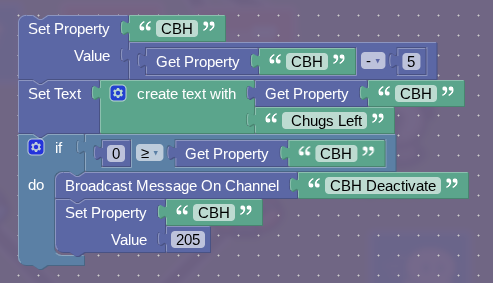
(In image, CBH deactivate channel Is Channel B, CBH property is Chug Jug Number Property)
Finally: Wire The Checker To Both Overlays So That If It Fails They Turn Off! That’s It!
Hope you liked this guide!
- How Good Is This Guide?
- 0/10 (Really Bad)
- 2/10 (Bad)
- 4/10 (Fine)
- 6/10 (Good)
- 8/10 (Great)
- 10/10 (Amazing!)
- 11/10 (Best Guide Ever!)