Introduction!
Hi! Howdy! its me Fleet!
Ever play Mario Galaxy? remember that one kind of platform that flipped if you spun, and then they brought it back in future games except it flipped if you jumped instead?
well here’s a way to make that in gimkit!
Now I did make this guide before! but this is me remaking it!
Now you may be wondering why I’m remaking this guide. it comes down to a few key reasons.
- I was never able to add back the pictures to the old guide after the image purge
- I want to format it a bit better.
So Here we go!!!
The (EVIL) guide
ok so first you will need a few objects
these include
- 3 properties
- 1 player coordinates device
- 1 trigger
- a pair of barriers colored red and blue (for each platform you want)
Got that? OKAY!!!
first lets make the properties since they are the easiest to make!
Property 1
Name: “LastY”
Type: Number
Scope: Player
Property 2
Name: Jumping
Type: Boolean (True or False)
Scope: Player
Property 3
Name: Platforms
Type: String
Scope: Player
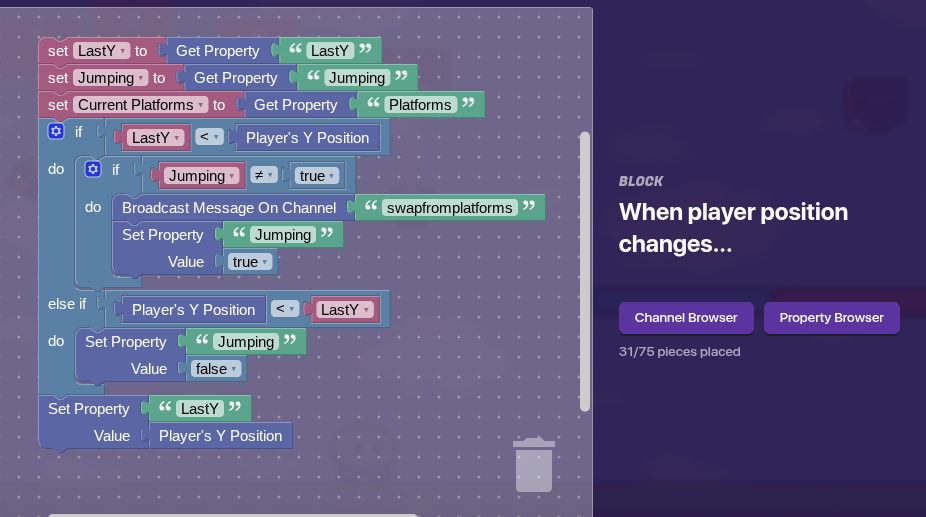
Alright now that you have those set up. It is time to setup the player coordinate device, and all we have to do here is make this block code!
Explanation
This code checks that whenever the position of the player changes, if the Y is greater than the last Y property, if it is, and we didn’t already set jumping to true, we set jumping to true and broadcast to swapfromplatforms, if the Y was LESS than the lastY property we set jumping to false. after these checks we set the lastY property to the players current Y position.
after you have done that go to your trigger and change its settings like so
Trigger
Trigger when receiving on: swapfromplatforms.
then make it have this block code!
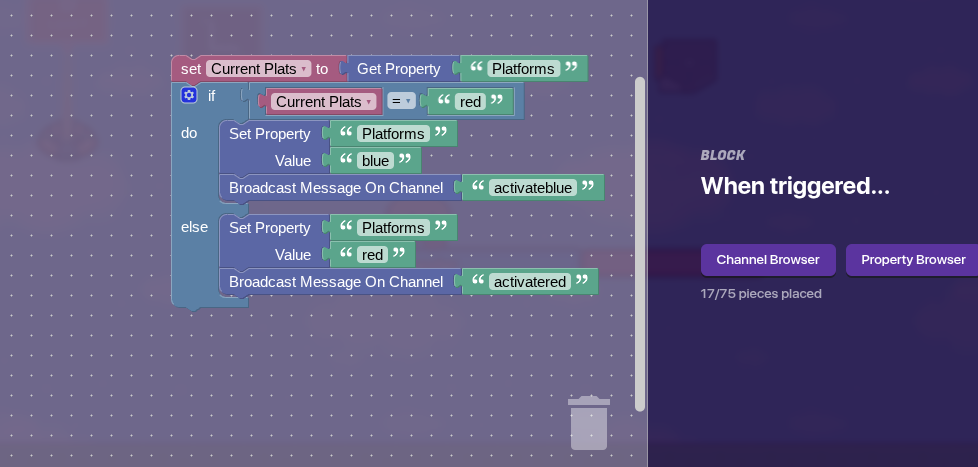
Explanation: the sequel.
This block code basically checks what the platforms value currently is, toggles it to a different value, then broadcasts to activate barriers of that type.
Now to setup your barriers
place 2 barriers in equal length next to each other, make 1 colored red and the other colored blue. now set them up like this!
Blue Barrier
Active on game start: False
Activate when receiving on: activateblue
Deactivate when receiving on: activatered
Red Barrier
Active on game start: True
Activate when receiving on: activatered
Deactivate when receiving on: activateblue
And just like that it should work!!
Conclusion
in conclusion! this is a unique platform that you can use to spice up your game! (or therotically be a crazy person and remake Mario galaxy entirely).
That will be all!
Please remember to not say “Good guide” and instead just use the  button! saying good guide tends to lead to more clutter and makes it harder to see the people who actually require help!