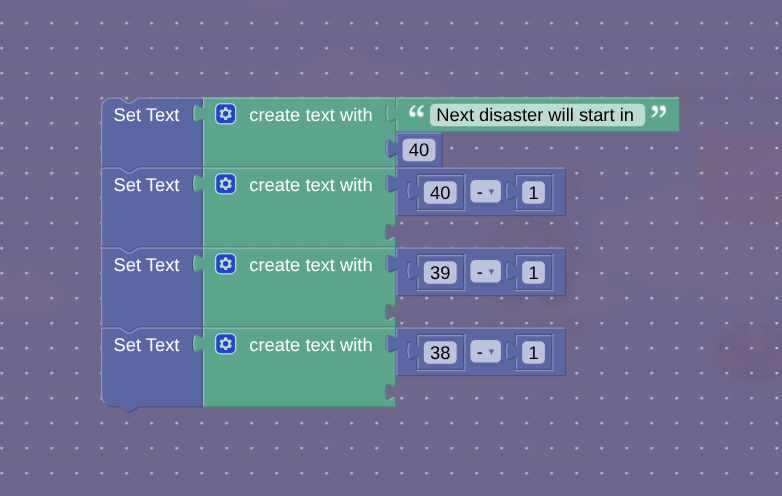
My timer is set to 40 but it immediately changes to 37. I want it to wait for 1.0
seconds for each decrement. I’ll show you


1 Like
So, what exactly do you need help with?

I think this is a bug, if that’s the problem.
Somebody else had the same problem, I think…

How to make a timer on the Overlay device but it has to wait for 1.0 seconds before each decrement.
I’m no expert here, [1] but it looks like you’re just making the text show the number 37 by default. You’re making each action immediately transmit on the next, so it instantly displays the value of 38 - 1, which is 37. You need to create a delay of 1 second in between each command, then you need to continue counting down the values until 0. Although I believe there’s a better way to do this.
literally I have never touched block code ↩︎
1 Like
The reason why its only displaying 37 is because all block code inside the same device triggers instantly so it triggers the top block then the next lowest one and on and on until the last block where it triggers last.
To fix this just make a trigger loop that triggers every second, then make that trigger loop decrement a counter every time it’s triggered. Said counter it connected to a property which is connected to the overlay device.
1 Like
Duplicate Topic | DNR
2 Likes
My bad, I thought the other topic already had a solution but wasn’t marked yet.
So it seems the OP has a solution… but doesn’t want to use a normal property timer for some reason?
1 Like