This tutorial is on how to make a live player counter in Gimkit Creative. The counter in this tutorial is for teams mode but it can be changed by changing the relay broadcast audience. I have tested this and made sure that it works. I think this is fairly easier than the other tutorials that i’ve seen, but I don’t know, it was just easier for me to read but I guess that’s because I made it. (disclaimer, step 3 is a lot)
This is the finished product:
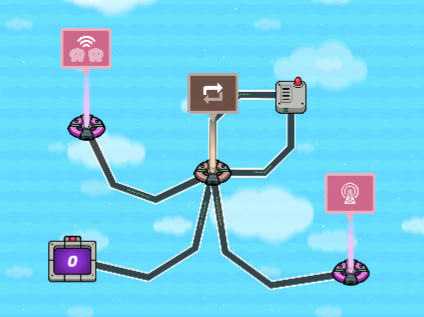
(UPDATE: removed the link to my game that I made it in because some people said that you aren’t allowed to post your own links)
(also this is my first guideline so pls be nice)
Resources:
- A Repeater (NOT a wire repeater)
- A Wire Repeater
- A Counter
- A Relay
- A Lifecycle
- A few wires
Step 1: Get out a Counter and set the “Increment Counter When Receiving On” to your desired channel
Step 2: Get a Relay, set the Relay Audience to All Players On Specific Team for teams, or All Players for a free-for-all. (You will need to make multiple of these setups for a team mode)
Step 3:
Get a Repeater and a Wire Repeater (THEY BOTH ARE DIFFERENT DEVICES). In the Repeater, set the Task Interval to 0.5 (that’s the lowest option). Set the Time To Run to anything between 10-1000 it doesn’t matter. Wire the Repeater to the Wire Repeater and the Wire Repeater back to the original Repeater to make a repeat clock. Wire the Repeater to the Counter and the Relay.
Step 4:
(ok step 3 was a lot lol) This is the last step. Get out a Lifecycle, set the Event to Game Start, and wire the Lifecycle to the Repeater.
And it’s done. So if a player joins, the counter increments, and if someone leaves, then it decrements. It works when every 0.5 seconds, the counter value is reset to 0, and a channel is broadcasted to all the players. Depending on how many players it broadcasts to or how many broadcasts are sent, the counter value updates to match.
This could be useful if you connect it to other pieces of code that need it (idk).
Hope you liked it!