Neon11
November 6, 2025, 9:36pm
1
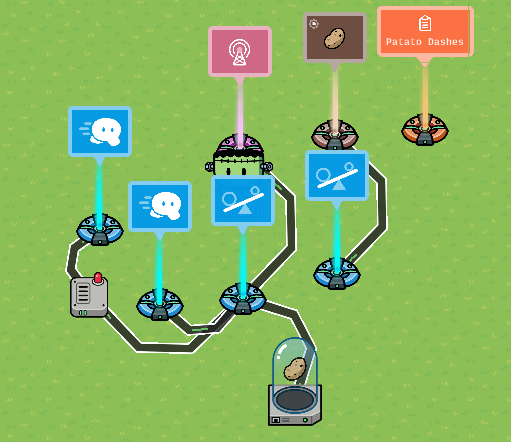
I was experimenting with a new item “The Dash Potato”! When You Pick Up The Potato, It Makes You Dash The Next Time Your Fire A Gadget. Then The Potato Is Dropped. Here’s How To Make it!
Devices Needed
Property (10 Memory)
2.
Step 1 : Property And Inventory Item Manager
Title Your Property “Potato Dashes”
Set It To A Number That Starts At 0
Player Scope
Set Inventory Item Manager To Potato
Set To Use By Default
No Item Alerts
Set Max Amount To 1
Set To Update The Potato Dashes Property
Step 2: Checker And Lifecycle
Set Lifecycle To On Player Fires Gadget
Set One Checker To Check If The Potato Dashes Property Is = To 1
Wire The Lifecycle To That Checker (Event Occurs → Run Check)
Set The Item Granter To Potato And -1
Wire The Checker To The Item Granter (Check Passes → Grant Item)
Step 3: Speed Modify
Set One Speed Modifier To 4x Speed
Keep The Other One At 1x Speed
Set The Wire Repeater To 0.1 Seconds Delay
Wire The Checker To The 4x Speed Modifier (Checker Passes → Set To Speed)
Wire The Checker To The Wire Repeater (Passed → Repeat The Pulse)
Wire The Wire Repeater To The 1x Speed Delay (When Pulse Received → Set To Speed)
Notes:
You Don’t Have To Use The Potato Item
I’m Gonna Add This To My Game That Already Has A Sprint Function So Tell Me If You Have Any Ideas Of How To Do That!
12 Likes
Jhan
November 6, 2025, 9:38pm
2
Is this a dash than can only work with a certain item?
3 Likes
Am i allowed to use other items or is only potato legal.
2 Likes
Neon11
November 6, 2025, 9:39pm
4
When You Pick Up The Potato, It Makes You Dash The Next Time Your Fire A Gadget. Then The Potato Is Dropped!
3 Likes
Neon11
November 6, 2025, 9:39pm
5
You can use what evr you want!
Jhan
November 6, 2025, 9:40pm
6
You should add this and make an introduction… this guide is pretty good and unique, I never thought about this.
And use dropdowns to organize the steps and add images for visual learners.
Summary
This text will be hidden
3 Likes
Neon11
November 6, 2025, 9:41pm
7
I didn’t want to use drop downs because it makes the guide look really small.
Yeah, Jhan is right. Organization can sometimes make people “trust” your guide more, if that makes sense.
Also, if not already done, note that you don’t just have to use a potato.
Sometimes, less it better.
I checked, and I didnt find any guide that might make this one a dupe. But if I’m wrong, someone let me know.
I’m keepin’ my eyes on you..
(psst. I’m joking)@Neon11 ^
6 Likes
Neon11
November 6, 2025, 9:45pm
9
my account got put on hold.:
I checked, and I didnt find any guide that might make this one a dupe. But if I’m wrong, someone let me know.
I’m keepin’ my eyes on you..
I would never copy someone
@Blackjack
1 Like
This is a very cool guide!
Neon11
November 6, 2025, 11:10pm
11
Does anybody have any ideas about how to make this work with the sprinting mechanic? The speed Modifiers would not work,
Cool! I can use to create a PvP game or even anything!
kh44359
November 7, 2025, 3:22am
13
Noice guide!
Is it just me or do you capitalize every word you say…?
Intro is a bit choppy but pretty good.
Try using bigger fonts to vary the looks of it, you know?
Put an = under the word.
Very creative though!
4 Likes
Guys its a dash potato! A POTATO. A POTATO. A potatoto
So…
Bump

 . This Was An Original Idea
 its ok