I keep seeing things being rotated but I don’t know how to do it
platformer and I just see things rotated
2 Likes
I think I know what you mean.
Are you talking about the props that rotate every like 1 second to make it harder to pass through?
Also, is your map a platformer or top-down?
3 Likes
When selecting a prop, click the blue button on the bottom left and press the dot to rotate the prop!
3 Likes
they are being ACTIVELY rotated in game
2 Likes
If you mean animation for custom shapes then there’s a tab in the settings for that
For actual props I think they use repeaters (ah!) or trigger/wire repeater loops
3 Likes
It’s very easy! Just select your prop, select “Change Size (in the bottom left corner),” and move the green square on the top to rotate it! (I think that’s what it is)
EDIT: oh wait a minute… never mind
SECOND EDIT: I can find a way, let me test real quick
2 Likes
Go to the animation tab on any custom shape!
This doesn’t work on all props however!
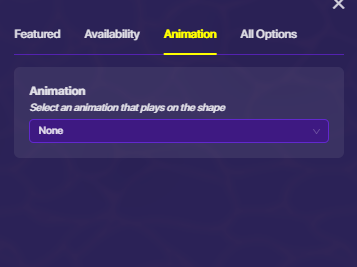
You have to trigger it to animate the shape.
3 Likes
I see that you set the title to solved.
Please mark a solution if any of the posts helped you!
1 Like
Topic solved, topic closed.