So I’ve tried googling how to make a group chat and I’ve hit dead ends, so I came here, if you have any tips, that would be helpful.
1 Like
How do you want this “group chat” to work?
2 Likes
That’s going to be… surprisingly simple.
What you would need is a device that gives the button on the screen (forgetting the name) and attach it to a notification that’ll send to all players and send the specific message. You’ve only got a certain amount of them though.
EDIT: as far as I know, that’s the closest you can get to a group chat.
2 Likes
there’s probably also some Community Made Guides for what you’re looking for, but I’m not going to go scouring around for it.
So that players can put messages on the map itself so that other players can see it
2 Likes
And thank you guys so much for the suggestions!
1 Like
so, in that scenario, there’s… no real good way to go about it. You can try what I suggested, but it’s limitations are… grand.
I mean, usually, I just use text devices to communicate to my friends, it’s not quite a gc though and isn’t quite efficient.
1 Like
Yikes, there’s not really a way to input text onto your map easily.
I would suggest using pop-ups with set text inputs, similar to Smash Bros. Ultimate online.
2 Likes
There is a device called a game overlay (button on the screen) and you can make it so that when you press it you could choose from a variety of things to say that appear as notifications.
Other than that idk if there’s any other way to chat in game. do you me to show you how to wire the overlay and the notifications?
1 Like
Wait, I forgot to add, are you trying to chat while game started or nah?
1 Like
If you have a the season ticket use the list form of popups to chose messages to appear on screen. I think this is the only possible way of doing it, other than using a bunch of popups wired to notifs.
Then us the other method the others gave you… a overlay that opens a list of popups, other than that I don’t think there is another way to do this.
2 Likes
It was a good shot, but I don’t have the season ticket
Then You could use popups and notifications. would you like me to show you how?
3 Likes
No need for season ticket! It’s always possible to do anything even without ticket
Its impossible to create an efficient chat system, we can only make quick chats with premade messages currently  .
.
Edit: @IDKwhat2put try editing you past replies because as a new user you only get 10 replies the first day, also welcome to the forums!
Recomended topics to read.
The following topics will help you understand how this place works!
FAQ - Gimkit Creative
Announcements/Additional Rules
2 Likes
Yeah, that’s all I know of so far, but I hold tight and believe that at some point it will be possible. Other reasons why it isn’t possible yet would be the risks of it, like… yeah i’m not gonna continue that.
No no wait Doesnt the chat system still work but we just need some soul to give images
3 Likes
Take a game overlay, toggle to this
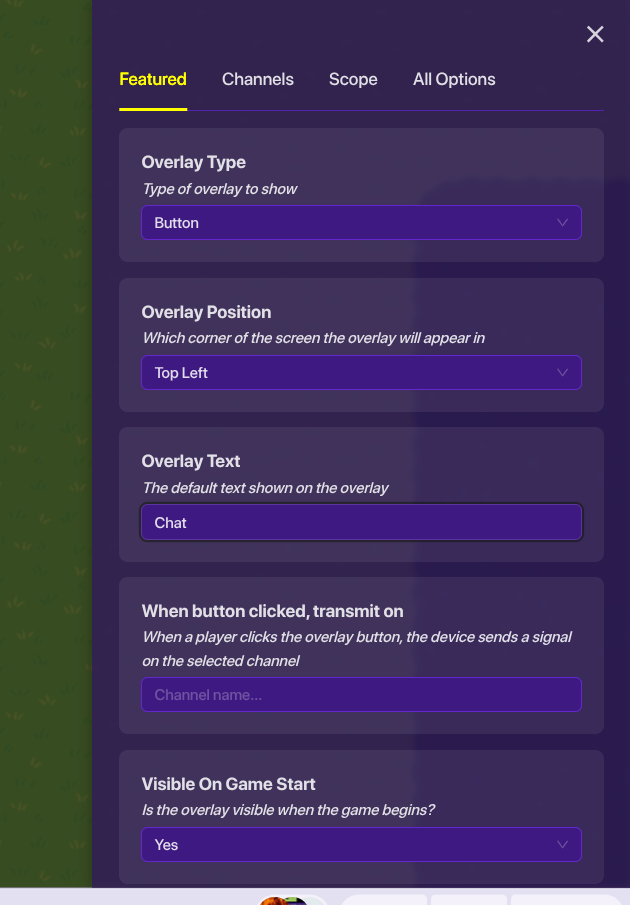
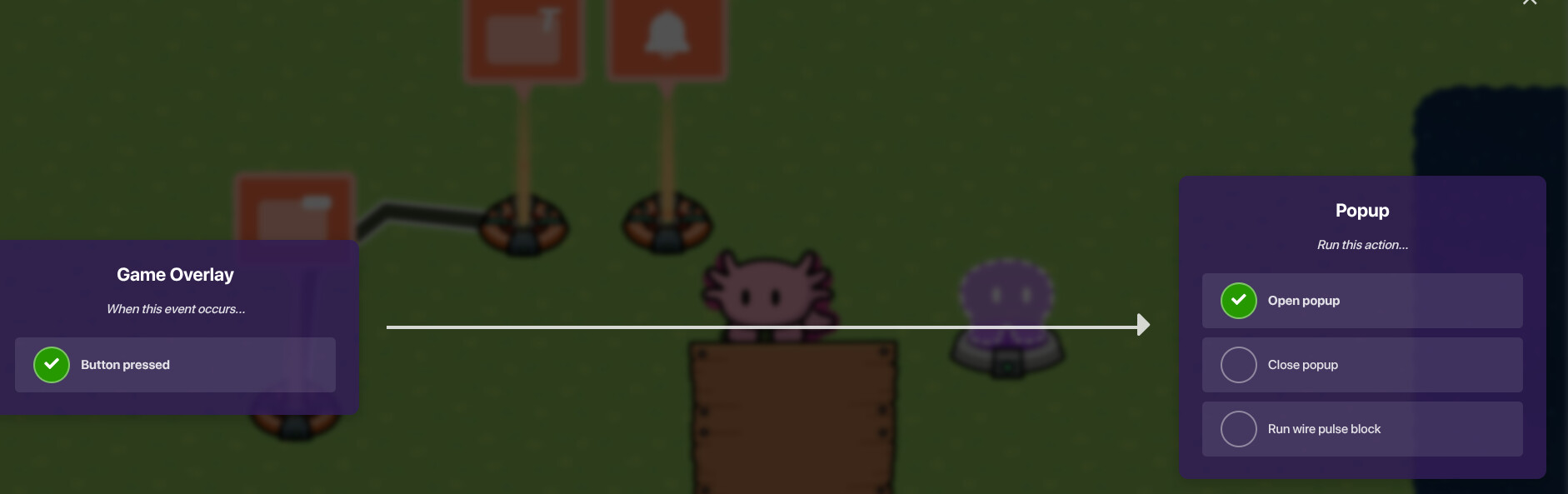
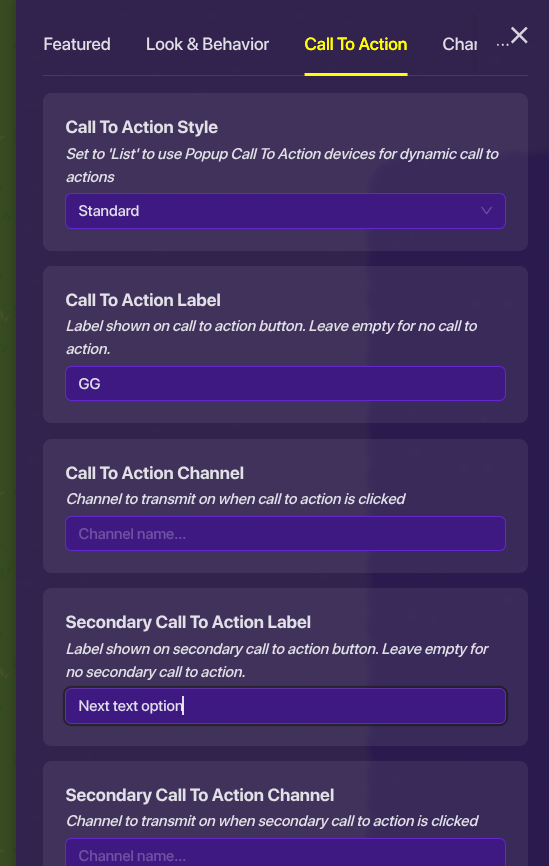
After that:
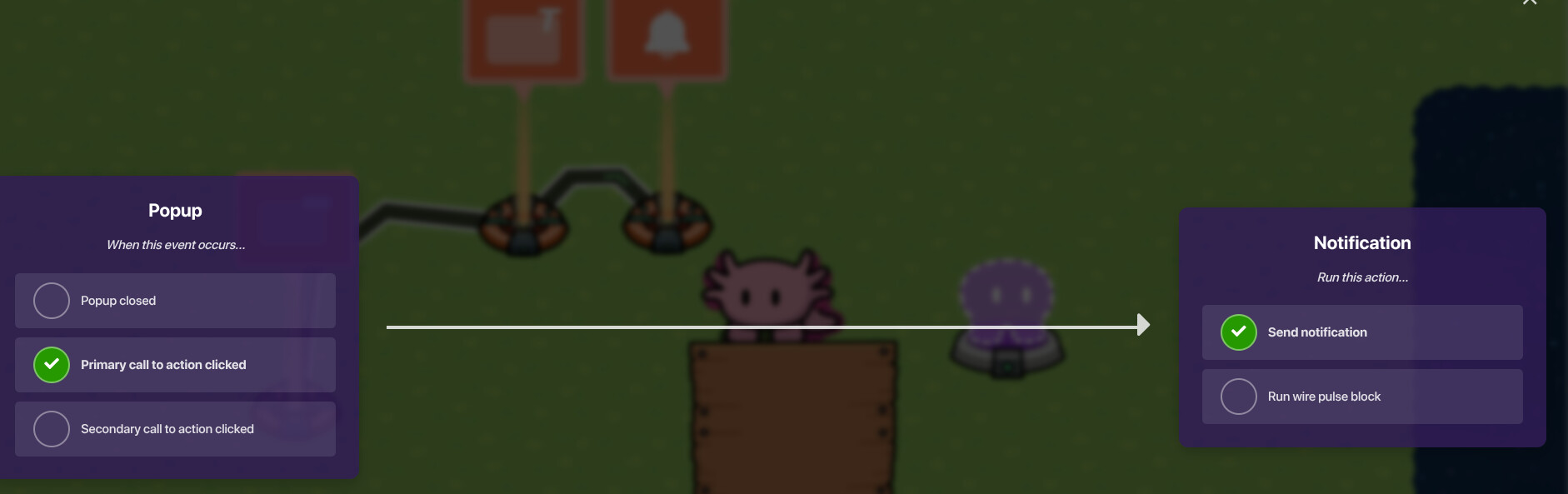

Yea and you just do that over and over till you have all the texts you wan’t in your chat. its the only way without a season ticket I believe.
someone tell me if I made a mistake..
@IDKwhat2put here you go, try this out. could you please mark a solution?
@Ayden1 , I did that 
6 Likes
Yeah, that was kinda what I was saying with the notifications and the button, thanks for demonstrating it for me
EDIT: Yes @Skittyss I used the like button too
1 Like