(THIS GUIDE IS A REMAKE OF MY PREVIOUS GUIDE ON INVENTORY ITEM MANAGERS)
The inventory item manager is a device that many players rely on to ensure that a player can only have a certain amount of an item, consumable, or gadget, so that the game can stay balanced and remain enjoyable to play. However, many players struggle to get it to work properly.
Today, I will be showing you and many other players how to flawlessly make an Inventory Item Manager work in the simplest way possible.
[Step by Step Instructions]
In order to make this work properly, the devices you will need are:
- Inventory Item Manager
- 2 Wire Repeaters
- Relay
Now that you have that done, set it up like this( It does not HAVE the same way I set it up, it’s purely just the way I like it set up)
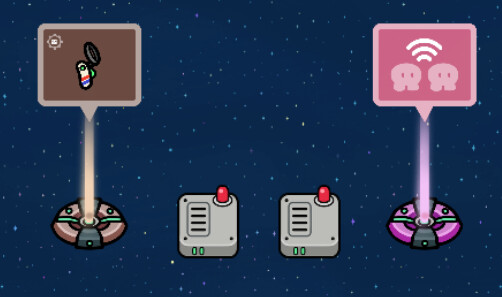
Now that you have set it up like this, connect the wires to look exactly like this. (WIRES MUST BE SET THIS WAY TO WORK PROPERLY)
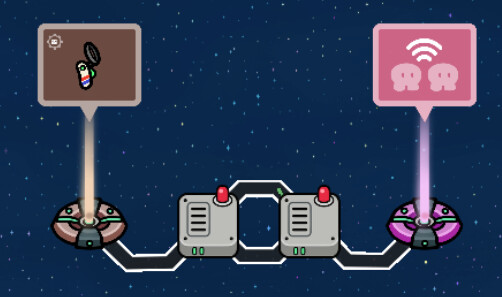
After Connecting the wires, make sure that the relay and IIM(inventory Item Manager) have their own channels. Make sure that the relay is set to all players, the relay channel and relay when receiving on channel must be the same name for the IIM.
On the inventory Item manager,
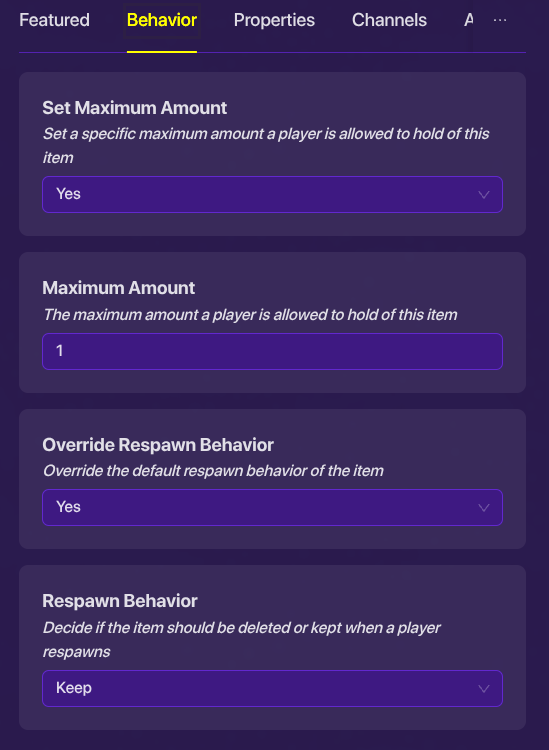
After doing this, Make sure that the activate when receiving on channel has the same name as the relay channel. Then, open blocks on your inventory Item manager and make sure that the code is the same as the one I have or it will not work.
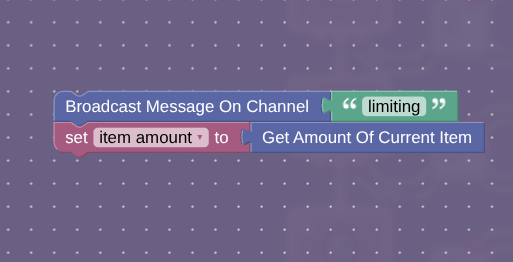
Once you have finished with the blocks, make sure that everything is correct. If everything is correct, Test it out yourselves and see if it works.
Also this uses 245 memory, but if the blocks used for the inventory item manager and wires are added, then it uses 785 memory.
