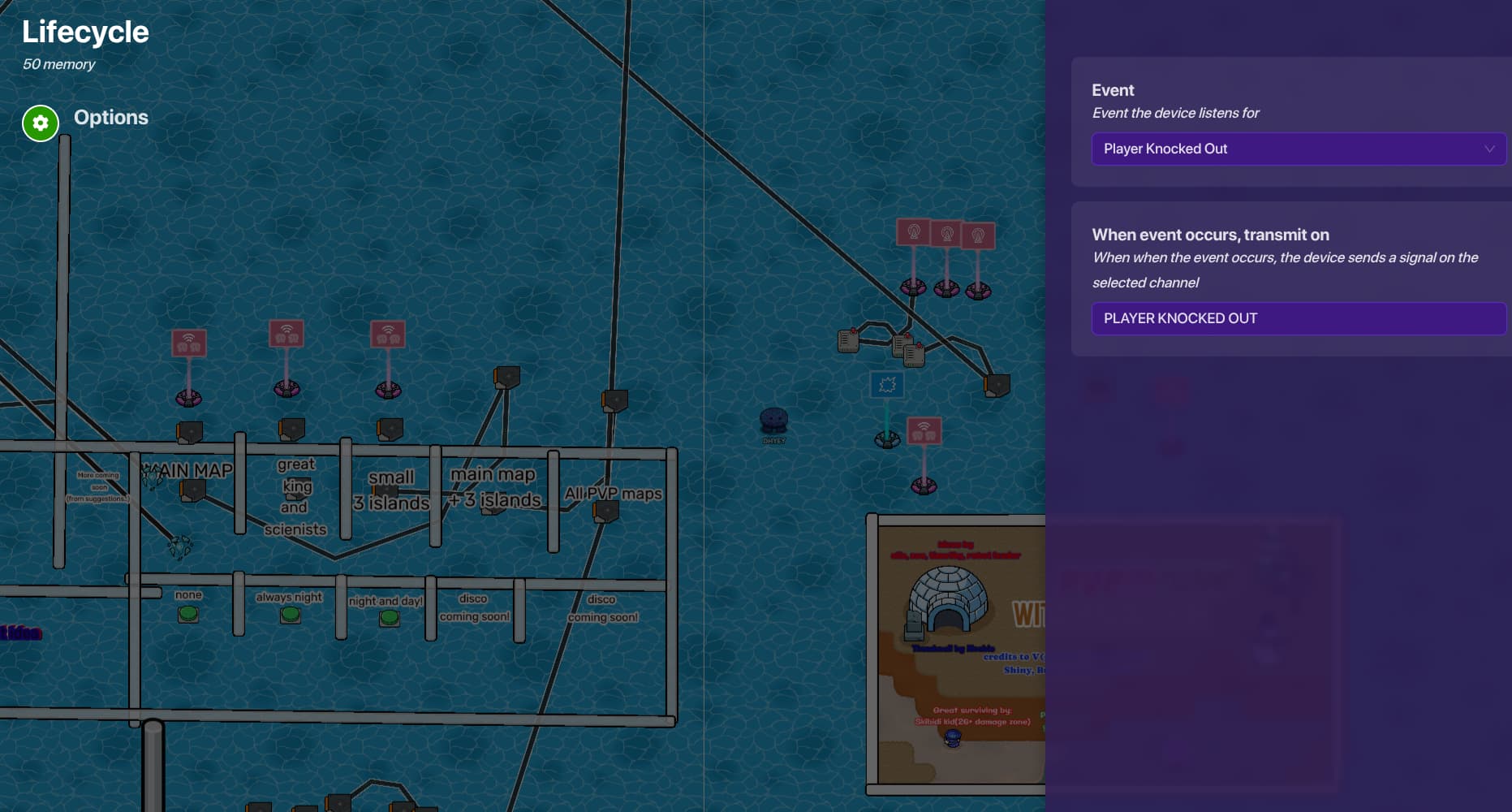
so one trigger transmits to a trigger that is deactivated, and if the trigger triggers it transmits to activate the other trigger. when a player is knocked out (as listed in lifecycle channel in 1st step) the activated trigger will trigger
the target value is how many lives a player have.
the “activated trigger” increments the counter, so every knockout the counter increases value and when it reaches target (the lives the player has) than the counter is gonna transmit to spectators which in the image above at the nearly top it shows that the players is switched to spectators when the thing transmits on spectators.
note
you do this steps over and over (as shown in 1st picture) to get a host choose multiple amount of lives a player can select
Did you make this guide based off of Fulcrum-19’s post on the help topic you made? (I don’t really know I kinda skimmed through the posts and it looks similar) but anyways great guide! I give it a 6.7/10 7.5/10, could’ve used some formatting (Example: dropdowns and marking steps, kind of contradicting myself with my guides) and gone more into depth about how it works, but great guide! now I can finally make a Kirby game that gives you like 5 lives every minute
Intro: 5/10
You explained what you’re going to do but you don’t really have a intro, you get straight to it.
Organization: 6/10
You explained the steps with pictures but maybe use drop downs
Descriptions/Details: 10/10
I think you did a good job explaining to the reader what to do by taking pictures of the settings!
Grammar: 9/10
Good vocabulary but some grammar mistakes here and there.
One last thing- Humor: 1/10
Maybe it isn’t important in guides but why not some funny jokes? It makes the reader want to keep reading the guide (I honestly just kinda got bored and skimmed through the last part).
@JackGimkit, good point! But (Boss_1s correct me if I’m wrong) I’m pretty sure Boss_1s’s point is that this guide lacks creativity as it has already been made before.
Long time no see, I remember the island I made for your game on one of those images. Though there’s a few things about this guide you could improve on:
First, try use better format to your guide, instead of putting up a bunch of image and unorganized text, use forum text features such as dropdowns[1]
, lines[2] and bullet points[3]. They can make your guide seems more organized and easier for readers to comprehend.
Second, there’s a couple more guides about this concept, perhaps use your search bar to search before making a guide to make sure no one else has made it before.
For example:
Also, if you still know the password to your original account @DHYEY, you should probably use that one, since alternative accounts are not allowed in here.
[details=“Summary”]
This text will be hidden
[/details] ↩︎
not yoyo i remember u. i tried to use the dropdowns (tried)
and this guide is for how can a player select a specific number of lives so it is different
To newer users of creative this could be more useful than the guide you mentioned @NotYoyo because it gets the point across very easily through images.
Yep, very true about that. What we are trying to do is help dhyey1 improve in guide making as feedback/constructive criticism helps more than compliments.
It’s trust levels.
When you just come to the community: Trust Level 0
After a bit: Trust level 1 (basic, what you are)
Gaining more trust: Trust level 2 (Member)
Gained even more trust and becoming a regular Forumer in this community: Trust level 3 (Regular)
Gained the trust of the whole community: Trust level 4 (Leader, highest one)
Regular (tl3) and Leader (tl4) have the option to put the title next to their name to show they are higher trust levels.
For more intel, look here! Understanding Discourse Trust Levels