Ending the game when hiders are gone! (pictures added)(for h+s)

SO HERE WE GO! MY FIRST GUIDE!


I had this question a little bit ago and it took me a LONG time to figure it out by posting a help topic. There were NO :prohibited: guides that really had what I wanted and were easy to understand so… I DECIDED TO MAKE MY OWN!
Keep in mind its literally 01:00AM when I am starting this so there might be some minor errors… :man_facepalming:
Without further adooooo [1] LETS GET INTO IT!!
Important Note [2]
Important Note 2 [3]


Materials

1x Counter
1x KO Manager
1x End Game Device
Some Wires

Step 1

So first you want to put down a counter and set it to these settings…
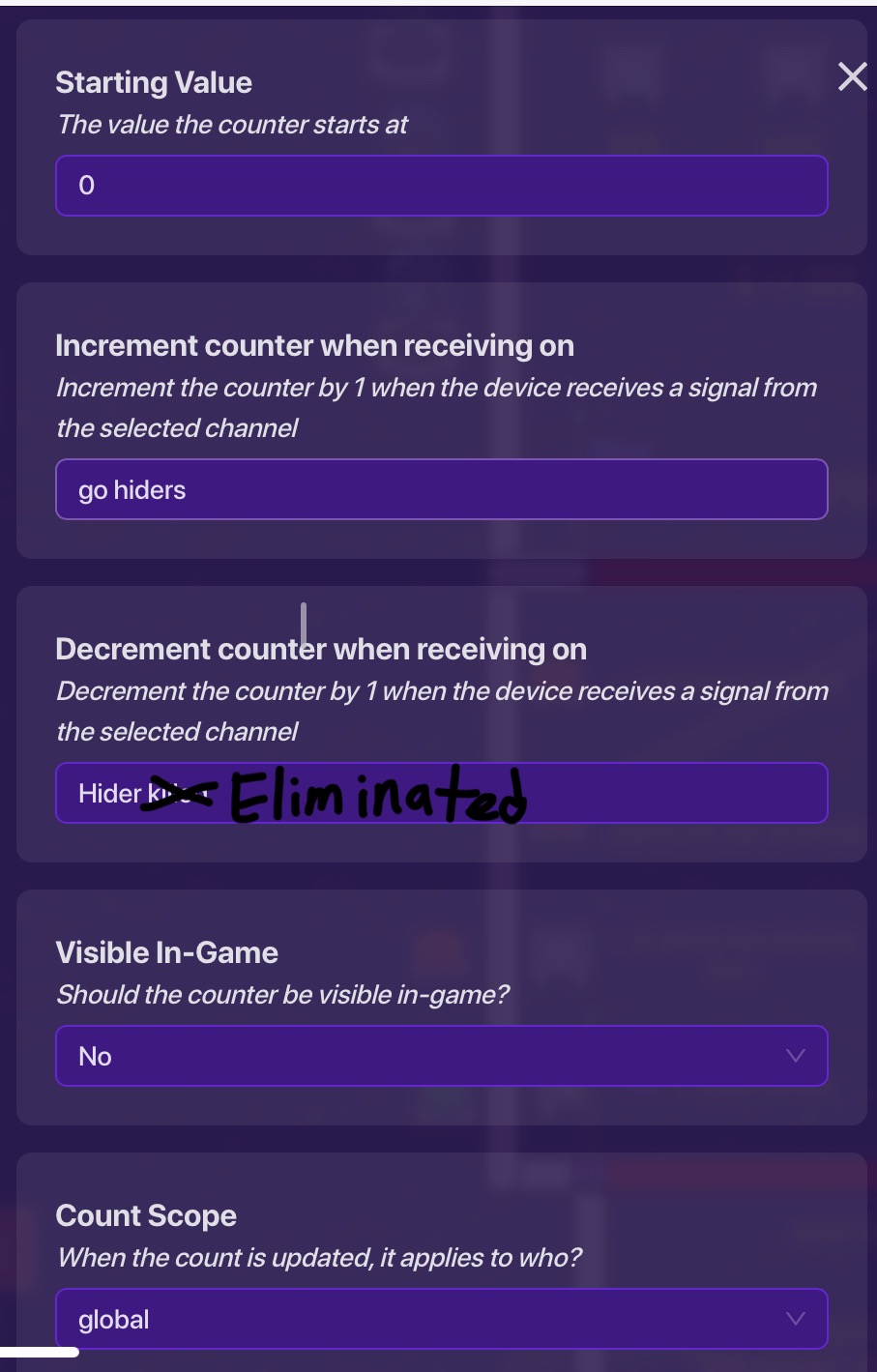

channel “go hiders”

The channel “go hiders” is how you track how many hiders there are to begin with. I set it up so after the game starts, 1 random player is sent to the seeker base and everyone else is sent to the hider base.
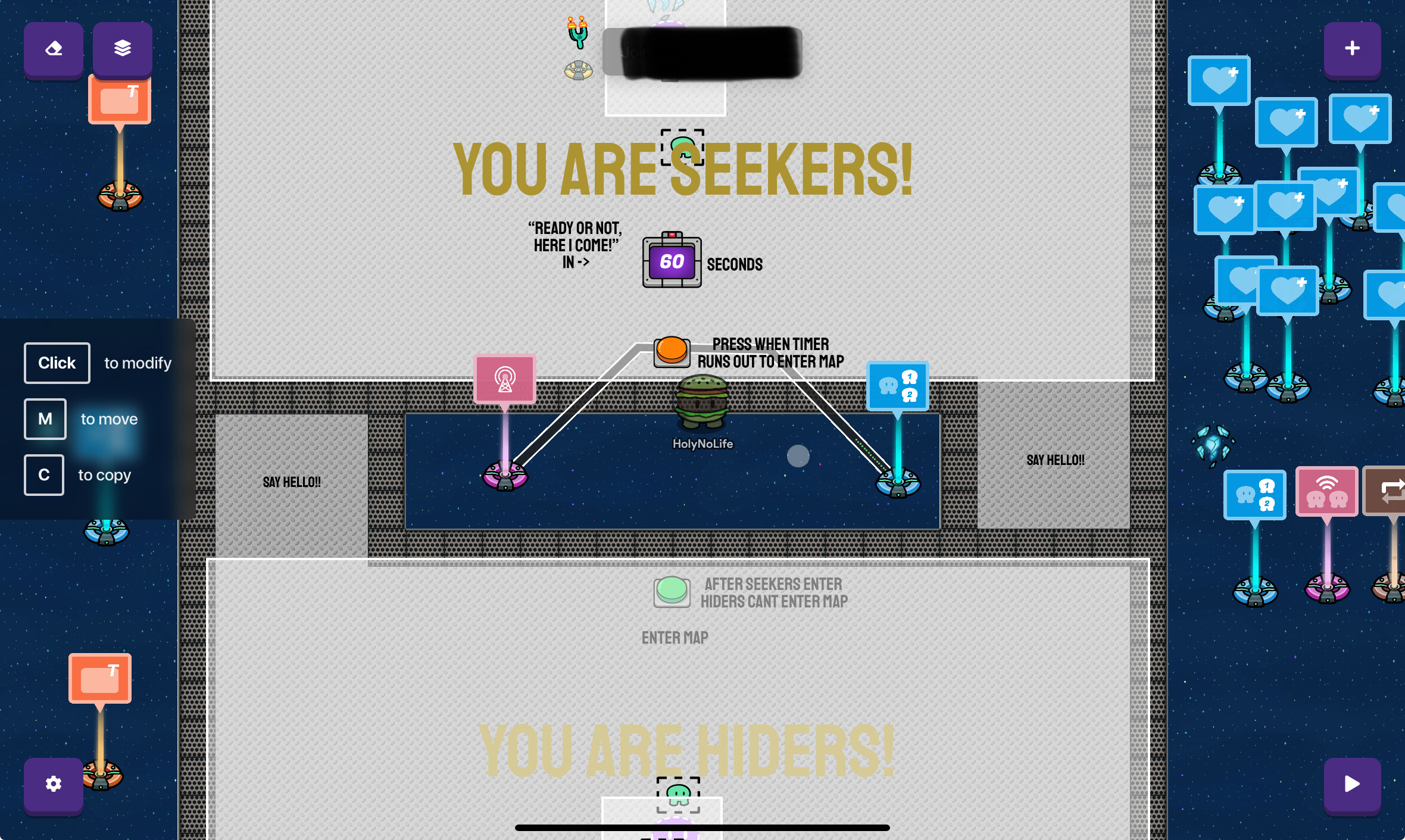
When the hiders press the button to go into the map to hide, it is transmitted on the channel “go hiders” (so we know exactly how many hiders there are).

channel “Hider eliminated

This channel we will get to in the next step

Step 2

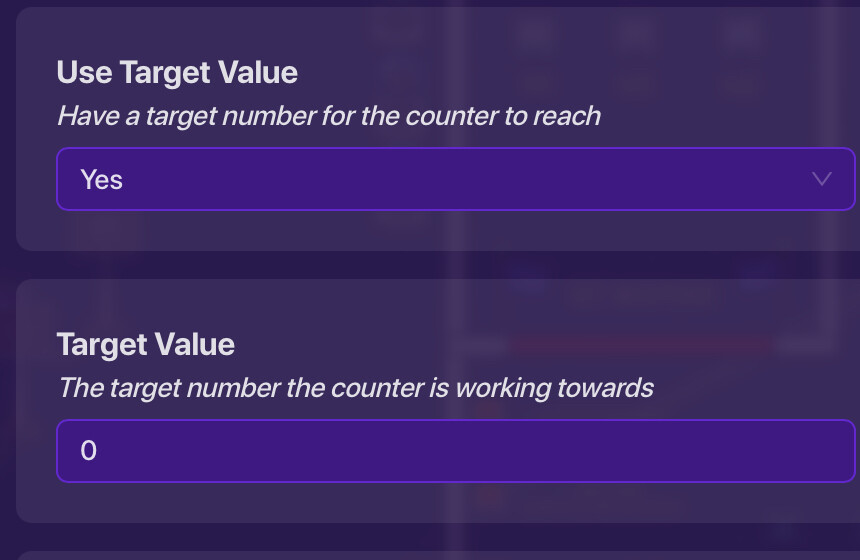
Know we will focus on the KO Manager. We will set the KO Manager’s settings to this…
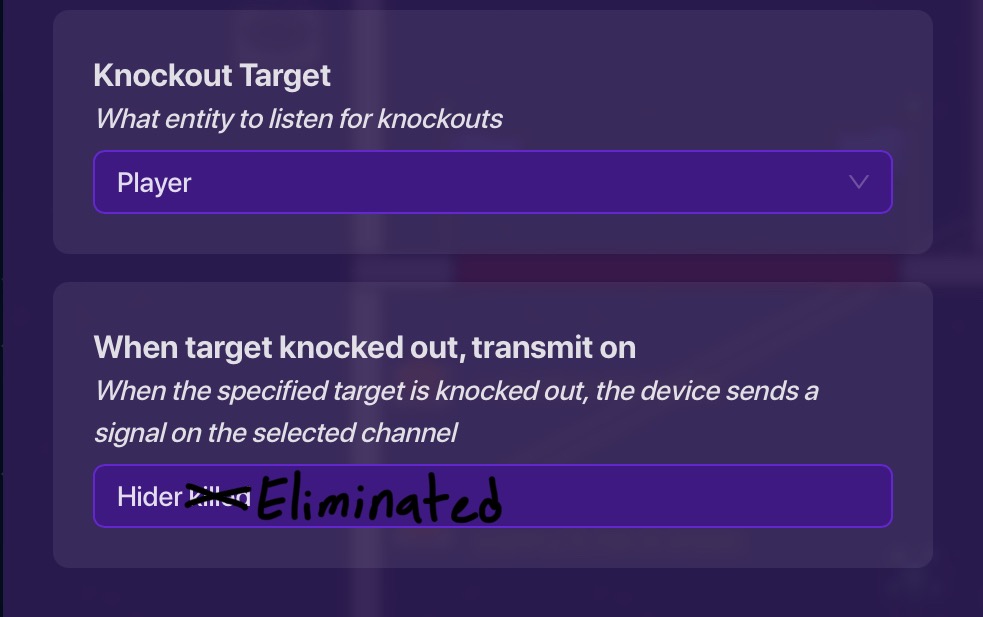

Leave everything else the same.

Step 3

Now add an End Game Device and wire everything up. The wires should look like this…

From Counter -> End Game Device

From KO Manager -> Counter


Now if you did everything right and YOU READ THE 2 IMPORTANT NOTES AT THE BEGINNING, then this should work. [4]


PLEASE ask if you have any questions and I will try my best to help!
Also please rate my guide!

  • 10/10 IT WAS PERFECT!!!
  • 9/10 IT WAS REALLY GOOD!!
  • 8/10 That was truly amazing but a few mistakes!
  • 7/10 Hey that was really good!
  • 6/10 I was good but could use work
  • 5/10 it was decent and got the point across
  • 4/10 i didnt really care for it
  • 3/10 i thought it needed a LOT of work
  • 2/10 wow that was bad
  • 1/10 pls just delete it it hurts my eyes
  • 0/10 :skull_and_crossbones:
0 voters

  1. i dont really know how thats spelled ↩︎

  2. This guide will only work if you have your hide and seek game set up so there can only be 1 seeker ↩︎

  3. Make sure that there is no way for a hider to KO a seeker otherwise the guide won’t work ↩︎

  4. unless I messed something up with is [4] possible considering the time I am working on this. ↩︎
3 Likes

i feel like this could be a dupe but i havent really checked yet
heres some extra formatting options tho

vvv i added more

extra formatting options for the uninformed!

[1]

Headings!

you can make this using a hashtag and a space (# exampleText)
there are SIX different sizes of heading!

exampleText (# exampleText)

exampleText (## exampleText)

exampleText (### exampleText)

exampleText (#### exampleText)

exampleText (##### exampleText)
exampleText (###### exampleText)

you can also make this using h1-h6 wrapped in the left and right arrows!

exampleTxt

<h1>exampleTxt</h1>

however, it seems like if you put text under headings using html formatting (that ^) then all formatting for that text just doesnt work

heading6
**bold**

bold

<h6>heading6</h6>
**bold**

**bold** //why does this one work?

[2]

heading6

bold

<h6>heading6</h6>

**bold** //??????

Dividers!

you can make these using three asterisks in an empty row! (***)
examples above this and directly below this sentence


Footnotes!

i used to refer to these as tooltips but it turns out theyre actually named footnotes
you can make these using one caret (^), one left bracket, whatever you want inside, and one right bracket!

^[]

[3]
also images can go into the tooltips
[4]


Images!

you probably know how to put these in
but you can actually change the sizes to a number outside of 100, 75 or 50!
simply go to the text version of the image

![2025_12_05_0dl_Kleki|690x431, 50%](upload://8Z7cJoamPD5uiGyRpwYgOg29ujL.png)

find where the size is typed in;

690x431, 50%]
or
width x height, current size of image]

and change the percentage!

![2025_12_05_0dl_Kleki|690x431, 10%](upload://8Z7cJoamPD5uiGyRpwYgOg29ujL.png)

this also applies to gifs!
Bunny
[5]

![Bunny|690x345, 10%](upload://7II3PPAcjFVSIo3vmEJ98RkNJw8.gif)

you can also crop them via the size (they wont stretch)

![2025_12_05_0dl_Kleki|690x200, 50%](upload://8Z7cJoamPD5uiGyRpwYgOg29ujL.png)

Strikethrough!

you can make these by using two tildes (~) on both sides of your text!

~~exampleTxt~~

exampleTxt
[6]
theres multiple ways of doings this, though markdown uses less characters

[s]exampleTxt[/s] bbcode
<s>exampleTxt</s> html
~~exampleTxt~~ markdown

the rest of these will just be extra things you can make using markdown (and maybe bbcode or html)

More Formatting Options!

Superscript and Subscript!

Normal text for comparison<sup>exampleTxtSuper</sup>

Normal text for comparisonexampleTxtSuper

Normal text for comparison<sub>exampleTxtSub</sub>

Normal text for comparisonexampleTxtSub

Small Text!

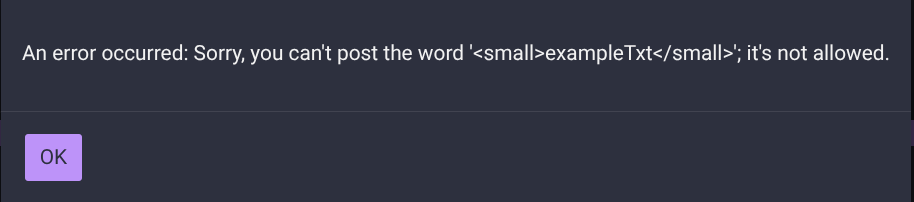
theres html formatting for this but its not allowed :thinking:

[7]

if you curious and want to try to use this then the formatting is
Screenshot 2026-01-05 6.06.51 AM

Marked Text!

<mark>exampleTxt</mark>

exampleTxt

Deleted Text!

<del>exampleTxt</del>

exampleTxt
[8]

Inserted Text!

<ins>exampleTxt</ins>

exampleTxt

its pretty nice but
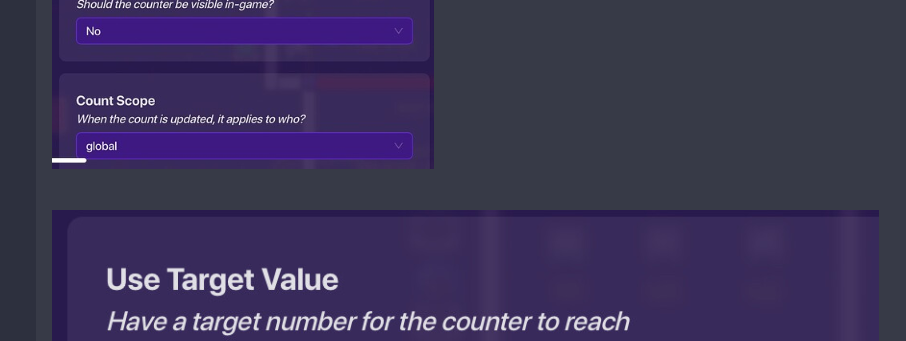
the difference in size for some of the images kinda bothers me

alr

no no im talking about the two images in the screenshot i showed
despite both of them being screenshots of the settings, one of the pictures is very clearly bigger than the other
heres what i think it should look like

(for some reason the width of the two images downloaded arent the same??? i ended up using 23% because it was the closest to the width of image 1)


  1. if it matters at all for you; i just copy & pasted this in since i dont have the energy to constantly retype this everytime somebody makes their first guide or has bad formatting ↩︎

  2. two slashes (//) make a comment in c sharp ↩︎

  3. exampleTxt ↩︎


  4. ↩︎

  5. nvm- it might only work if you have the gif in your files? ↩︎

  6. :.|:; ↩︎

  7. actually wait it might be possible??? earlier i added two quotation marks and all of a sudden it didnt allow subscript text then i removed those quotation marks and then it did allow subscript text??? ↩︎

  8. fun fact: this is actually how i used to do strikethroughs :sweat_smile: ↩︎

3 Likes

I know…
i used all of those except the heading one

It’s not…[1]
the “other ones” are very old, dont have pictures and do it a different way. This one is also easier to understand [2]

they are all 75% except the really long one which is 50%
i didnt know you could change that size even lower than 50% [3]


  1. im pretty sure ↩︎

  2. i think ↩︎

  3. if i did i would have done that. My bad :cry: ↩︎

3 Likes

Uhh, okay, thanks for an updated guide on this. This is not a dupe, as a lot of the older guides are outdated or unmaintained by ex-users.

I only have one critique about this guide.

Grammar.

Summary

*I

*little

*I started

*I

I won’t go too far from there (cus I don’t feel like it,) but try to avoid texting language in your Community Made Guides

2 Likes

You might want to add more descriptions so that if the images are deleted, it will still work for people.
Nice guide.

4 Likes

Bumpppppppppppppppppppppppppppppppppppppppppppppppppppp pppppppppppppppppppppppppppppppppppppppppppppppppppp pppppppppppppppppppppppppppppppppppppppppppppppppppp pppppppppppppppppppppppppppppppppppppppppppppppppppp yes.