One of the most important features in Gimkit Creative is the laser.
In this guide, I will go over how to use the laser, and the features of the laser.
If you have any questions, don’t hesitate to ask in the comments!
I know most people know this, but just as a guide, you might learn something.
I know I have been inactive for a while, so please bear with me.
So, what is a laser? (Basics)
a device that utilizes the natural oscillations of atoms or molecules between energy levels for generating a beam of coherent electromagnetic radiation usually in the ultraviolet, visible, or infrared regions of the spectrum — m-w.com.
Whoa
However, it’s completely different in Gimkit.
In Gimkit, a laser is basically a line that does damage. In a health style map, it decreases health, however, in a knockback style map, it increases the knockback level.
For instance in a health map if you get hit by a laser that is set to do 10 damage points, and you have 100 shield, 100 health, you would end up with 90 shield, 100 health.
In a knockback style map, if you had 0% knock back, and got hit by a laser that is set to do 10 damage points, you would go from 0% to 10% knockback.
2. 3.
Using the laser
Lasers can be used to make traps. For instance, if a player falls down a dropper, and hits a laser that does 10000 damage, there is no way they can survive.
Or is there…
There is…
Think about it. In a knockback style map, it would just deal knockback damage, not knockout the player.
So how do you solve this? Simple. Channels / Wires
Basically set it up so when the player gets hit by the laser, they get knocked out by a respawn device.
There is still one way to get around this though. Well from friends playing my map, two ways.
-
They go super fast through the laser. This can happens if you have like 999% knockback and you get hit by like a Quantum Portal.
-
From my friends. Note: I don’t hack. If you have hacks you can like go outside of the map, it’s weird.
Places where you can use the laser
As previously said before, droppers and traps.
The rest is creativity
However, so far in this guide, you have only learned how to keep lasers on forever. Not turn them off. So, let’s proceed.
Controlling Lasers
So, as always, there are multiple ways.
-
Use a repeater and channels and triggers to turn the lasers on and off. Or, we can do this the easier way.
-
Use the laser beam manager.
So, what is the laser bean manager?
Using the Laser Beam Manager
The laser beam manager basically has everything you need for lasers
This is what the inside settings of the Laser Beam Manager has
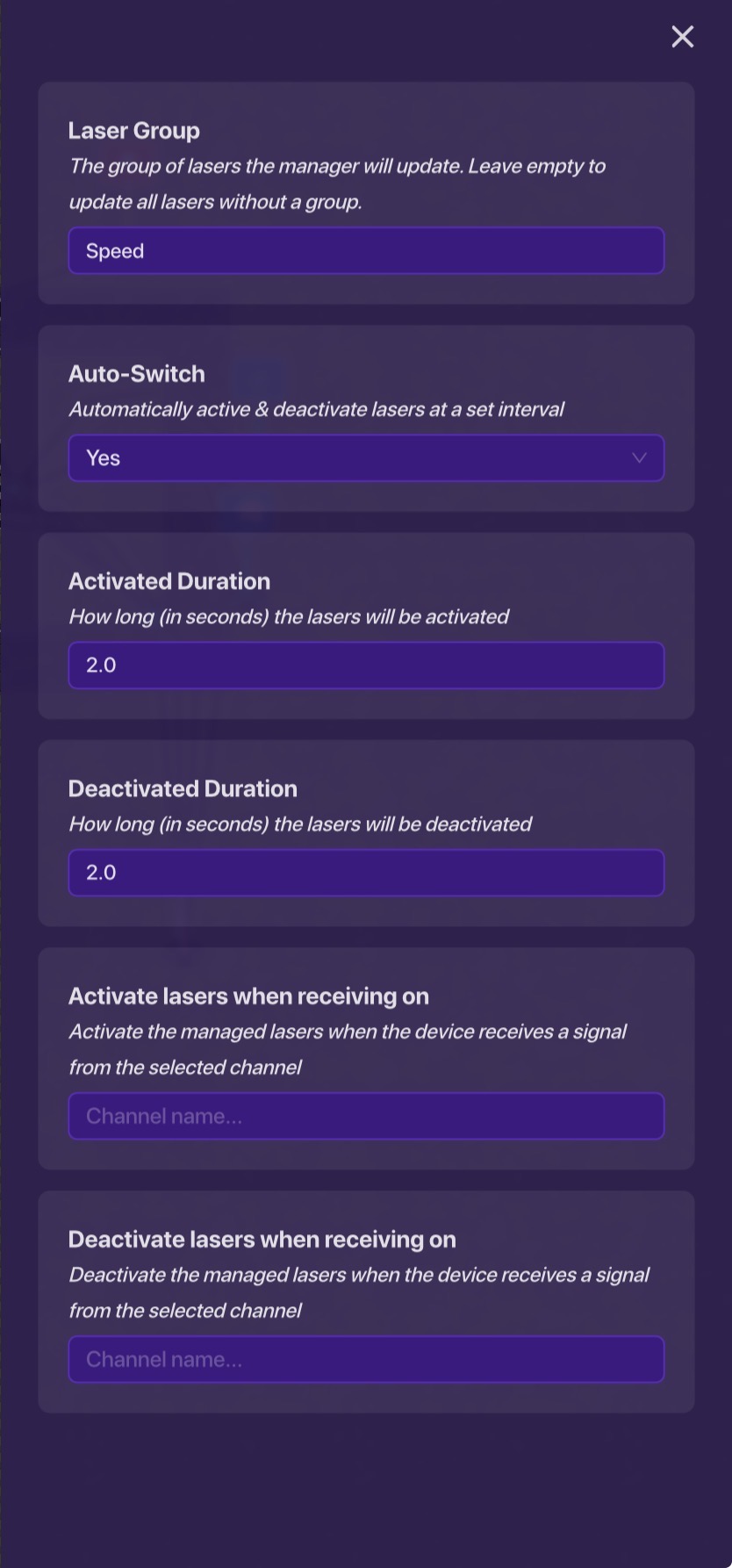
So, how do you do this?
Materials:
Laser Beam and Laser Beam Manager and a brain…
In the laser, set the laser group to whatever you want, in this case, “Speed”.
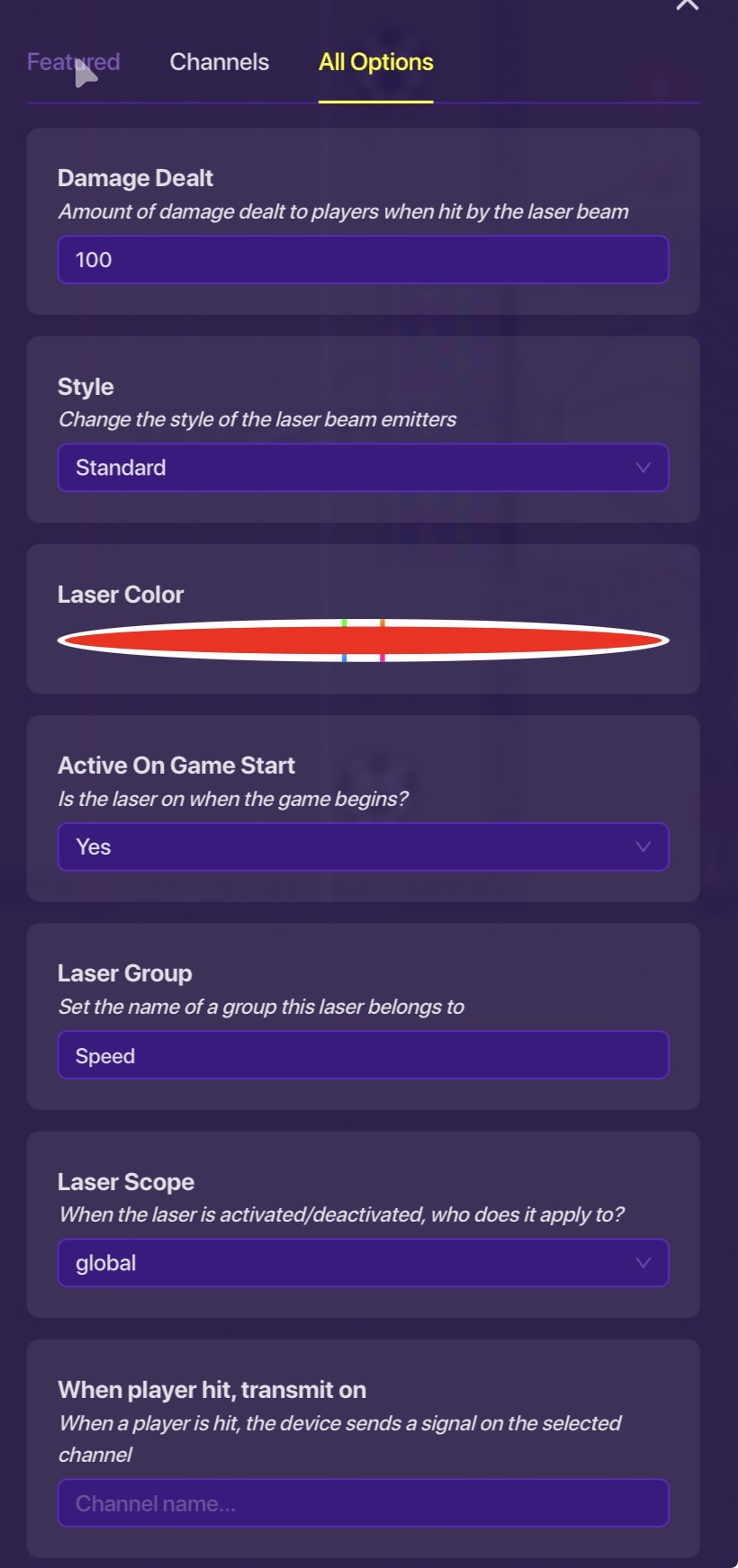
This laser is does 100 health damage and is connected to the group “Speed”.
In the laser beam manager:
Set the group name.
Fill in the rest. In this case, lasers in the group speed will turn off every 2 seconds for 2 seconds before turning back on; on a 2 second interval basically.
This way, any laser in the group speed for me, will follow that 2 second pattern.
Using another delayed laser beam manager can create one laser on, one laser off.
The End (READ THIS)
Thank you, please like this guide. Please put in the comments section what device you would like to see next. Also in the comments, put anything I should add to the guide, or just edit it yourself. Thank you!
- 1
- 2
- 3
- 4
- 5
- 6
- 7
- 8
- 9
- 10
- 1
- 2
- 3
- 4
- 5
- 6
- 7
- 8
- 9
- 10