items needed:
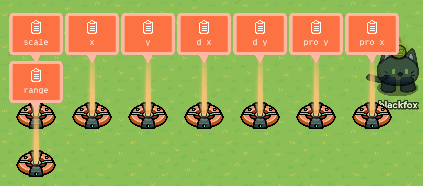
8 properties
5 triggers
1 player coordinate device
1 game overlay button (may switch out firing methods if desired)
1 notification (optional but best for testing)
2 blocks total
step one
lay out these 9 properties all player scoped and number based
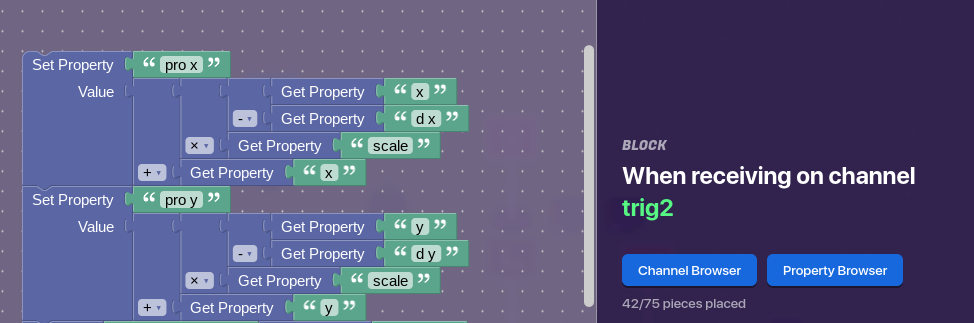
place your first trigger next to the coordinate device with a delay under 1 but not below 0 (do note that the larger the delay is the more it will influence the projectile range so watch your delay carefully) and make it recieve on the channel the coordinate device broadcasts on then make a block in the trigger and set it to this
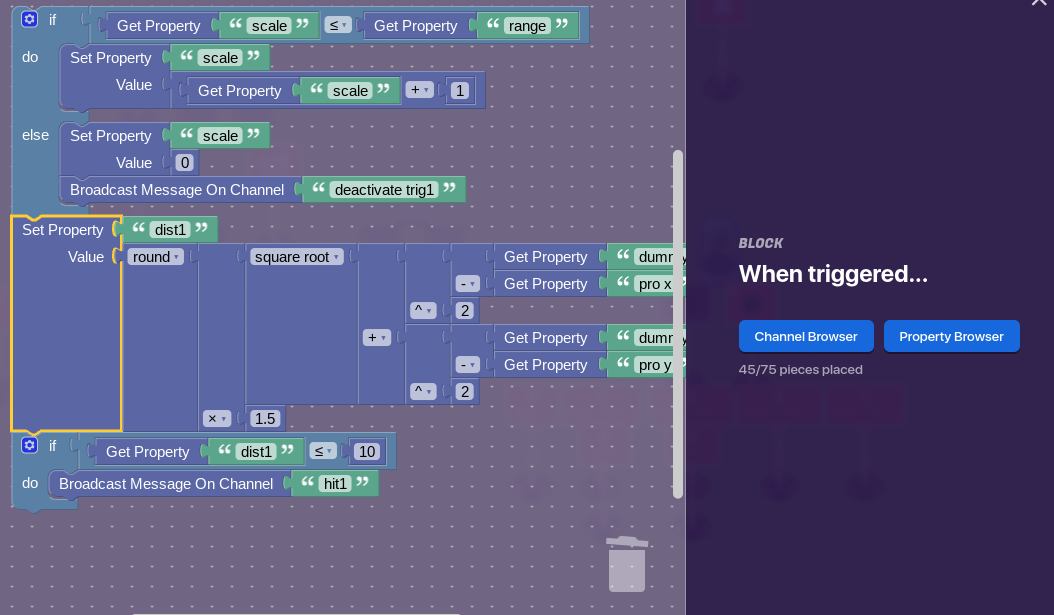
make a trigger loop with the far right one activate and trigger on a channel named “fire” with a delay of your choosing this will be how fast the projectile moves then add this block to one of the triggers
and make the trigger with the block activate and trigger on fire and deactivate itself with the channel in the block above
(the way dummy coords or target coords can be calculated is entirely up to you but the projectile coords willstay the same on all the distance equation you will separately make for each enemy with a trigger loop that of course is basically a dupe of this one)
this version is outdated and has scoping bugs probably wont get to updating it for a long while
also second side note I did not make this guide based off my help topic for likes and stuff (I’m not that stoobi) just thought it would be nice to unlock some possibilities for others
besides this’ll be helping me remember how to make it in my map :p
Sure i’ll grab something from desmos and keep some of the visuals and tweak em
visuals are being stubborn ._. trying to add as much as I cant to make easy to look at
alright here’s a visual representation using desmos
let the a loop
and mess with the radius slider the t and p variables change the origin of the rotation the visuals yes are bad but they’re not needed for the system regardless
you could it’d just be more painful to make
if you want it to be good
but brain’s half burnt rn
if anything i would focus on improving this a bit more
as it still spams the hitbox >_< so yeah this is gonna recieve a bit more work in the future but im gonna let my toaster brain cooldown
when the projectile comes into contact with something the trigger loop counts it multiple times like once it’s in the hitbox it spams until it resets or gets out of range
ah here we go
I figured out a while ago that it dosent go by terrain tiles but by something else that made it hard for me to measure by tiles so I go by repetitions per second which is 0.04 in this case with a maximum of 25 before the radius resets to one so basically it has a 1 second speed
So 25 tiles per second and say the gim is 1 tiles squared. This means that a 0.4 second i-frame or a bit longer (the gim might not be 1 tile, this could be checked by grid lock and lasers) would be needed for hit detection to actually register 1 hit only.