I don’t have time for explanations either lol.
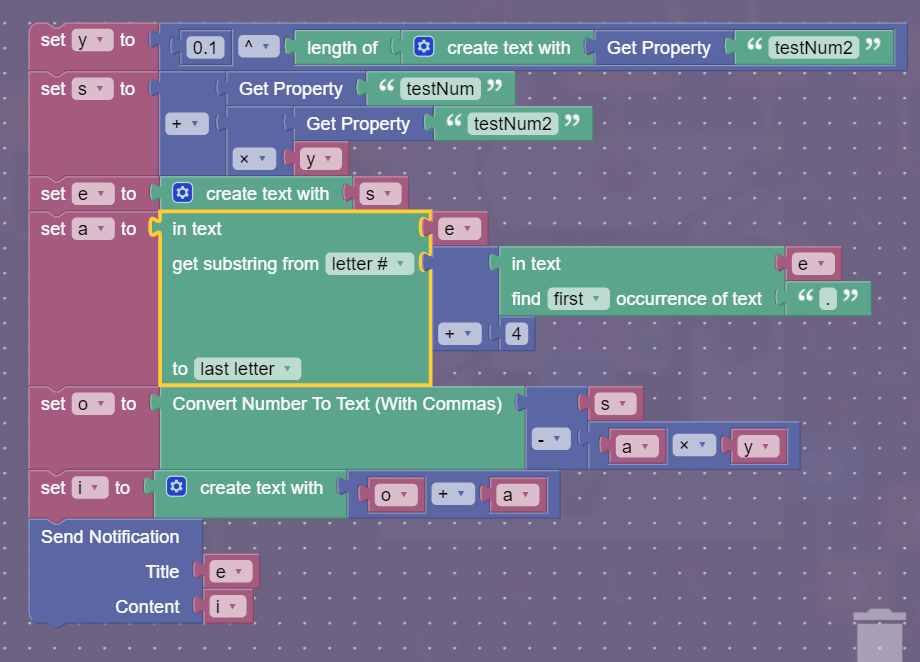
Below, and behold; My image.
Hopefully you can understand it with all the external input formatting.
Mini explanation:
This is in a notification device for testing purposes so ignore the last block.
Since you can’t use decimals in properties, I did a little extra (so you can easily change the number being translated). I had 2 properties(2 whole numbers; testNum = 100000000, testNum2 = 314159) which I turned into a decimal number (output is 100000000.314159). Then in the “a” variable, I found the decimal point in a number and added 4 to the letter # of that point, the first decimal place that isn’t included in the “Create Number to Text w/ commas” block. From there, I made another variable “o” that go the number and converted it into a text number with commas. The subtraction in the “o” variable is to make sure there are no decimal numbers past the 3rd decimal place upon conversion so that it doesn’t round the decimals.[1] Finally, in variable “i”, I added 2 variables (the one holding the extra decimals and the one holding the converted number with commas) to create the final number. In this case the final number is 100,000,000.314159. This algorithm works no matter what numbers you input into the 2 properties (or so I’ve tested) :D
Anyways, I did this on a whim so I’ll provide more help after my hour or so walk.
For example, if I converted 3.14159 to text with the “Create number to text w/ commas” block, it would result with 3.142 instead of 3.141 ↩︎